

Moon Capture
Steven Marshall · Photo & Video
Independent analytics for this App Store listing. AppTracker is not affiliated with Steven Marshall.
Chart standing · US
What changed · US
Listing changes AppTracker has observed for this app in this storefront — new versions, price moves, rating shifts, and store copy.
Moon Capture 1.8 adds a richer Moon Info experience with a new interactive Moon Atlas, smarter local alerts, and a cleaner calendar design. What’s New • Added local Moon Shot Alerts to help you know when conditions are good for moon photos. • Added a new interactive Moon Atlas with a 3D rotating moon and landmark flags. • Added Moon Atlas access on iPhone from Moon Info. • Replaced the iPad Gallery tab with Moon Atlas for a better iPad experience. • Added custom Atlas icons and improved landmark selection styling. • Added animated 3D flags for lunar landmarks. • Improved the Moon Calendar with collapsible layout, mini day cards, cleaner headers, and new phase icons. • Moon Position, Alerts, and Calendar cards now remember whether they were collapsed. • Refined Moon Info styling, buttons, chevrons, and current phase visuals.
In-app purchases · US
No in-app purchases.
Screenshots



Keywords this app targets
Search terms AppTracker associates with this app — estimates, not search volume. ❝ = in the app's title; a highlighted number is its current position for that term.
Similar apps
Competitors and close alternatives, as estimated by AppTracker.
 MoonCapture -Light and Shadow-
Naoto Tsuno
1 shared topic
MoonCapture -Light and Shadow-
Naoto Tsuno
1 shared topic
 iMoonCamera3
康行 Nagasima
1 shared topic
iMoonCamera3
康行 Nagasima
1 shared topic
 MoonCatcher
HIROFUMI MARUO
MoonCatcher
HIROFUMI MARUO
 Moon Phase Calendar & Tracker
Daniel McAleese
1 shared title word
Moon Phase Calendar & Tracker
Daniel McAleese
1 shared title word
 StarryCamera2
康行 Nagasima
1 shared topic
StarryCamera2
康行 Nagasima
1 shared topic
 Starry sky Camera
HIROFUMI MARUO
1 shared topic
Starry sky Camera
HIROFUMI MARUO
1 shared topic
 Moonlitt: Moon Phase Tracker
Flipping Hues Srls
1 shared title word
Moonlitt: Moon Phase Tracker
Flipping Hues Srls
1 shared title word
 ThunderCam
Tomasz Lukaszyk
1 shared topic
ThunderCam
Tomasz Lukaszyk
1 shared topic
About
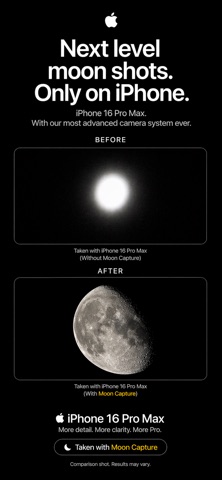
Moon Capture is a dedicated camera app designed to help you photograph the moon and night sky more clearly. Instead of relying on generic auto settings, Moon Capture gives you purpose-built shooting modes for full moons, crescents, supermoons, and stars. The app combines guided camera controls with tools that help you get cleaner, sharper results directly from your iPhone or iPad. Features: • Dedicated shooting modes for different lunar and night sky conditions • Smart exposure assistance for easier framing • Manual-style moon capture settings tuned for detail • Exposure bracketing for difficult lighting • Multi-frame stacking for cleaner low-noise results • Zoom controls optimized for lunar framing • Moon info and phase guidance • Built-in gallery for reviewing and managing captures inside the app Whether you are shooting a bright full moon, a thin crescent, or a darker night sky scene, Moon Capture helps make the process simpler and more reliable. Best results: Moon Shot features work best on iPhones with telephoto camera systems, where the app can capture more lunar detail. Devices without telephoto lenses can still use the app, but close-up moon results may be limited.
What's new · 1.8
Moon Capture 1.8 adds a richer Moon Info experience with a new interactive Moon Atlas, smarter local alerts, and a cleaner calendar design. What’s New • Added local Moon Shot Alerts to help you know when conditions are good for moon photos. • Added a new interactive Moon Atlas with a 3D rotating moon and landmark flags. • Added Moon Atlas access on iPhone from Moon Info. • Replaced the iPad Gallery tab with Moon Atlas for a better iPad experience. • Added custom Atlas icons and improved landmark selection styling. • Added animated 3D flags for lunar landmarks. • Improved the Moon Calendar with collapsible layout, mini day cards, cleaner headers, and new phase icons. • Moon Position, Alerts, and Calendar cards now remember whether they were collapsed. • Refined Moon Info styling, buttons, chevrons, and current phase visuals.
Details