

iMoonCamera3
康行 Nagasima · Photo & Video
Independent analytics for this App Store listing. AppTracker is not affiliated with 康行 Nagasima.
Chart standing · US
What changed · US
Listing changes AppTracker has observed for this app in this storefront — new versions, price moves, rating shifts, and store copy.
Supported iOS27. Updated internal data.
Ratings breakdown · US
The star breakdown behind this app's rating in this storefront.
In-app purchases · US
No in-app purchases.
Screenshots




Keywords this app targets
Search terms AppTracker associates with this app — estimates, not search volume. ❝ = in the app's title; a highlighted number is its current position for that term.
Similar apps
Competitors and close alternatives, as estimated by AppTracker.
 Moon Capture
Steven Marshall
1 shared topic
Moon Capture
Steven Marshall
1 shared topic
 MoonCapture -Light and Shadow-
Naoto Tsuno
1 shared topic
MoonCapture -Light and Shadow-
Naoto Tsuno
1 shared topic
 MoonCatcher
HIROFUMI MARUO
MoonCatcher
HIROFUMI MARUO
 Night Camera HD
Nico Schroeder
2 shared topics
Night Camera HD
Nico Schroeder
2 shared topics
 Nightcam Camera: Night Mode
RAY INFORMATICS YAZILIM TEKNOLOJI MEDYA DANISMANLIK VE EGITIM TICARET LIMITED SIRKETI
1 shared topic
Nightcam Camera: Night Mode
RAY INFORMATICS YAZILIM TEKNOLOJI MEDYA DANISMANLIK VE EGITIM TICARET LIMITED SIRKETI
1 shared topic
 Camera M - Pro Manual Camera
bxb
2 shared topics
Camera M - Pro Manual Camera
bxb
2 shared topics
 OneCam 2 (with Effects)
masahiro seto
1 shared topic
OneCam 2 (with Effects)
masahiro seto
1 shared topic
 Camera Sun - Pro Camera
ZAHIR MIRZA
Camera Sun - Pro Camera
ZAHIR MIRZA
About
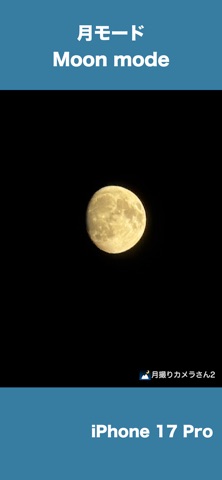
iMoonCameraPro is a camera app to shoot the moon easily. # How to use the moon mode 1. Select brightness. 2. Select zoom magnification. 3. Adjust focus manually. or Touch the moon (in case iPhone with telephoto lens) If it doesn't work, adjust focus manually. 4. Tap the shutter button. # How to use the moon + scene mode 1. Put iPhone on a tripod 2. Adjust moon brightness. 3. Tap the shutter button. 4. Adjust scene brightness. 5. Tap the OK button. 6. Wait a few seconds for the end of the shot. # How to use the lunar eclipse mode 1. Put iPhone on a tripod because a lunar eclipse is much darker than the full moon. 2. Adjust focus before eclipse begin. 3. Take a photo of a lunar eclipse. # 3 app modes Easy mode : Adjust exposure by brightness slider only. Manual mode : Adjust exposure by ISO & Shutter speed sliders. High-quality mode: The basic operation is the same as easy mode, but this mode prioritizes image quality. However, it may not function properly depending on the iOS version. # For good photos If the shutter speed is slow, fix iPhone on a tripod or something.
What's new · 3.4.0
Supported iOS27. Updated internal data.
Details