

RefStage
Samoremi LLC · Graphics & Design
Independent analytics for this App Store listing. AppTracker is not affiliated with Samoremi LLC.
Chart standing · US
What changed · US
Listing changes AppTracker has observed for this app in this storefront — new versions, price moves, rating shifts, and store copy.
• Video, 3D models, and PDFs now live in your library alongside images • Practice: timed drawing sessions from your own references, with goals, streaks, and routines • Search by color • Web Capture: collect images as you browse • Shapes, connectors, and Apple Pencil sketching on your boards • Non-destructive crop, rotate, adjust, and pixelate • Accent colors, hidden items, automatic backups, and a redesigned interface • Many iPad and touch fixes You'll be asked to accept our updated Privacy Policy, which now covers Web Capture.
In-app purchases · US
No in-app purchases.
Screenshots




Keywords this app targets
Search terms AppTracker associates with this app — estimates, not search volume. ❝ = in the app's title; a highlighted number is its current position for that term.
Similar apps
Competitors and close alternatives, as estimated by AppTracker.





About
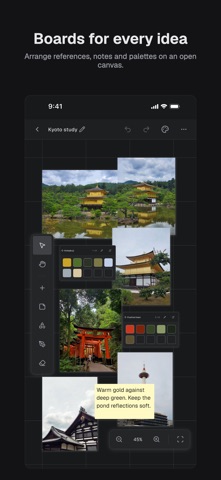
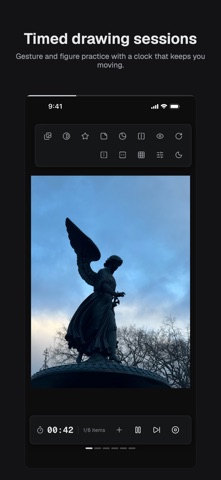
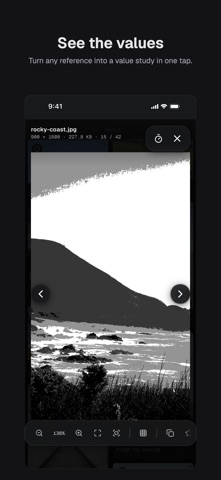
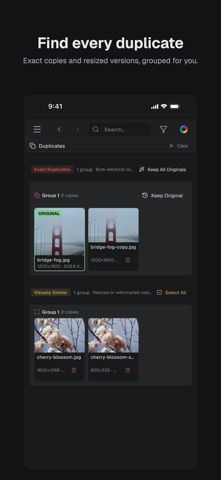
An infinite canvas for your references, plus a fast library to hold them all — images, video, 3D models, and PDFs. RefStage is built for artists, illustrators, and designers who work from reference. EVERYTHING ON ONE CANVAS • Drag-and-drop canvas for images, video clips, sticky notes, and color palettes • Arrange, group, and resize freely — your board, your layout • Draw shapes, link ideas with connectors, and sketch with Apple Pencil • Export any board as an image or PDF A REAL REFERENCE LIBRARY • Folders, tags, favorites, and smart folders • Fast full-text search, plus search by color • Find and clear out duplicate images automatically • Step through video, orbit 3D models, and read PDFs — save any frame or page as a new reference • Built to stay fast on large collections PRACTICE • Timed drawing sessions from your own references • Gesture, class, value, memory, and more • Study aids like grayscale, posterize, grid, and mirror — your originals never change • Goals, streaks, history, and routines with reminders EDIT WITHOUT DAMAGE • Crop, rotate, flip, adjust, and pixelate — the original file is never modified COLLECT FROM ANYWHERE • Web Capture: browse any site and collect the images you see • Pull images in from Photos, Files, or other apps THE FORMATS ARTISTS ACTUALLY USE • Images: JPEG, PNG, GIF, WebP, HEIC, AVIF, TIFF, JPEG 2000, JPEG XL • Camera RAW from most major manufacturers — no converting first • Video: MP4, MOV • 3D: OBJ, STL, glTF, FBX, USDZ, and more • Documents: PDF PRIVATE BY DESIGN • Your references and boards stay on your device • No account required, and no ads, ever • Anonymous analytics are OFF by default; crash reporting can be turned off in Settings • Hide references, folders, or boards behind an optional Face ID, Touch ID, or passcode lock Whether you're building a mood board, collecting style references, planning a shoot, or putting in daily practice, RefStage gives the images that drive your work a focused home. Bring your references together.
What's new · 1.1.0
• Video, 3D models, and PDFs now live in your library alongside images • Practice: timed drawing sessions from your own references, with goals, streaks, and routines • Search by color • Web Capture: collect images as you browse • Shapes, connectors, and Apple Pencil sketching on your boards • Non-destructive crop, rotate, adjust, and pixelate • Accent colors, hidden items, automatic backups, and a redesigned interface • Many iPad and touch fixes You'll be asked to accept our updated Privacy Policy, which now covers Web Capture.
Details