

PDF Bank Statement Converter
C. M. LEAL LTDA · Finance
Independent analytics for this App Store listing. AppTracker is not affiliated with C. M. LEAL LTDA.
Chart standing · US
What changed · US
Listing changes AppTracker has observed for this app in this storefront — new versions, price moves, rating shifts, and store copy.
• Balance check: every converted statement is verified (opening balance + transactions = closing balance), so you know nothing was missed or misread. • Export for accounting software: QuickBooks (.qbo), Quicken (.qfx), OFX, QIF, Xero CSV, YNAB CSV, a clean transactions CSV, plus Excel (.xlsx). • Open PDFs from any app: use Share or Open in… from Mail, Files, Safari and more. • Password-protected statements are now supported. • Faster, more reliable conversion of long statements. • Clearer error messages, and a failed conversion no longer counts against your plan.
In-app purchases · US
What this app sells inside itself, grouped by kind and priced for this storefront.
Screenshots



Similar apps
Competitors and close alternatives, as estimated by AppTracker.
 PDF to CSV Converter
MTTenterprise Inc.
PDF to CSV Converter
MTTenterprise Inc.
 PDF Converter - Word to PDF
Minimodev Technologies LTD
PDF Converter - Word to PDF
Minimodev Technologies LTD
 Account Statement
Manu Gupta
Account Statement
Manu Gupta
 PDF Export Pro - PDF Editor
LiveBird Technologies Private Limited
PDF Export Pro - PDF Editor
LiveBird Technologies Private Limited
 PDF Editor - Convert File
Wellresion Limited
PDF Editor - Convert File
Wellresion Limited
 PDF Converter - PDF Editor・
Techgear Inc
PDF Converter - PDF Editor・
Techgear Inc
 PDF Converter - OCR Reader
Hitek Limited
PDF Converter - OCR Reader
Hitek Limited
 InstantPDF
Systemiko Inc.
InstantPDF
Systemiko Inc.
About
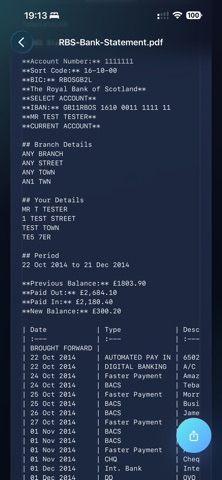
Convert bank statements into organised, share-ready files—instantly and securely. PDF Bank Statement Converter extracts transactions from your PDF statements and turns them into clean Excel, CSV, QuickBooks (QBO), Quicken (QFX), OFX, QIF, Xero and YNAB files, ready for Numbers, your accounting software, Files, email and messaging. A built-in balance check confirms every transaction adds up. • Why you’ll love it ‣ Fast mobile workflow – Import a PDF, hit *Convert*, preview the result, share it anywhere. ‣ Balance check – Opening balance + transactions = closing balance, verified on every statement, so nothing is missed or misread. ‣ Accounting-ready exports – One tap to QuickBooks (.qbo), Quicken (.qfx), OFX, QIF, Xero CSV, YNAB CSV, Excel or a clean transactions sheet. ‣ Open from any app – Share a PDF from Mail, Files or Safari straight into the app. Password-protected statements are supported. ‣ Built for iPhone and iPad – Quick personal conversions on iPhone, bigger review space on iPad. ‣ Any bank, any language – Our advanced pattern-recognition engine handles global statement formats with exceptional accuracy. ‣ Text or table previews – Review your statement as readable text, raw markdown or a structured table before exporting. ‣ Transactions-Only mode – Strip away headers, ads and footers for a clean transaction list. ‣ Privacy first – Your original PDFs stay on your device. Only transient, encrypted text is formatted in our secure cloud and auto-deleted immediately after. ‣ Reopen anytime – Converted statements are cached locally so you can come back later without reprocessing the same file. ‣ Share-ready output – Send clean results to Files, Mail, Messages, WhatsApp and other apps in seconds. • How it works 1. On-device OCR converts PDFs to raw text locally. 2. Encrypted text is briefly sent to our isolated cloud formatter. 3. Structured output returns to your device and is cached locally. 4. Source PDFs remain private—always. • Plans ‣ Free Trial – 2 statement conversions total. ‣ Premium – Monthly, Quarterly or Annual. • Subscription details Payment is charged to your Apple ID at confirmation. Subscription renews automatically unless cancelled at least 24 hours before the end of the current period. Manage or cancel anytime in your App Store account settings. • Support Need help? Found a tricky statement? Email contact@greatapps.store—we’d love to improve support for your bank. ‣ Terms of Use: https://www.apple.com/legal/internet-services/itunes/dev/stdeula/ ‣ Privacy Policy: https://www.greatapps.store/privacy-policy-bank-statement-pdf-converter/
What's new · 1.1.0
• Balance check: every converted statement is verified (opening balance + transactions = closing balance), so you know nothing was missed or misread. • Export for accounting software: QuickBooks (.qbo), Quicken (.qfx), OFX, QIF, Xero CSV, YNAB CSV, a clean transactions CSV, plus Excel (.xlsx). • Open PDFs from any app: use Share or Open in… from Mail, Files, Safari and more. • Password-protected statements are now supported. • Faster, more reliable conversion of long statements. • Clearer error messages, and a failed conversion no longer counts against your plan.
Details