

MeetStack: Business Card Scan
Rene Fandida · Business
Independent analytics for this App Store listing. AppTracker is not affiliated with Rene Fandida.
Chart standing · US
What changed · US
Listing changes AppTracker has observed for this app in this storefront — new versions, price moves, rating shifts, and store copy.
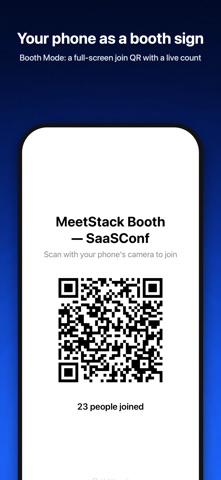
MeetStack 1.6 is made for iPhone Duo and built for event days. • On iPhone Duo, unfold for a sidebar, contacts beside their details, and scan review next to the card photo • Two MeetStack windows side by side on iPhone Duo, and My QR and Booth Mode turn sideways when you prop the phone up • Conference Mode tags everyone you meet to the event, keeps Scan and My QR in a Lock Screen Live Activity, and ends with who to follow up • Apple Watch: your QR code on your wrist and a brief for your next meeting • With Apple Intelligence, AI card parsing, follow-up drafts and memo summaries run on your iPhone, even offline (Pro) • Scan from Control Center, the Lock Screen or the Action button • Ask Siri who you met at an event, or find contacts in Spotlight • Booth Mode: a full-screen join QR with a live count • Business: scan conference badges and rate leads hot, warm or cold, add up to three join questions, connect Salesforce, and send new contacts to your CRM automatically • Companies view, bulk actions, and a weekly recap of how often your card was saved • Where We Met: an opt-in map of where you met people • Pipeline: loss reasons, stage history, your own stage names and win chances, and deal tasks • Contests with prizes, a fair server-side draw and winner notifications, plus card templates for teams
In-app purchases · US
What this app sells inside itself, grouped by kind and priced for this storefront.
Screenshots



Similar apps
Competitors and close alternatives, as estimated by AppTracker.
 CardFollowUp
Find Friends For LLC
CardFollowUp
Find Friends For LLC
 ScanBizCards
ScanBiz Mobile Solutions L.P.
ScanBizCards
ScanBiz Mobile Solutions L.P.
 Tapify: Digital Business Card
Tapify
Tapify: Digital Business Card
Tapify
 Business Card Scanner vCardify
VojGin s.r.o.
Business Card Scanner vCardify
VojGin s.r.o.
 IntroCard – QR Business Card
Andras Feszthammer
IntroCard – QR Business Card
Andras Feszthammer
 Business Card Scanner - Scard
Muhammet Emre YILMAZ
Business Card Scanner - Scard
Muhammet Emre YILMAZ
 Cardline - Scan Business Cards
Amos Rossman
Cardline - Scan Business Cards
Amos Rossman
 CamCard AI Business Assistant
INTSIG Information Co., Ltd
CamCard AI Business Assistant
INTSIG Information Co., Ltd
About
MeetStack turns every business card, QR exchange and trade show conversation into a lead you actually follow up. NEW IN 1.6: MADE FOR iPhone Duo Unfold iPhone Duo to see your contacts beside their details, and check each scan next to the card photo. Conference Mode tags everyone you meet to the event, puts Scan and My QR on your Lock Screen, and ends with who to follow up. Also new: an Apple Watch app, on-device AI with Apple Intelligence, Booth Mode and, on Business, badge scanning and Salesforce. TRY IT WITHOUT AN ACCOUNT Tap "Continue as Guest" and start scanning. Sign in with Apple or Google later and keep every card you've scanned. SCAN BUSINESS CARDS IN SECONDS On-device text recognition pulls out name, title, company, email, phone, website and LinkedIn URL. You review every field before saving, and the card image stays with the contact. Pro adds AI card parsing for tricky layouts. YOUR DIGITAL BUSINESS CARD Share your card by QR code, link, Apple Wallet or an NFC tag you program from the app. Whoever opens it can send their details straight back, with no app needed. Pro unlocks premium themes. CONTACTS THAT STAY ORGANIZED Search by name, company, email, phone or job title. Add tags, notes and favorites. Each contact has Details, Activity and Deals tabs. MeetStack warns you about duplicates and merges them, keeping the best details from each. CAPTURE THE CONTEXT Tap Add Voice Memo and talk for twenty seconds about who you met and what you discussed. It's transcribed on your iPhone and saved to the contact; the audio is deleted immediately and never uploaded. This is dictation, not a call recorder. Pro turns it into a summary with tags and a follow-up date. NEVER FORGET TO FOLLOW UP Set reminders and keep-in-touch cadences. Every contact is marked warm, cooling or cold, and Home's Today list shows who's due. A morning brief sums up your day. Five follow-up templates are free; Pro rewrites the one you pick for that person. KNOW WHO YOU'RE MEETING Connect your calendar for a brief 30 minutes before each meeting: their role, company and when you last spoke. Afterwards, one tap logs it. Optional, read-only, and your calendar never leaves your device. HOST EVENTS, COLLECT LEADS WITH CONSENT Create up to 3 events free, from templates for Networking Mixers, Conference Booths, Workshops and Meetups. Attendees scan your join QR once, and their details are shared only with their explicit consent. Publish events so people nearby find them on the map. Business adds unlimited events, campaigns, contests and team access. SEND LEADS TO YOUR CRM Export to CSV or vCard on every plan, including Free. On Business, push contacts to HubSpot or Pipedrive; contacts already in HubSpot are updated, not duplicated. TRACK WHAT'S CLOSING The deal pipeline shows a weighted forecast for this month and quarter, win rate, average cycle, and warnings for stalled deals. WORKS OFFLINE No signal on the show floor? Keep scanning and saving; everything syncs when you're back online. Add your card to Apple Wallet and your QR code is there even without signal. PRIVATE BY DESIGN Your contacts and card images are private to your account, and event data is shared only with attendee consent. PLANS • Free: 10 scans a month, 10 reminders, digital card, contacts and export, duplicate detection, advanced filters, voice memos, follow-up templates, Insights, up to 3 events with lead capture and CSV lead export, and unlimited events to join • Pro: unlimited scans and reminders, premium themes, card analytics, AI card parsing, AI follow-ups and memo summaries • Business: everything in Pro, plus unlimited events, HubSpot and Pipedrive export, campaigns, contests, teams and Business-only card themes Pro and Business renew monthly or yearly. Your local price is shown in the app before you subscribe. Terms of Use (EULA): https://www.apple.com/legal/internet-services/itunes/dev/stdeula/ Privacy Policy: https://culi.app/apps/meetstack/privacy-policy
What's new · 1.6.0
MeetStack 1.6 is made for iPhone Duo and built for event days. • On iPhone Duo, unfold for a sidebar, contacts beside their details, and scan review next to the card photo • Two MeetStack windows side by side on iPhone Duo, and My QR and Booth Mode turn sideways when you prop the phone up • Conference Mode tags everyone you meet to the event, keeps Scan and My QR in a Lock Screen Live Activity, and ends with who to follow up • Apple Watch: your QR code on your wrist and a brief for your next meeting • With Apple Intelligence, AI card parsing, follow-up drafts and memo summaries run on your iPhone, even offline (Pro) • Scan from Control Center, the Lock Screen or the Action button • Ask Siri who you met at an event, or find contacts in Spotlight • Booth Mode: a full-screen join QR with a live count • Business: scan conference badges and rate leads hot, warm or cold, add up to three join questions, connect Salesforce, and send new contacts to your CRM automatically • Companies view, bulk actions, and a weekly recap of how often your card was saved • Where We Met: an opt-in map of where you met people • Pipeline: loss reasons, stage history, your own stage names and win chances, and deal tasks • Contests with prizes, a fair server-side draw and winner notifications, plus card templates for teams
Details