

Business Card Scanner vCardify
VojGin s.r.o. · Business
Independent analytics for this App Store listing. AppTracker is not affiliated with VojGin s.r.o.
Chart standing · US
What changed · US
Listing changes AppTracker has observed for this app in this storefront — new versions, price moves, rating shifts, and store copy.
vCardify now speaks fourteen more languages. • Full interface in German, French, Spanish, Portuguese, Italian, Dutch, Polish, Turkish, Czech, Korean, Simplified and Traditional Chinese — plus European Portuguese and Mexican Spanish • Extraction tuned per language: academic and professional titles stay with the name, legal forms survive whole, and tax numbers are no longer read as phone numbers • Phone labels are read off the card, so a fax is saved as a fax rather than as a number you might dial • Two-surname names are kept intact rather than split Everything still happens on your device. No cloud, no account.
Ratings breakdown · US
The star breakdown behind this app's rating in this storefront.
In-app purchases · US
What this app sells inside itself, grouped by kind and priced for this storefront.
Screenshots




Keywords this app targets
Search terms AppTracker associates with this app — estimates, not search volume. ❝ = in the app's title; a highlighted number is its current position for that term.
Similar apps
Competitors and close alternatives, as estimated by AppTracker.
 Covve - Business Card Scanner
Covve Visual Network Limited
1 shared topic · 6 shared title words
Covve - Business Card Scanner
Covve Visual Network Limited
1 shared topic · 6 shared title words
 Business Card Scanner + Reader
Asad Ahsan
1 shared topic · 6 shared title words
Business Card Scanner + Reader
Asad Ahsan
1 shared topic · 6 shared title words
 ABBYY Business Card Reader Pro
ABBYY USA Software House Inc
2 shared topics · 3 shared title words
ABBYY Business Card Reader Pro
ABBYY USA Software House Inc
2 shared topics · 3 shared title words
 Vistr Business Card Scanner
Nicholas Shipley
1 shared topic · 6 shared title words
Vistr Business Card Scanner
Nicholas Shipley
1 shared topic · 6 shared title words
 Business Card Reader, Scanner
Abdulla Yasin
1 shared topic · 4 shared title words
Business Card Reader, Scanner
Abdulla Yasin
1 shared topic · 4 shared title words
 Business Card Reader
ABBYY USA Software House Inc
1 shared topic · 3 shared title words
Business Card Reader
ABBYY USA Software House Inc
1 shared topic · 3 shared title words
 CardFollowUp
Find Friends For LLC
1 shared topic
CardFollowUp
Find Friends For LLC
1 shared topic
 CamCard AI Business Assistant
INTSIG Information Co., Ltd
2 shared topics · 1 shared title word
CamCard AI Business Assistant
INTSIG Information Co., Ltd
2 shared topics · 1 shared title word
About
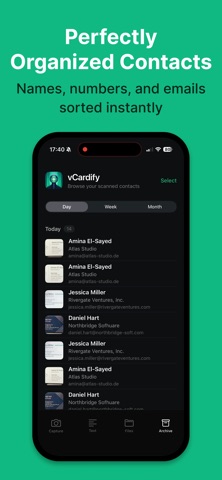
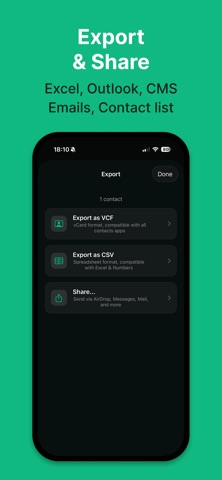
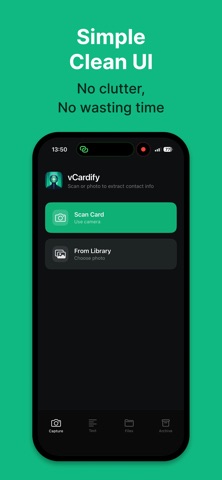
Never type another business card again. vCardify turns cards, email signatures, websites, and any text into clean iOS contacts — entirely on your device. FREE TO SCAN, ON EVERY iPHONE Download free and scan as much as you want. vCardify's extraction engine runs on any iPhone or iPad with iOS 26 — no special hardware needed. On devices with Apple Intelligence, an extra on-device AI layer refines tricky cards automatically. Includes 3 free contact reveals; unlock vCardify Pro once and reveal, save, and export without limits — forever. No subscription. POINT. SCAN. DONE. The smart camera outlines the card, captures it automatically when steady, and fixes the perspective. Extraction starts instantly: • Names, job titles, and companies — in 25+ languages • Phone numbers and emails, captured exactly (no AI guesswork on digits) • Websites, social profiles, and addresses • Smart enough to skip tax IDs, registration numbers, and other non-contact noise EVERY WAY TEXT REACHES YOU • Camera scan with automatic card detection • Paste any text — email signatures, web pages, message threads • Import PDFs and photos • Drag & drop on iPad and Mac • Share into vCardify from any app SCAN A WHOLE STACK Multi-card mode digitizes a conference haul in one session. Pasted text with several contacts? vCardify splits and extracts them all — one unlock covers the whole batch. YOUR SCANS, ORGANIZED Every scan lands in the archive with its photo, text, and contact — grouped by date, searchable at a glance. Save to iOS Contacts with one tap, or export as VCF (vCard) and CSV for Excel, Numbers, and your CRM. AirDrop, Messages, Mail — anywhere. GENUINELY PRIVATE Everything happens on your device. No cloud. No account. No analytics. No tracking. vCardify works in airplane mode — your contacts never leave your iPhone. ONE PURCHASE, ALL YOUR DEVICES vCardify Pro is a single purchase with Family Sharing, across iPhone, iPad, and Mac. Bought vCardify back when it was a paid app? You already have Pro — thank you for being an early supporter. PERFECT FOR • Professionals digitizing conference contacts • Sales teams capturing leads on the spot • Recruiters, founders, freelancers — anyone who meets people • Anyone who refuses to trade privacy for convenience REQUIREMENTS iOS/iPadOS 26.0 or later. That's it — every compatible iPhone and iPad gets full scanning, extraction, saving, and export. Apple Intelligence (iPhone 15 Pro and newer) adds optional AI refinement for unusual layouts. Download vCardify and turn your next handshake into a saved contact before you've pocketed the card.
What's new · 2.4
vCardify now speaks fourteen more languages. • Full interface in German, French, Spanish, Portuguese, Italian, Dutch, Polish, Turkish, Czech, Korean, Simplified and Traditional Chinese — plus European Portuguese and Mexican Spanish • Extraction tuned per language: academic and professional titles stay with the name, legal forms survive whole, and tax numbers are no longer read as phone numbers • Phone labels are read off the card, so a fax is saved as a fax rather than as a number you might dial • Two-surname names are kept intact rather than split Everything still happens on your device. No cloud, no account.
Details