

BoardStrategist for Basketball
Yusaku Miki · Sports
Independent analytics for this App Store listing. AppTracker is not affiliated with Yusaku Miki.
Chart standing · US
What changed · US
Listing changes AppTracker has observed for this app in this storefront — new versions, price moves, rating shifts, and store copy.
This update polishes the screens you use every day. ■ Clearer scorebook recording • Score badges such as +2 now appear beside the score instead of on top of it • Finished games now open on their last period with input disabled, instead of on OT1 with recording still possible • Clear Selection no longer looks disabled, and Gym view now uses the same name as Classic view • Quick view now records a shot with a single tap, without asking for the shot location • Running scores of games in progress no longer say Final, and the graph axis uses round numbers • On iPhone, the top buttons of the running score screen are now icon buttons that fit on screen (press and hold to see their names) ■ Easier-to-read box scores and stats tables • Box scores now lead with points, rebounds and assists, align digits, separate starters from the bench, add a totals row and dim players who did not play • Jersey numbers and names stay pinned on the left as you scroll sideways • Long player names now shrink to fit instead of being cut off with "..." • Sideways-scrolling tables and tabs fade at the edge to show there is more • Terms that varied between screens, such as 2P/3P, OREB/DREB and Home/Away, are now consistent • Four Factors and season highlights on the team detail screen are now available for free ■ Updated win-loss counting • Games that end tied now count as ties (T) rather than losses, and records appear like "16-8-1" • Games in progress no longer count toward records, win percentage, last 10 games, streaks or Scouting head-to-head records • In Recent results on the team detail screen, the result and score now sit next to the date. Wins are orange and losses gray ■ Light theme and color improvements • Heat maps now use a blue-gray-orange scale, and player details use orange and gray for wins, losses and changes, so they are easier to tell apart for people who see color differently • Faint orange text in the light theme is darker, and controls on the team detail screen no longer blend into the background • Segmented buttons and switches use the accent color, and calendar selections are easier to see • Pro locks now appear as a small lock in the top-right corner, so button labels and headings are no longer hidden • The purchase screen, the share notice and the theme previews now read well in both dark and light themes ■ Clearer text • Revised the Japanese text in Help, the glossary, Pro feature descriptions, the backup screen and PDF reports. Help now matches the actual buttons and behavior • PDF game commentary now sticks to what the recorded data can support • Wording on the video PbP tag screen now consistently uses "link" ■ Other fixes • Fixed the status bar overlapping the top buttons on iPad after opening the video screen • On iPhone in landscape, screen edges are no longer hidden by the Dynamic Island, and video PbP tags and markers stay on screen • Improved the scorebook How to Use pages: buttons, bullet lists, figures and iPad spacing • On iPhone, the Apple Pencil switch and Quick view guide are hidden, since they are unavailable there • Tidied the purchase screen and show free trials in days. Languages other than Japanese now see English screenshots there • On the free plan, View report on player details now shows plan information first • Fixed some characters appearing as boxes in PDF reports, and dates and team names being cut off • Translated headings that were still in English in the official score sheet summary and Recent results • Fixed "00:00" being clipped in the calendar, schedule dates wrapping, and the iPad layout of event details and Settings • Reduced power use while Spectator Mode is shown on a TV or projector Thank you for using BoardStrategist. We would love to hear your ideas and requests through Settings.
In-app purchases · US
What this app sells inside itself, grouped by kind and priced for this storefront.
Screenshots

Keywords this app targets
Search terms AppTracker associates with this app — estimates, not search volume. ❝ = in the app's title; a highlighted number is its current position for that term.
Similar apps
Competitors and close alternatives, as estimated by AppTracker.
 Basketball Tactix Board
ATTRACT, LIMITED LIABILITY COMPANY
2 shared topics · 1 shared title word
Basketball Tactix Board
ATTRACT, LIMITED LIABILITY COMPANY
2 shared topics · 1 shared title word
 iScout Basketball
Blackbelt Apps LLC
1 shared topic · 1 shared title word
iScout Basketball
Blackbelt Apps LLC
1 shared topic · 1 shared title word
 Basketball Stat Tracker
Hachisoft Corporation
1 shared title word
Basketball Stat Tracker
Hachisoft Corporation
1 shared title word
 SubTime: Game Management
OTDSOFT INC.
2 shared topics
SubTime: Game Management
OTDSOFT INC.
2 shared topics
 STATS Basketball
Jeronimo Cabezuelo Ruiz
STATS Basketball
Jeronimo Cabezuelo Ruiz
 Basketball Stats Assistant
Artalejo Solutions SL
1 shared topic · 1 shared title word
Basketball Stats Assistant
Artalejo Solutions SL
1 shared topic · 1 shared title word
 TakticalSnap
Emre ALICI
TakticalSnap
Emre ALICI
 HoopStats Basketball Scoring
Michael Rarick
1 shared topic · 1 shared title word
HoopStats Basketball Scoring
Michael Rarick
1 shared topic · 1 shared title word
About
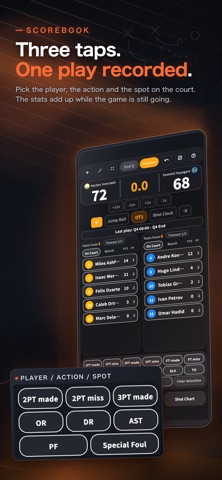
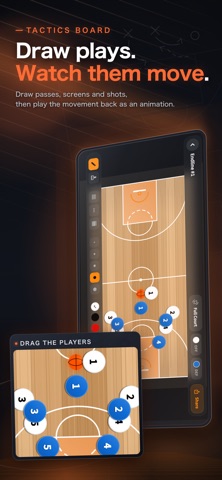
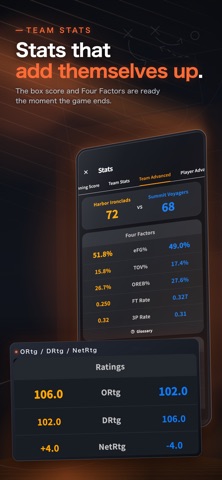
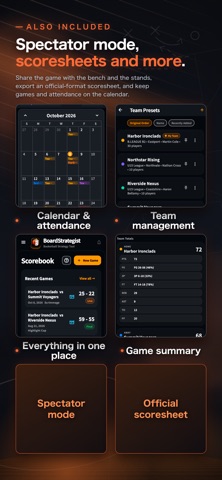
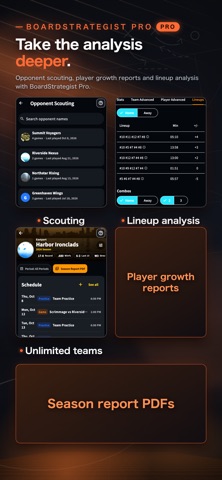
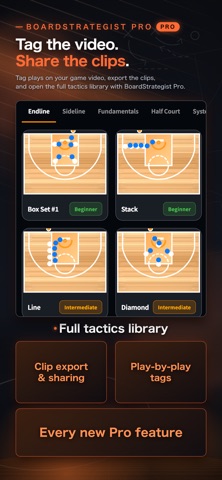
Pick the player, the action and the spot on the court. Three taps record a play, and your stats add up while the game is still going. Record your games, review them, and take what you learn into the next practice. Works on iPad and iPhone; for live games, we recommend iPad for its larger screen. ■ Scorebook: three taps per play - Choose the player, choose the action, tap the spot on the court. That's one play recorded - Record made and missed 2P/3P/FT, rebounds, assists, steals, blocks, turnovers and fouls - Game clock with quarters (5 to 12 minutes), substitutions and timeouts - Play-by-play, undo, and resume a paused game ■ Stats that add themselves up Everything is totaled as you record, so the box score is ready the moment the game ends. - Box score (FGM/FGA/FG%/3PM/3PA/3P%/FTM/REB/AST/STL/BLK/PF/PTS) - Career stats and game logs for every player, plus an all-player leaderboard - Four Factors (eFG%, TOV%, OREB%, FT Rate) and other advanced numbers ■ Review the game, plan the next practice - The shot chart shows where your team shot from and where the shots fell. Switch to a heat map by zone - The running score shows where the lead changed hands - Once you see what to work on, walk through it on the tactics board and put the practice on the calendar ■ Spectator mode: share the game with the bench and the stands A screen made to be watched, with the score, the clock and the stats shown large. - Put the device you're recording on into full screen during a timeout or a break - Connect a monitor or projector at the venue (cable or AirPlay) and only the spectator view goes to the big screen. Your device stays on the scorebook, so recording never stops ■ Scoresheets and sharing - Export an official-format scoresheet as a PDF straight from your recorded game. Excel export is also available - Turn the game result into a summary card, as an image or an MP4 video, and send it to your team and families ■ Tactics board: draw plays, then watch them move - Draw passes, dribbles, screens and shots with your finger or a stylus - Play back player and ball movement as an animation, and export it as a video ■ Team management - Register teams and players (name and number) and load them straight into a game - Keep games, practices and attendance on the calendar. Recorded games open right from the calendar ■ Pricing The app is a one-time purchase. Everything above is included, with no monthly fee. For deeper analysis, the optional BoardStrategist Pro subscription is available, with a 14-day free trial for first-time subscribers. - Opponent scouting: record, tendencies and per-player stats for each opponent, plus a pre-game briefing PDF - Player growth reports: each player's trends, strengths and areas to work on - Lineup analysis: points scored and allowed by every five-player combination - Tag plays on your game video, then export and share the clips - Season report PDFs and bench alerts - The full tactics library and unlimited My Team registrations ■ Who it's for - Coaches of youth, school and club teams - Parents and team managers asked to keep the score ■ Built for courts everywhere The whole app is localized. Stat abbreviations (PTS / REB / AST and so on) stay in the international English form. ■ Subscription details BoardStrategist Pro is an auto-renewable subscription. Payment is charged to your Apple ID at confirmation and renews automatically unless canceled at least 24 hours before the end of the current period. Manage or cancel anytime in Apple account settings. Terms of Use (EULA): https://www.apple.com/legal/internet-services/itunes/dev/stdeula/ Privacy Policy: https://boardstrategist.net/privacy/
What's new · 4.5.0
This update polishes the screens you use every day. ■ Clearer scorebook recording • Score badges such as +2 now appear beside the score instead of on top of it • Finished games now open on their last period with input disabled, instead of on OT1 with recording still possible • Clear Selection no longer looks disabled, and Gym view now uses the same name as Classic view • Quick view now records a shot with a single tap, without asking for the shot location • Running scores of games in progress no longer say Final, and the graph axis uses round numbers • On iPhone, the top buttons of the running score screen are now icon buttons that fit on screen (press and hold to see their names) ■ Easier-to-read box scores and stats tables • Box scores now lead with points, rebounds and assists, align digits, separate starters from the bench, add a totals row and dim players who did not play • Jersey numbers and names stay pinned on the left as you scroll sideways • Long player names now shrink to fit instead of being cut off with "..." • Sideways-scrolling tables and tabs fade at the edge to show there is more • Terms that varied between screens, such as 2P/3P, OREB/DREB and Home/Away, are now consistent • Four Factors and season highlights on the team detail screen are now available for free ■ Updated win-loss counting • Games that end tied now count as ties (T) rather than losses, and records appear like "16-8-1" • Games in progress no longer count toward records, win percentage, last 10 games, streaks or Scouting head-to-head records • In Recent results on the team detail screen, the result and score now sit next to the date. Wins are orange and losses gray ■ Light theme and color improvements • Heat maps now use a blue-gray-orange scale, and player details use orange and gray for wins, losses and changes, so they are easier to tell apart for people who see color differently • Faint orange text in the light theme is darker, and controls on the team detail screen no longer blend into the background • Segmented buttons and switches use the accent color, and calendar selections are easier to see • Pro locks now appear as a small lock in the top-right corner, so button labels and headings are no longer hidden • The purchase screen, the share notice and the theme previews now read well in both dark and light themes ■ Clearer text • Revised the Japanese text in Help, the glossary, Pro feature descriptions, the backup screen and PDF reports. Help now matches the actual buttons and behavior • PDF game commentary now sticks to what the recorded data can support • Wording on the video PbP tag screen now consistently uses "link" ■ Other fixes • Fixed the status bar overlapping the top buttons on iPad after opening the video screen • On iPhone in landscape, screen edges are no longer hidden by the Dynamic Island, and video PbP tags and markers stay on screen • Improved the scorebook How to Use pages: buttons, bullet lists, figures and iPad spacing • On iPhone, the Apple Pencil switch and Quick view guide are hidden, since they are unavailable there • Tidied the purchase screen and show free trials in days. Languages other than Japanese now see English screenshots there • On the free plan, View report on player details now shows plan information first • Fixed some characters appearing as boxes in PDF reports, and dates and team names being cut off • Translated headings that were still in English in the official score sheet summary and Recent results • Fixed "00:00" being clipped in the calendar, schedule dates wrapping, and the iPad layout of event details and Settings • Reduced power use while Spectator Mode is shown on a TV or projector Thank you for using BoardStrategist. We would love to hear your ideas and requests through Settings.
Details