

AxioFlow Personal
Hazel Taniegra · Finance
Independent analytics for this App Store listing. AppTracker is not affiliated with Hazel Taniegra.
Chart standing · US
What changed · US
Listing changes AppTracker has observed for this app in this storefront — new versions, price moves, rating shifts, and store copy.
Bug fixes, performance improvements, and general stability updates for a smoother AxioFlowPersonal experience.
Screenshots



Keywords this app targets
Search terms AppTracker associates with this app — estimates, not search volume. ❝ = in the app's title; a highlighted number is its current position for that term.
Similar apps
Competitors and close alternatives, as estimated by AppTracker.
 Finore - Spending Tracker
ANDREI-GABRIEL BOTITA
Finore - Spending Tracker
ANDREI-GABRIEL BOTITA
 Budget & Expense: Moneyboard
Damien Vieira
Budget & Expense: Moneyboard
Damien Vieira
 CashJot - Expense Tracker
Jun Sheng Pierre Teo
CashJot - Expense Tracker
Jun Sheng Pierre Teo
 Ghollak (Persian - English)
elyas naranjee sani
Ghollak (Persian - English)
elyas naranjee sani
 Monefy: Bills & Money Tracker
Reflective Technologies ApS
Monefy: Bills & Money Tracker
Reflective Technologies ApS
 Spent Pro: Spending Tracker
Aleksandr Kundelev
Spent Pro: Spending Tracker
Aleksandr Kundelev
 AI Budget Manager - WalletGPT
Afaq Ahmed
AI Budget Manager - WalletGPT
Afaq Ahmed
 Copilot: Track & Budget Money
Copilot Money, Inc.
Copilot: Track & Budget Money
Copilot Money, Inc.
About
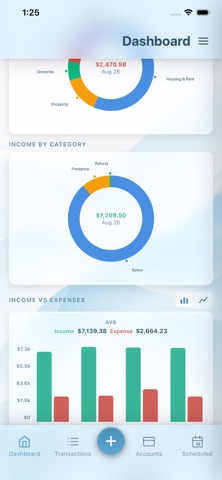
AxioFlowPersonal Finance Tracker AxioFlowPersonal is a simple, private personal finance tracker designed to help you take control of your money. Track income and expenses, manage multiple accounts, set budgets, schedule recurring payments, and monitor installments, all from one clean and intuitive interface. Quickly log transactions from your iPhone Home Screen with the interactive AxioFlowPersonal widget. YOUR MONEY, YOUR DEVICE All your financial data stays on your device. Nothing is sent to external servers. If you enable iCloud Sync or Backup, your data is stored in your own iCloud account and never shared with anyone. INTERACTIVE HOME SCREEN WIDGET Manage your finances without opening AxioFlow. • See the balances of your 3 most-used accounts • Quickly add Income, Expense, or Transfer • Select an account, enter an amount, and choose a category from the widget • Complete transactions without opening the main app • Widget balances update automatically DASHBOARD AT A GLANCE See monthly income, expenses, and net balance in one place. The Due Today panel highlights bills and scheduled payments that need attention. View income and expense breakdowns and spending trends over time. TRANSACTION TRACKING Log income, expenses, and transfers with a built-in calculator. Browse by month in list view or by date in calendar view. Filter by account and see running balances. Swipe to delete or tap to edit. MULTIPLE ACCOUNTS Manage up to 6 account types: Cash, Debit, Credit, eWallet, Loan, and Savings. Choose which accounts are included in your total balance, track credit card debt separately, and transfer money between accounts. SCHEDULED TRANSACTIONS Set up recurring payments daily, weekly, monthly, yearly, or at the end of the month. Post full or partial amounts when they come due. Edit a single occurrence or future occurrences. Completed and expired items are automatically archived. INSTALLMENT TRACKING Track payment plans such as phone installments or loans. See how many periods you've paid and how many remain. Each installment can automatically create a scheduled transaction. BUDGETS Set monthly spending limits for expense categories and track your progress at a glance. NET WORTH See your overall financial picture with a net worth figure based on your assets and liabilities, including credit card debt and remaining installments. SPENDING INSIGHTS See your savings rate, month-over-month spending change, average daily spend, biggest expense, and top 3 expense categories. BILL REMINDERS Get push notifications when scheduled payments are due and choose your preferred reminder time. CATEGORIES Use built-in expense and income categories. Pro users can add custom categories, rename existing ones, and delete categories they don't need. iCLOUD SYNC & BACKUP Keep your data updated across devices with iCloud Sync. Create timestamped backups and restore previous backups at any time. Auto Backup runs daily when enabled. EXPORT Export transactions as a CSV spreadsheet or printable PDF report. Select a date range and get a clean summary of income, expenses, and net totals. THEMES Choose Dark, Light, or System theme. FREE TO USE AxioFlowPersonal is free with core features including up to 3 accounts, 5 scheduled transactions, and full transaction tracking. Upgrade to Pro for unlimited accounts and scheduled transactions, budgets, installments, net worth, charts, spending insights, bill reminders, iCloud Sync & Backup, exports, all themes, custom categories, and an ad-free experience. PRO OPTIONS • Monthly or Yearly subscription with a 7-day free trial • Lifetime purchase for ₱1,290 with no recurring charges Privacy Policy: https://github.com/jchtaniegra17/axioflow-personal-privacy Terms of Use: https://github.com/jchtaniegra17/axioflow-personal-terms
What's new · 2.1.6
Bug fixes, performance improvements, and general stability updates for a smoother AxioFlowPersonal experience.
Details