

HQSSH - AI + SFTP
TCGSWAP LLC · Developer Tools
Independent analytics for this App Store listing. AppTracker is not affiliated with TCGSWAP LLC.
Chart standing · US
What changed · US
Listing changes AppTracker has observed for this app in this storefront — new versions, price moves, rating shifts, and store copy.
Reliability fixes. • Fixed a terminal crash when a program cleared to the start of a line. • Projects, sessions and tasks now work through jump hosts. • Sessions open at the right size, and Retry after a dropped connection no longer gets stuck. Update hqsshd to v1.6.0+ for the server-side fixes.
Ratings breakdown · US
The star breakdown behind this app's rating in this storefront.
In-app purchases · US
No in-app purchases.
Screenshots




Keywords this app targets
Search terms AppTracker associates with this app — estimates, not search volume. ❝ = in the app's title; a highlighted number is its current position for that term.
Similar apps
Competitors and close alternatives, as estimated by AppTracker.
 SSH Terminal Pro
志鹏 潘
2 shared topics
SSH Terminal Pro
志鹏 潘
2 shared topics
 SSH Term X
Haga Kunihiko
1 shared topic
SSH Term X
Haga Kunihiko
1 shared topic
 Termify - AI SSH Terminal
Maple Labs Co., Ltd
1 shared topic · 1 shared title word
Termify - AI SSH Terminal
Maple Labs Co., Ltd
1 shared topic · 1 shared title word
 La Terminal: Mosh & SSH Client
Xibbon, Inc
1 shared topic
La Terminal: Mosh & SSH Client
Xibbon, Inc
1 shared topic
 SSHive: SSH, SFTP & Terminal
NetMeSafe
1 shared title word
SSHive: SSH, SFTP & Terminal
NetMeSafe
1 shared title word
 Terminal - SSH Client
Serhan Cetin
1 shared topic
Terminal - SSH Client
Serhan Cetin
1 shared topic
 WebSSH - Sysadmin Toolbox
MENGUS ARNAUD
1 shared topic
WebSSH - Sysadmin Toolbox
MENGUS ARNAUD
1 shared topic
 SSH, SFTP, databases: Boopbeep
Gabriel Lopez Santana
1 shared topic · 1 shared title word
SSH, SFTP, databases: Boopbeep
Gabriel Lopez Santana
1 shared topic · 1 shared title word
About
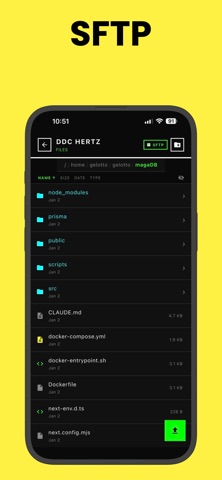
HQSSH - SSH Terminal and File Manager HQSSH is an SSH terminal, SFTP file manager, and AI CLI tool launcher built for developers and vibe coders who manage remote servers from their phone. Full terminal. Full file browser. AI tool integration. Persistent sessions that survive disconnects and follow you across devices. SSH Terminal 256-color xterm emulation with a keyboard toolbar designed for mobile. ESC, TAB, Ctrl+C, Ctrl+D, Ctrl+Z, and arrow keys are always one tap away. Portrait and landscape support. This is a real terminal — not a stripped-down shell. SFTP File Manager Browse, upload, download, rename, and delete files on your remote systems. Create directories, change permissions with a chmod dialog, preview text files, and share downloads. Transfer progress tracking with cancel support. AI CLI Tools Launch Claude Code, Codex, or Aider directly from your phone. HQSSH discovers git repositories on your remote systems, detects which AI tools are installed, and lets you launch them in the right project directory with one tap. Manage AI-assisted development sessions on the go. Persistent Sessions Start a session on your phone. Pick it up later on another device. Sessions survive disconnects and device switches with full scrollback history. Multi-client attach lets you share sessions across devices simultaneously. SSH Key Management Generate ED25519, RSA, or ECDSA keys directly in the app. Import existing private keys. Keys are stored securely in the iOS Keychain. Password and private key authentication supported. Command Snippets Save frequently used commands as snippets — global or per-system. Organize by category, set auto-execute, and run with one tap. Includes built-in snippets for common operations. Task Automation Define reusable tasks at the system or project level. Run deployments, health checks, or any shell command with one tap. Review execution history and output logs. Multi-System Dashboard Manage all your servers from a single screen. Active sessions, quick-launch tasks, and recent run history at a glance. Import systems in bulk from your ~/.ssh/config file. Jump host support for bastion connections. Secure by Default SSH credentials encrypted with the iOS Keychain. Host key verification with fingerprint tracking. No data sent to third-party services. Supports any SSH-accessible system running Linux or macOS.
What's new · 1.5.2
Reliability fixes. • Fixed a terminal crash when a program cleared to the start of a line. • Projects, sessions and tasks now work through jump hosts. • Sessions open at the right size, and Retry after a dropped connection no longer gets stuck. Update hqsshd to v1.6.0+ for the server-side fixes.
Details