

HRV Watch - Stress Watch
钰斌 唐 · Health & Fitness
Independent analytics for this App Store listing. AppTracker is not affiliated with 钰斌 唐.
Chart standing · US
What changed · US
Listing changes AppTracker has observed for this app in this storefront — new versions, price moves, rating shifts, and store copy.
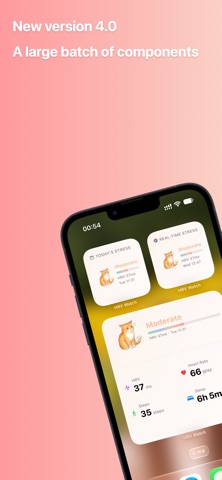
• Brand-new iPhone widgets: small, medium and large on the Home Screen; circular and inline on the Lock Screen — stress, steps, heart rate and a daily overview at a glance • Two Lock Screen circle styles: Gauge (open ring with percentage) and Ring (closed ring filled to the value, with a glyph inside) • Apple Watch complications gain corner and rectangular layouts — put them in the watch face corners or the Smart Stack • New Step Goal setting (Settings → Other Settings): adjustable in 1,000-step increments, default 10,000 steps, synced to widgets and Apple Watch • Tap any widget to open the matching detail screen; theme art, colors and custom labels stay consistent across every widget • Fixed an issue where the inline watch complication showed the wrong metric, plus widget refresh and stability improvements
In-app purchases · US
No in-app purchases.
Screenshots




Keywords this app targets
Search terms AppTracker associates with this app — estimates, not search volume. ❝ = in the app's title; a highlighted number is its current position for that term.
Similar apps
Competitors and close alternatives, as estimated by AppTracker.
 Stress Tracker HRV
Alvaro Garcia Pizarro
1 shared topic · 2 shared title words
Stress Tracker HRV
Alvaro Garcia Pizarro
1 shared topic · 2 shared title words
 SweetBeat HRV Classic
SweetWater Health LLC
2 shared topics · 1 shared title word
SweetBeat HRV Classic
SweetWater Health LLC
2 shared topics · 1 shared title word
 StressWatch: AI Stress Monitor
One Hundred Bad Ideas Limited
1 shared title word
StressWatch: AI Stress Monitor
One Hundred Bad Ideas Limited
1 shared title word
 HRV Tracker Minimal
Kunihiko Ayuha
1 shared title word
HRV Tracker Minimal
Kunihiko Ayuha
1 shared title word
 Welldo: AI Stress Monitor
APP ORIGINS STUDIO YAZILIM ANONIM SIRKETI
1 shared title word
Welldo: AI Stress Monitor
APP ORIGINS STUDIO YAZILIM ANONIM SIRKETI
1 shared title word
 SweetBeat HRV
SweetWater Health
SweetBeat HRV
SweetWater Health
 FeelFlow-Stress&HRV&Sleep
Chongqing Wulitu Technology Co., Ltd.
1 shared topic · 2 shared title words
FeelFlow-Stress&HRV&Sleep
Chongqing Wulitu Technology Co., Ltd.
1 shared topic · 2 shared title words
 CalmingVibration
Raffaele De Lorenzo
CalmingVibration
Raffaele De Lorenzo
About
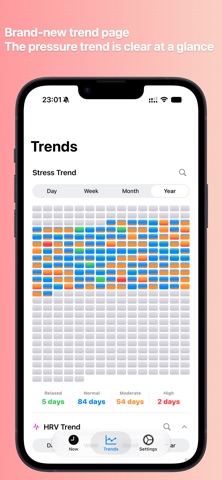
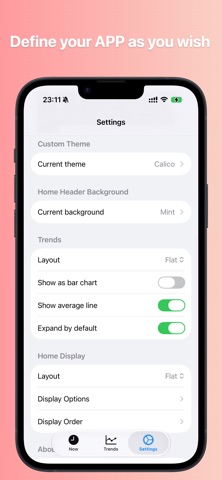
HRV Watch helps you understand stress, heart rate, and recovery trends more intuitively—using Apple Watch and data from the Health app. Key features: - HRV trends: Track HRV (SDNN) over time to see how your body is recovering - Heart rate: Current heart rate, resting heart rate, and historical trends - Stress insights: Estimates stress from HRV, heart rate, and related signals; includes a yearly stress heatmap for long-term patterns - Custom stress display: Beyond the default color ring, choose from 16 cute hand-drawn theme icon sets (animals, plants, spooks, jelly, and more) that change across four tiers—Relaxed, Normal, Moderate, High; optional custom tier labels - Steps & sleep: Daily activity and sleep data to help you see the bigger picture - Apple Watch: Quick access to key metrics on your wrist; theme syncs from iPhone - Widgets & complications: Stress, steps, heart rate, and more on your watch face; rectangular stress complications show theme icons when a custom theme is selected - Languages: English and Simplified Chinese - Home: Cards or flat layout with customizable visible items, order, and optional header gradient - Trends: Dedicated sections per metric; flat by default, cards optional - 28 hand-drawn stress themes including new cartoon animal breeds; synced to Apple Watch and widgets HRV Watch reads only the Health data you authorize and analyzes it on your device. It does not replace professional medical advice; all results are for everyday reference only. Who it’s for: - Anyone tracking stress day to day - People who care about HRV and recovery - Apple Watch users who want a simple health dashboard - Users who prefer visual themes or heatmaps for stress Important disclaimer: HRV Watch is for general wellness purposes only and is not a medical device. All data, estimates, and insights are for informational use only and are not intended to diagnose, treat, cure, or prevent any disease or condition. Consult a qualified healthcare professional before making health-related decisions.
What's new · 4.0
• Brand-new iPhone widgets: small, medium and large on the Home Screen; circular and inline on the Lock Screen — stress, steps, heart rate and a daily overview at a glance • Two Lock Screen circle styles: Gauge (open ring with percentage) and Ring (closed ring filled to the value, with a glyph inside) • Apple Watch complications gain corner and rectangular layouts — put them in the watch face corners or the Smart Stack • New Step Goal setting (Settings → Other Settings): adjustable in 1,000-step increments, default 10,000 steps, synced to widgets and Apple Watch • Tap any widget to open the matching detail screen; theme art, colors and custom labels stay consistent across every widget • Fixed an issue where the inline watch complication showed the wrong metric, plus widget refresh and stability improvements
Details