

Tablewright: SQLite Editor
Pennyworth Labs LLC · Developer Tools
Independent analytics for this App Store listing. AppTracker is not affiliated with Pennyworth Labs LLC.
Chart standing · US
What changed · US
Listing changes AppTracker has observed for this app in this storefront — new versions, price moves, rating shifts, and store copy.
What's new in 1.4.1: • Fixed an issue where some users could get stuck at the purchase screen with no way to continue • The free database limit no longer miscounts a file as "new" just because it changed size • Sample and app-created databases no longer use up your free database slot • When you hit the free limit, you can now switch to using that database instead of being blocked
Ratings breakdown · US
The star breakdown behind this app's rating in this storefront.
In-app purchases · US
What this app sells inside itself, grouped by kind and priced for this storefront.
Screenshots



Keywords this app targets
Search terms AppTracker associates with this app — estimates, not search volume. ❝ = in the app's title; a highlighted number is its current position for that term.
Similar apps
Competitors and close alternatives, as estimated by AppTracker.
 SQLiteFlow - SQLite Editor
晨亮 贾
2 shared topics · 3 shared title words
SQLiteFlow - SQLite Editor
晨亮 贾
2 shared topics · 3 shared title words
 SQLite - Editor & Browser
俊锋 仝
2 shared topics · 3 shared title words
SQLite - Editor & Browser
俊锋 仝
2 shared topics · 3 shared title words
 SQLite Editor & DB Viewer
Sahana A S
SQLite Editor & DB Viewer
Sahana A S
 SQLed - SQL Database Manager
Andreas Zimnas
1 shared topic
SQLed - SQL Database Manager
Andreas Zimnas
1 shared topic
 SQLite Mobile Client
Filippo Maguolo
1 shared title word
SQLite Mobile Client
Filippo Maguolo
1 shared title word
 MagicSQL - SQL Client & Editor
Fatih Yesilbas
1 shared topic · 1 shared title word
MagicSQL - SQL Client & Editor
Fatih Yesilbas
1 shared topic · 1 shared title word
 TablePro
Dat Ngo Quoc
TablePro
Dat Ngo Quoc
 SQL Connect WK Studio
KONRAD WITKOWSKI
SQL Connect WK Studio
KONRAD WITKOWSKI
About
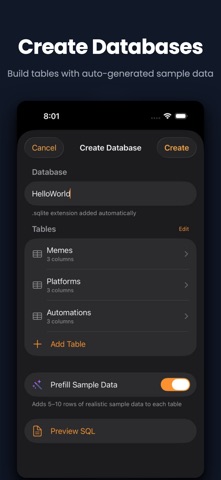
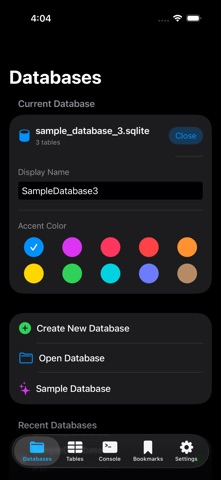
The SQLite database tool with no account and no subscription - just your data, on your device. Tablewright is the native database editor developers have been waiting for. Open any SQLite database, browse tables, run SQL queries, and edit data — all with a fast, fluid, offline interface. OPEN ANY DATABASE • Open .sqlite, .db, and .sqlite3 files from Files or other apps • Recent databases for quick access • Works with any SQLite database, no size limits BROWSE YOUR DATA • View all tables with row counts at a glance • Sort, filter, and paginate through any table • Tap rows to see complete details • Navigate foreign key relationships instantly INSPECT YOUR SCHEMA • View columns, types, and constraints • Browse indexes and foreign keys • Copy column definitions and CREATE TABLE statements PRO FEATURES Unlock the full toolkit with a one-time purchase: • Write SQL queries with syntax highlighting • Edit data directly — insert, update, delete rows • Edit cells inline from query results • Create and modify table schemas • Import data from CSV and JSON • Export results as CSV or JSON • Save and organize your favorite queries VIEW & MANAGE IMAGES • View images stored in BLOB columns — JPEG and PNG detected automatically • Upload photos from your camera or library • Share or download images directly from any cell BUILT FOR DEVELOPERS • Native SwiftUI — fast and fluid on all devices • Tablet optimized with sidebar navigation • No account required — everything stays on your device • No external dependencies — pure SQLite, no cloud sync PERFECT FOR • Mobile developers inspecting app databases • Data analysts exploring datasets on the go • Students learning SQL • DBAs and engineers who work with SQLite files One purchase. No subscription. Your database, always yours.
What's new · 1.4.1
What's new in 1.4.1: • Fixed an issue where some users could get stuck at the purchase screen with no way to continue • The free database limit no longer miscounts a file as "new" just because it changed size • Sample and app-created databases no longer use up your free database slot • When you hit the free limit, you can now switch to using that database instead of being blocked
Details