

SQLiteFlow - SQLite Editor
晨亮 贾 · Developer Tools
Independent analytics for this App Store listing. AppTracker is not affiliated with 晨亮 贾.
Chart standing · US
What changed · US
Listing changes AppTracker has observed for this app in this storefront — new versions, price moves, rating shifts, and store copy.
• Hex Editor. Fix an issue that may cause user can't input character in ascii section. • Dump Database. Views structure now will be exported. • Additional bug fixes and stability improvements.
Price & rating history · US
Reconstructed from the listing changes AppTracker has observed in this storefront. A field is charted once it has changed more than once, and each line starts at the value it moved from.
Average rating · ★ 4.51 now · 5 changes on record
Ratings breakdown · US
The star breakdown behind this app's rating in this storefront.
In-app purchases · US
What this app sells inside itself, grouped by kind and priced for this storefront.
Screenshots





Keywords this app targets
Search terms AppTracker associates with this app — estimates, not search volume. ❝ = in the app's title; a highlighted number is its current position for that term.
Similar apps
Competitors and close alternatives, as estimated by AppTracker.
 SQLite - Editor & Browser
俊锋 仝
3 shared topics · 3 shared title words
SQLite - Editor & Browser
俊锋 仝
3 shared topics · 3 shared title words
 Tablewright: SQLite Editor
Pennyworth Labs LLC
2 shared topics · 3 shared title words
Tablewright: SQLite Editor
Pennyworth Labs LLC
2 shared topics · 3 shared title words
 SQLite Editor & DB Viewer
Sahana A S
SQLite Editor & DB Viewer
Sahana A S
 SQLed - SQL Database Manager
Andreas Zimnas
1 shared topic
SQLed - SQL Database Manager
Andreas Zimnas
1 shared topic
 SQLite Mobile Client
Filippo Maguolo
1 shared topic · 1 shared title word
SQLite Mobile Client
Filippo Maguolo
1 shared topic · 1 shared title word
 Easy CSV Editor Mobile
VDT LABS S.R.L.
1 shared topic · 1 shared title word
Easy CSV Editor Mobile
VDT LABS S.R.L.
1 shared topic · 1 shared title word
 MagicSQL - SQL Client & Editor
Fatih Yesilbas
2 shared topics · 1 shared title word
MagicSQL - SQL Client & Editor
Fatih Yesilbas
2 shared topics · 1 shared title word
 MySQL Commander for iPhone
Niklas Saers
2 shared topics
MySQL Commander for iPhone
Niklas Saers
2 shared topics
About
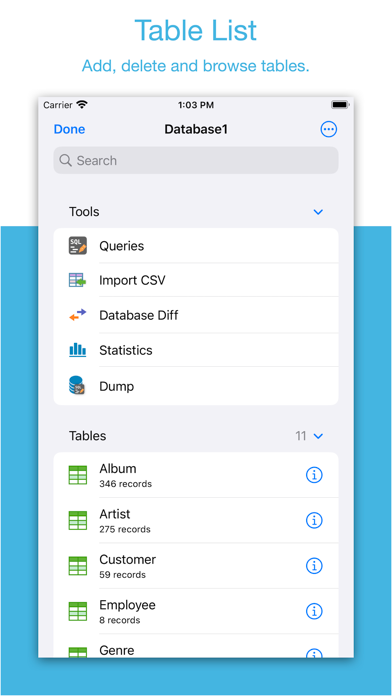
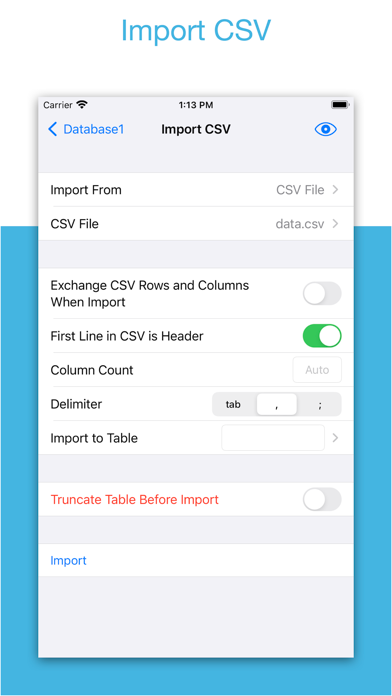
Two-week free trial! So you can purchase SQLiteFlow after you know you like it! SQLiteFlow is an SQLite editor for Mac & iOS which is intuitive, stable and reliable to use. It contains features as described below: Browse • Manage files. Supports add, remove, duplicate, rename folders, SQLite databases, SQL files, CSV files, etc. • Supports import database from iCloud Drive by the file picker. • Supports open external SQL files, CSV files and Filter files. • Supports open external folders. Requires iOS 13.0 or iPadOS 13.0. • Supports show recents files. Query Editor • Multi-query execution. • Syntax highlighting. • SQL auto-completion. • Format query. Data Editor • View, edit or add table data. • Multiple cells/rows/columns selection. • View table data with a convenient filter. • Sort records by tapping on column title. • Edit blob data as hex or show it as preview if possible. Alter Table • View, edit or add table fields, indexes, foreign keys, checks. • View triggers. • View DDL. Table List • Supports display each table's name and records count. Connect • Supports let SQLiteFlow(macOS) connect databases in this app. One use case is that you can debug query performance issue on your iPhone or iPad directly through your Mac. Drag and Drop • Supports drag and drop to import or export SQLite databases and SQL files in iPad. Database Statistics • Supports show records count of each table. • Supports show total size of each table • Supports show size of each table's content. • Supports show size of each table's index. This feature may help you get more insight about your SQLite databases' data storage information, which may let you see if there're any chances to let SQLite working in a more effective way in your device. ER Diagram • Supports display ER diagram. • Supports toggle field type hide or show. • Supports Relationship Guessing. • Supports copy as Mermaid markdown. Database Diff • Supports generate SQL text that can let you transform a database content into another. • Supports show a summary of the differences between two databases. Import • Supports import CSV data. • Supports import JSON data. Export • In Data Editor or Query Results, supports export data to CSV, JSON, Markdown or List. • In Data Editor, supports export data to Insert Statement or Update Statement if possible. Multiple Windows • Supports multiple windows for iPadOS 13 or later. Dark Mode • Supports dark mode. visionOS • Supports visionOS. Shortcuts • Supports "Run Query" action. • Supports "Import CSV" action. • Supports "Import JSON" action. Create Function • Supports create scalar function using a simple JavaScript routine. Terms of Use: https://www.apple.com/legal/internet-services/itunes/dev/stdeula/
What's new · 6.8.6
• Hex Editor. Fix an issue that may cause user can't input character in ascii section. • Dump Database. Views structure now will be exported. • Additional bug fixes and stability improvements.
Details