

Dashcam Viewer: for Tesla
Daily Prompt · Utilities
Independent analytics for this App Store listing. AppTracker is not affiliated with Daily Prompt.
Chart standing · US
What changed · US
Listing changes AppTracker has observed for this app in this storefront — new versions, price moves, rating shifts, and store copy.
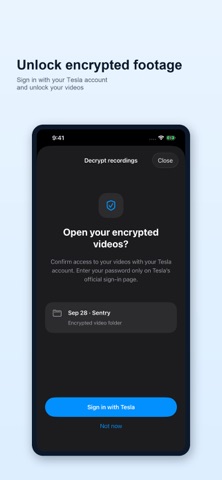
- Added support for TeslaCam video decryption.
Price & rating history · US
Reconstructed from the listing changes AppTracker has observed in this storefront. A field is charted once it has changed more than once, and each line starts at the value it moved from.
Price · 7.99 USD now · 2 changes on record
Ratings breakdown · US
The star breakdown behind this app's rating in this storefront.
In-app purchases · US
No in-app purchases.
Screenshots



Keywords this app targets
Search terms AppTracker associates with this app — estimates, not search volume. ❝ = in the app's title; a highlighted number is its current position for that term.
Similar apps
Competitors and close alternatives, as estimated by AppTracker.
 Dash for Tesla
豪 陈
1 shared title word
Dash for Tesla
豪 陈
1 shared title word
 Dashla: Wireless Dashboard
Thirty Two Tech, Inc.
Dashla: Wireless Dashboard
Thirty Two Tech, Inc.
 Remote for Tesla
Rego Apps
1 shared title word
Remote for Tesla
Rego Apps
1 shared title word
 SentryGuard
Benjamin Barghoud
SentryGuard
Benjamin Barghoud
 Drive Log for Tesla - TSLogger
Fumihiro Kawasaki
Drive Log for Tesla - TSLogger
Fumihiro Kawasaki
 Car Camera DVR-Dashcam
APPASPECT TECHNOLOGIES PRIVATE LIMITED
1 shared title word
Car Camera DVR-Dashcam
APPASPECT TECHNOLOGIES PRIVATE LIMITED
1 shared title word
 EV Watch for Tesla
Excelsis Consulting
1 shared title word
EV Watch for Tesla
Excelsis Consulting
1 shared title word
 DashCam Pro - Car Camera
Matteo Zappia
DashCam Pro - Car Camera
Matteo Zappia
About
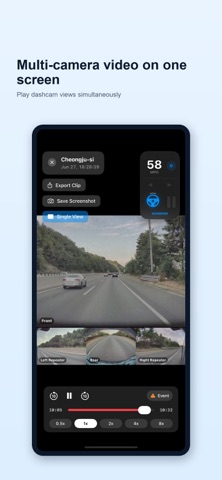
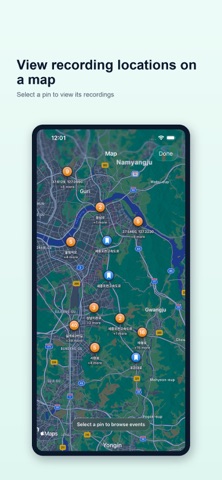
Unlock Encrypted TeslaCam Footage Sign in with your Tesla account to unlock and play encrypted footage you are authorized to access. Review TeslaCam dashcam and Sentry Mode recordings with Dashcam Viewer: for Tesla. - Play multiple camera views together and switch between cameras. - View speed, gear, turn signals, accelerator and brake inputs, and Autopilot/FSD status. - Find and play event moments in Saved and Sentry recordings. - View recording locations on a map. - Drag on the playback screen to seek to another moment. - Zoom single-camera video up to 4×. - Export combined 4-camera or 6-camera videos, or save screenshots to Photos. Available cameras and driving and location information depend on the contents of each recording. Videos are processed on your device and video files are not uploaded. Tesla sign-in and decryption require internet access. Your login information is securely stored on your device. Tesla authentication information is used only to unlock encrypted footage and is not sent to external servers other than Tesla. You can sign out at any time in app settings. Connect your Tesla USB drive and select the TeslaCam folder or a parent folder containing it. An unofficial app compatible with USB recordings from Tesla vehicles.
What's new · 1.8.0
- Added support for TeslaCam video decryption.
Details