

RevPDF: PDF Editor & Reader
Pawandeep Singh · Utilities
Independent analytics for this App Store listing. AppTracker is not affiliated with Pawandeep Singh.
Chart standing · US
What changed · US
Listing changes AppTracker has observed for this app in this storefront — new versions, price moves, rating shifts, and store copy.
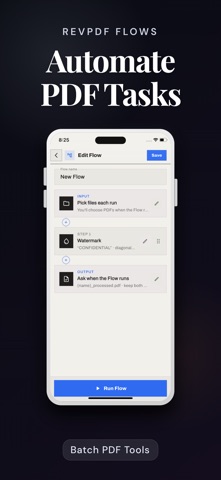
**What’s New in RevPDF 5.0** • New WYSIWYG editor for smoother, faster PDF editing • Flows for batch PDF automation • PDF Compare • PDF to Excel and improved PDF to Word • Smarter redaction tools • New Organize PDF, Header & Footer, and PDF/A tools • Improved Split and form filling • New themes and expanded language support
Price & rating history · US
Reconstructed from the listing changes AppTracker has observed in this storefront. A field is charted once it has changed more than once, and each line starts at the value it moved from.
Average rating · ★ 4.70 now · 9 changes on record
Ratings breakdown · US
The star breakdown behind this app's rating in this storefront.
In-app purchases · US
What this app sells inside itself, grouped by kind and priced for this storefront.
Screenshots





Similar apps
Competitors and close alternatives, as estimated by AppTracker.
 PDF Reader Pro - Sign,Edit PDF
PDF Technologies, Inc.
PDF Reader Pro - Sign,Edit PDF
PDF Technologies, Inc.
 PDF Reader - Editor & Scanner
DAOWEI NETWORK TECHNOLOGY PTE. LTD.
PDF Reader - Editor & Scanner
DAOWEI NETWORK TECHNOLOGY PTE. LTD.
 Converter & Editor: PDF Expert
The Last Sunrise LLC
Converter & Editor: PDF Expert
The Last Sunrise LLC
 PDF Editor App | Edit Document
Allied Clicks LLC
PDF Editor App | Edit Document
Allied Clicks LLC
 PDF Editor: Private & Offline
大鹏 张
PDF Editor: Private & Offline
大鹏 张
 PDF Editor – PDF Whip
Desygner Pty Ltd
PDF Editor – PDF Whip
Desygner Pty Ltd
 PDF Expert: Editor & Reader
Readdle Technologies Limited
PDF Expert: Editor & Reader
Readdle Technologies Limited
 RedactPDF – Secure Redaction
lee xiaoming
RedactPDF – Secure Redaction
lee xiaoming
About
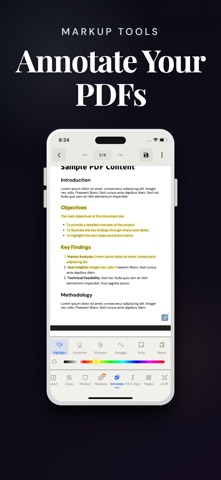
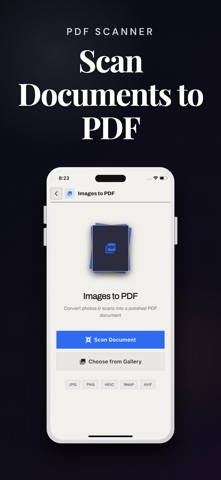
RevPDF is a powerful offline PDF editor that lets you edit existing PDF text, sign documents, run OCR, redact sensitive information, convert files, and manage pages without uploading your PDFs for processing. EDIT PDF TEXT DIRECTLY Edit existing text inside the PDF with a true WYSIWYG editing experience. RevPDF supports paragraph reflow, text spilling onto following pages, font handling, find and replace, and precise content editing without rebuilding the document from scratch. OCR & SEARCH SCANNED PDFS Recognize text in scanned documents, select and search OCR text, and create searchable PDFs using an invisible text layer. SIGN, DRAW & ANNOTATE Draw your signature directly onto a PDF. Add freehand pen marks, highlights, comments, bookmarks, strikethroughs, and other annotations for review and markup. REDACT SENSITIVE INFORMATION Redact text and content with customizable redaction tools, or use Auto Redaction to find and remove matching sensitive information faster. CONVERT & PROCESS PDFS • PDF to Word • PDF to Excel • PDF/A conversion • Scan documents to PDF • Extract images from PDFs • Merge, split, and compress PDFs • Split a PDF page vertically or horizontally at the position you choose • Organize, reorder, and manage pages POWER TOOLS Compare PDF documents, edit PDF metadata, add headers and footers, add watermarks, flatten PDFs, remove passwords from documents you can access, and use Flows to batch-process multiple files with repeatable operations. PRIVATE BY DESIGN Your PDF files are processed on your device and are not uploaded for editing or processing. RevPDF can work offline for document operations. The app may occasionally access the internet for supporting resources such as downloading a required font, but your PDF documents stay on your device. COMPACT, SERIOUS PDF SOFTWARE RevPDF brings advanced editing, OCR, redaction, conversion, annotation, signing, and batch tools into a compact app designed for everyday documents and professional workflows. Open a PDF and get the work done with RevPDF.
What's new · 5.0.0
**What’s New in RevPDF 5.0** • New WYSIWYG editor for smoother, faster PDF editing • Flows for batch PDF automation • PDF Compare • PDF to Excel and improved PDF to Word • Smarter redaction tools • New Organize PDF, Header & Footer, and PDF/A tools • Improved Split and form filling • New themes and expanded language support
Details