

A4Pad – Annotate, Merge PDF
Giuseppe Lucariello · Productivity
Independent analytics for this App Store listing. AppTracker is not affiliated with Giuseppe Lucariello.
Chart standing · US
What changed · US
Listing changes AppTracker has observed for this app in this storefront — new versions, price moves, rating shifts, and store copy.
Every feature in A4Pad is now included for everyone, with no limits. • PDF exports are unlimited — the export limit has been removed • Collections, Notebooks, and Pages remain unlimited • There is no in-app purchase — nothing is held back, and there is nothing to buy inside the app • If you previously purchased Unlimited Exports, you keep everything it provided • Nothing you have already created is affected Thank you for using A4Pad.
Price & rating history · US
Reconstructed from the listing changes AppTracker has observed in this storefront. A field is charted once it has changed more than once, and each line starts at the value it moved from.
Price · Free now · 4 changes on record
Screenshots




Keywords this app targets
Search terms AppTracker associates with this app — estimates, not search volume. ❝ = in the app's title; a highlighted number is its current position for that term.
Similar apps
Competitors and close alternatives, as estimated by AppTracker.
 PDF Reader - Scanner app
Tech Nest IT Services
PDF Reader - Scanner app
Tech Nest IT Services
 PDFMagic: PDF Editor & Scanner
iCubemedia Inc.
PDFMagic: PDF Editor & Scanner
iCubemedia Inc.
 Smart Document Scanner: PDF GO
Arima Jain
Smart Document Scanner: PDF GO
Arima Jain
 Smallpdf: Scanner & PDF Editor
Smallpdf GmbH
Smallpdf: Scanner & PDF Editor
Smallpdf GmbH
 Photos PDF : Scanner Converter
DIGISET LLC
Photos PDF : Scanner Converter
DIGISET LLC
 Lens - PDF Scanner & Editor
Colleen Williamson
Lens - PDF Scanner & Editor
Colleen Williamson
 PDF Craft - Toolkit
岩 薄
PDF Craft - Toolkit
岩 薄
 Converter & Editor: PDF Expert
The Last Sunrise LLC
Converter & Editor: PDF Expert
The Last Sunrise LLC
About
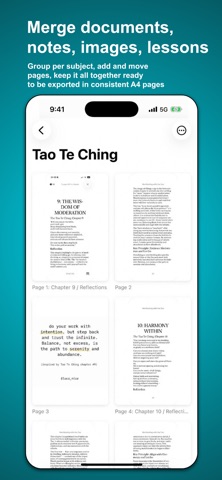
Combine images, PDF, Scans, everything into one clean document — then write all over it. Handwrite notes on real A4 pages with Apple Pencil, place images anywhere, and mark up any page. No account, no cloud — everything stays on your iPhone or iPad. A4Pad is the fast, private way to bring the files you already have into one tidy document. Combine existing PDFs, photos, and screenshots — plus fresh camera scans when you need them — into a single organized notebook. Or open one existing PDF just to annotate and highlight it directly, no merging required. No sign-up, no learning curve, no clutter. Arrange the pages exactly how you want, mark them up, and export a single polished PDF — all on device. **A notebook that starts from your documents.** Most note apps give you a blank page. A4Pad gives you a blank A4 page too — plain, ruled, squared, or dotted — but it also lets you write straight onto the scans, PDFs, and screenshots you already have, in the same notebook. Handwrite with Apple Pencil on iPad, or with your finger on iPhone. Strokes stay on their own layer, so you can erase and adjust them later without ever touching the page underneath. **COMBINE & ORGANIZE** • Combine existing PDFs, photos, and screenshots into one document • Reorder, duplicate, and organize pages with a tap • Convert images to PDF automatically on export • Create portrait or landscape documents — your choice per notebook **PLACE IMAGES ON A PAGE** • Drop photos, logos, or screenshots onto any page • Move, resize, rotate, duplicate, and reorder them like objects on a slide • Rotation snaps to straight angles, so things line up without fiddling • Paste straight from the clipboard • Your notes stay on their own layer, always above the images **HANDWRITTEN NOTES & ANNOTATION** • Take handwritten notes on blank A4 pages — plain, ruled, squared, or dotted • Or write directly onto your scans, PDFs, photos, and screenshots • Full Apple Pencil support on iPad — pen, pencil, marker, highlighter, and eraser • Finger-friendly on iPhone, with the same tools • Notes stay on their own layer — erase or adjust strokes later, the page underneath is never altered • True A4 format on every page, so notes stay clean and print-ready **IMPORT FROM ANYWHERE** • Drop in existing PDFs — pages are merged in automatically • Import photos and screenshots from your Photo Library or the Files app • Send into A4Pad from any app with the system Share Sheet • Scan paper documents with your camera when you need to **EXPORT** • One tap to export a single, print-ready PDF at a clean 150 DPI • Share via Mail, Messages, AirDrop, or any app **PRIVATE BY DESIGN** • Everything stays on your device — no account, no cloud, no login • No trackers, no ads, no data collection • You're always in control of your files **NO LIMITS, NO FRICTION** • Unlimited Collections, Notebooks, and Pages • Every feature is available the moment you open the app • Organize into Collections and Notebooks for a clear structure across every project Fast, private, and focused — on iPhone and iPad.
What's new · 3.2.0
Every feature in A4Pad is now included for everyone, with no limits. • PDF exports are unlimited — the export limit has been removed • Collections, Notebooks, and Pages remain unlimited • There is no in-app purchase — nothing is held back, and there is nothing to buy inside the app • If you previously purchased Unlimited Exports, you keep everything it provided • Nothing you have already created is affected Thank you for using A4Pad.
Details