

Kin - Record Doctor Visits
Kin Health Technologies, Inc. · Medical
Independent analytics for this App Store listing. AppTracker is not affiliated with Kin Health Technologies, Inc.
Chart standing · US
What changed · US
Listing changes AppTracker has observed for this app in this storefront — new versions, price moves, rating shifts, and store copy.
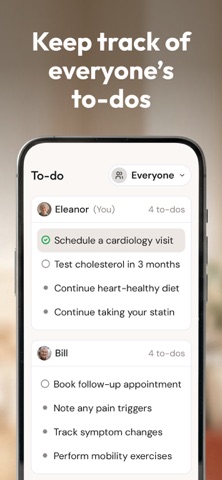
Prepare before you go Tell Kin about an upcoming appointment and it builds the agenda with you, asking who the visit is for and what you want out of it. Edit, undo, or reorder anything before you walk in. Talk to Kin Use your voice from any chat, including the lock screen. Interrupt whenever you want and change direction. Everything you need to do, in one place The new To-do tab gathers every task from every visit, for everyone you care for. Open a task and Kin shows you which visit it came from. Kin by text Text Kin and it is the same Kin you use in the app. Share a visit, send photos, audio, or video, or start a group — two parents can manage a child's care circle together. A new home New tab bar, and the person you are viewing stays selected as you move between Home, Records, new visits, and new notes. Recordings that survive the car If CarPlay or Bluetooth drops in the middle of a visit, your recording keeps going instead of ending. Screenshot a visit summary and Kin will offer to share it.
Price & rating history · US
Reconstructed from the listing changes AppTracker has observed in this storefront. A field is charted once it has changed more than once, and each line starts at the value it moved from.
Average rating · ★ 4.85 now · 9 changes on record
Ratings breakdown · US
The star breakdown behind this app's rating in this storefront.
In-app purchases · US
No in-app purchases.
Screenshots








Keywords this app targets
Search terms AppTracker associates with this app — estimates, not search volume. ❝ = in the app's title; a highlighted number is its current position for that term.
Similar apps
Competitors and close alternatives, as estimated by AppTracker.
 ADVCT
JASON ROBERT O'DONNELL
ADVCT
JASON ROBERT O'DONNELL
 Kinleaf: Growing Together
Franklin Sotolongo
Kinleaf: Growing Together
Franklin Sotolongo
 Kiro: Understand Your Health
KIRO (Apps)
1 shared topic
Kiro: Understand Your Health
KIRO (Apps)
1 shared topic
 AlignCare: Doctor Visit Notes
FRANNAKS HEALTHCARE ADVISORY LLC
AlignCare: Doctor Visit Notes
FRANNAKS HEALTHCARE ADVISORY LLC
 Medication Reminder: RecapMed
Wilton Fernandes da Silva
Medication Reminder: RecapMed
Wilton Fernandes da Silva
 HomeTeams
The Pacific Clinic
HomeTeams
The Pacific Clinic
 Patiently AI: Simplify Notes
Medcopywriter Ltd
Patiently AI: Simplify Notes
Medcopywriter Ltd
 MedKee: Pill Reminder
Onur Albayrak
MedKee: Pill Reminder
Onur Albayrak
About
Record doctor visits. Get clear summaries. Remember what to do next. Kin helps you prepare for healthcare appointments, capture the conversation, and follow through afterward so you can stay present during the visit instead of taking notes or trying to remember everything later. After each visit, Kin turns the conversation into a focused summary. Rather than giving you a word-for-word transcript, Kin organizes the key points, recommendations, and next steps so you can quickly understand what happened and what to do next. Kin is available in English and Spanish. Record visits in either language and get your visit summary and next steps in Spanish when you prefer. Use Kin for your own doctor visits or to help care for a parent, spouse, or loved one. Kin also supports women's health, pregnancy, children's appointments, specialist care, repeat follow-ups, and other important health conversations. WHAT KIN HELPS YOU DO Record appointments Tap record before or during a visit. Kin captures the conversation so you can focus on the discussion instead of taking notes. Prepare for the visit Tell Kin about an upcoming appointment and it builds your agenda with you, asking who the visit is for and what you want from it. Or save your own questions, concerns, symptoms, notes, photos, and documents. Talk to Kin Ask Kin anything with your voice, from any chat or straight from the lock screen. Interrupt and change direction whenever you want. Use Kin by text Text Kin and it is the same Kin you use in the app. Share a visit, send photos, audio, or video, or start a group so two parents can manage a child's care together. Bring important health information Keep relevant health information and documents with Kin so they are easier to reference before, during, and after appointments. Review a clear summary See the key points, recommendations, and next steps from the conversation without having to read through a long transcript. Stay on top of next steps One to-do list across every visit and everyone you care for. Open a task to see which visit it came from. Keep track of medications, lab work, referrals, questions, and follow-up appointments. Share with your care circle Invite family members or caregivers to review summaries and stay aligned on what happened and what comes next. BUILT FOR REAL CARE MOMENTS Regular doctor visits Keep a useful history of appointments and summaries across doctors and specialists. Older adults and caregivers Help a parent, spouse, or loved one remember instructions, organize follow-up, and share updates. Patient portals and health records Use Kin alongside your patient portal. Bring relevant records, documents, and questions into the visit, capture the conversation, and keep the summary and next steps organized afterward. Women's health Use Kin for fertility, pregnancy, postpartum, menopause, and other women's health conversations. Parents and children Capture your child's appointments, questions, instructions, and follow-up care so important details are easier to remember. Ongoing and specialist care Use Kin for specialist visits, lab work, referrals, recurring appointments, and continued follow-up. Pet and vet visits Keep veterinary visit notes, care instructions, and next steps organized for your pets. BUILT ALONGSIDE DOCTORS Kin supports your care but does not replace your doctor or healthcare provider. Kin does not diagnose, prescribe, or make medical decisions. It helps you capture the visit, understand what was discussed, and follow the care plan you were given. PRIVACY AND CONTROL Your health information belongs to you. You decide who can access your visit information, and you can delete recordings or summaries at any time. Download Kin and make every important appointment easier to remember.
What's new · 1.14.1
Prepare before you go Tell Kin about an upcoming appointment and it builds the agenda with you, asking who the visit is for and what you want out of it. Edit, undo, or reorder anything before you walk in. Talk to Kin Use your voice from any chat, including the lock screen. Interrupt whenever you want and change direction. Everything you need to do, in one place The new To-do tab gathers every task from every visit, for everyone you care for. Open a task and Kin shows you which visit it came from. Kin by text Text Kin and it is the same Kin you use in the app. Share a visit, send photos, audio, or video, or start a group — two parents can manage a child's care circle together. A new home New tab bar, and the person you are viewing stays selected as you move between Home, Records, new visits, and new notes. Recordings that survive the car If CarPlay or Bluetooth drops in the middle of a visit, your recording keeps going instead of ending. Screenshot a visit summary and Kin will offer to share it.
Details