

Mocolamma
Taiga Imaura · Utilities
Independent analytics for this App Store listing. AppTracker is not affiliated with Taiga Imaura.
Chart standing · US
What changed · US
Listing changes AppTracker has observed for this app in this storefront — new versions, price moves, rating shifts, and store copy.
--- New Features --- General - Support iPhone Duo → Now displays correctly on iPhone Duo, and toolbar overflow menu priorities have been organized so that key toolbar actions are less likely to be placed into the overflow menu on iPhone Duo or small iPad windows. Model - Support decision model tag --- Bug Fixes and Improvements --- General - Improve toolbar icons for server actions and model actions → Changed the toolbar icons for server actions and model actions added in 1.4.0 so that they are less easily confused with the overflow menu. Model - Improve unknown tags to display in title case in the inspector Image Generation - Change the tab name to "Image" → Shortened the tab name to prevent layout issues on narrow screens such as iPhone. The navigation title continues to display "Image Generation". Release Notes: https://mocolamma.taikun.design/release-notes
In-app purchases · US
No in-app purchases.
Screenshots

Keywords this app targets
Search terms AppTracker associates with this app — estimates, not search volume. ❝ = in the app's title; a highlighted number is its current position for that term.
Similar apps
Competitors and close alternatives, as estimated by AppTracker.
 Chat for Ollama
Timothy Krechel
2 shared topics
Chat for Ollama
Timothy Krechel
2 shared topics
 Invoke - Local LLM Client
kazuhiko sugimoto
1 shared topic
Invoke - Local LLM Client
kazuhiko sugimoto
1 shared topic
 LLM Bridge - Multi LLM Client
Byungil Park
1 shared topic
LLM Bridge - Multi LLM Client
Byungil Park
1 shared topic
 ai.local
Bruno Wernimont
1 shared topic
ai.local
Bruno Wernimont
1 shared topic
 Enchanted Developers Only
Augustinas Malinauskas
1 shared topic
Enchanted Developers Only
Augustinas Malinauskas
1 shared topic
 LLM Server
Linosec
1 shared topic
LLM Server
Linosec
1 shared topic
 Reins: for Ollama & LM Studio
Ibrahim Cetin
1 shared topic
Reins: for Ollama & LM Studio
Ibrahim Cetin
1 shared topic
 Local LLM Server Pro
Kevin Tang
1 shared topic
Local LLM Server Pro
Kevin Tang
1 shared topic
About
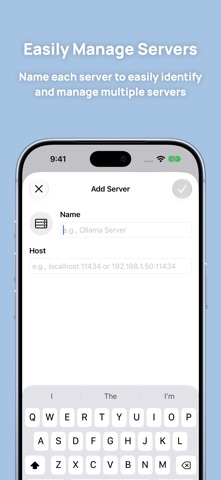
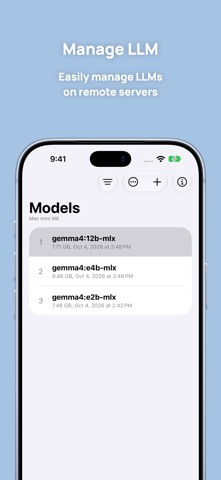
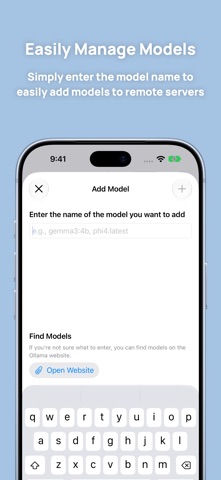
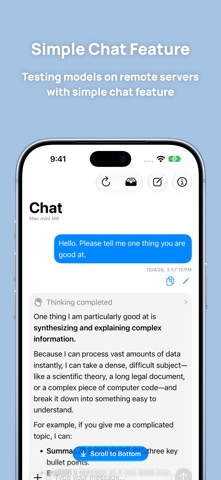
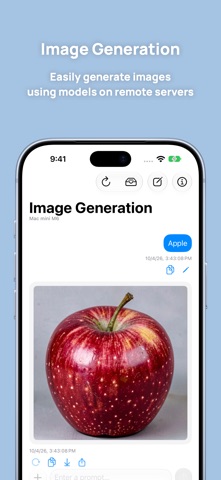
Mocolamma is an unofficial Ollama manager app that lets you manage remote servers using the Ollama API. Connect to remote servers to manage models on them or use models on the server for simple chat. No need to enter complicated commands in the terminal! Key Features ・Manage Multiple Servers Add multiple remote servers to the app and switch between them easily. Assign custom names to each server for simple identification and management. Each server entry displays its connection status, letting you instantly see if a configured remote server is currently accessible. Error messages appear if connection fails, simplifying troubleshooting. ・Manage Large Language Models (LLMs) You can view model information on remote servers, add new models, or delete existing ones. The model list can be sorted in various ways, making it useful for sorting by size to find and delete unused large models. Additionally, if the models contain license information, you can access that data directly from Mocolamma, making it easy to quickly check a model's license status. You can also view detailed parameters like the parameter count and context length. ・Simple Chat Feature You can use models on the remote server to perform simple chat. This is ideal for testing newly added models. This feature is strictly for basic testing purposes. For more advanced chat functionality, it is recommended to use the official Ollama app or a dedicated chat application. ・Easily Generate Images You can easily generate images using models on remote servers. You can also save the generated images to your device or share them. * Mocolamma is an unofficial Ollama app and is not affiliated with Ollama in any way. ** Ollama is not included in Mocolamma. A separate Ollama server is required to use most features. *** Using Mocolamma requires allowing local network access.
What's new · 1.4.1
--- New Features --- General - Support iPhone Duo → Now displays correctly on iPhone Duo, and toolbar overflow menu priorities have been organized so that key toolbar actions are less likely to be placed into the overflow menu on iPhone Duo or small iPad windows. Model - Support decision model tag --- Bug Fixes and Improvements --- General - Improve toolbar icons for server actions and model actions → Changed the toolbar icons for server actions and model actions added in 1.4.0 so that they are less easily confused with the overflow menu. Model - Improve unknown tags to display in title case in the inspector Image Generation - Change the tab name to "Image" → Shortened the tab name to prevent layout issues on narrow screens such as iPhone. The navigation title continues to display "Image Generation". Release Notes: https://mocolamma.taikun.design/release-notes
Details