

LLM Bridge - Multi LLM Client
Byungil Park · Utilities
Independent analytics for this App Store listing. AppTracker is not affiliated with Byungil Park.
Chart standing · US
What changed · US
Listing changes AppTracker has observed for this app in this storefront — new versions, price moves, rating shifts, and store copy.
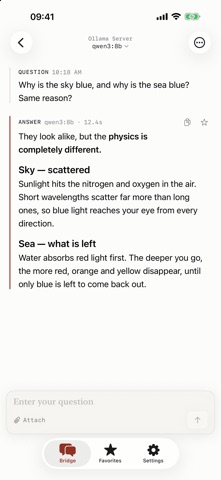
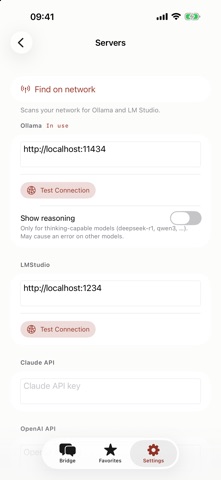
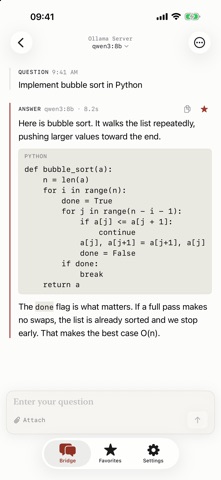
A new name, a new icon — and no more typing in server addresses. • Find servers — Ollama and LM Studio on your network, found automatically. Try it in Settings > Servers • Settings, reorganized — Servers and Response are now separate pages, and the Save button is gone. Changes are kept as you make them • Easier to read — Larger type, more line spacing, and code blocks that actually look like code • Favorites and Copy are visible — No long press needed; they sit next to each answer • Copy or share the whole conversation — From the menu at the top right • Answers now show how long they took
In-app purchases · US
No in-app purchases.
Screenshots

Keywords this app targets
Search terms AppTracker associates with this app — estimates, not search volume. ❝ = in the app's title; a highlighted number is its current position for that term.
Similar apps
Competitors and close alternatives, as estimated by AppTracker.
 Invoke - Local LLM Client
kazuhiko sugimoto
3 shared title words
Invoke - Local LLM Client
kazuhiko sugimoto
3 shared title words
 LLM Server
Linosec
1 shared topic · 1 shared title word
LLM Server
Linosec
1 shared topic · 1 shared title word
 Private LLMApp
yuta saito
Private LLMApp
yuta saito
 ai.local
Bruno Wernimont
ai.local
Bruno Wernimont
 Local LLM: Private Secure Chat
Pocket Bits LLC
1 shared topic · 1 shared title word
Local LLM: Private Secure Chat
Pocket Bits LLC
1 shared topic · 1 shared title word
 VoiceLM
OSAMU YAMAGUCHI
2 shared topics
VoiceLM
OSAMU YAMAGUCHI
2 shared topics
 Private LLM - Local AI Chat
Numen Technologies Limited
1 shared topic · 1 shared title word
Private LLM - Local AI Chat
Numen Technologies Limited
1 shared topic · 1 shared title word
 Local LLM Server Pro
Kevin Tang
1 shared topic · 1 shared title word
Local LLM Server Pro
Kevin Tang
1 shared topic · 1 shared title word
About
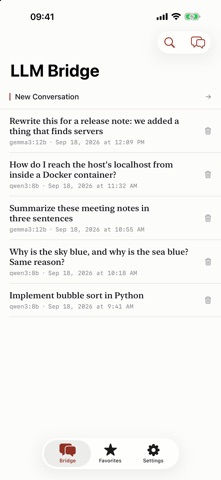
Use the LLM running on your home or office machine — from the device in your hand. Ollama and LM Studio have no official mobile app. LLM Bridge fills that gap. ■ It finds your server One tap finds the Ollama and LM Studio servers on your network. No walking over to the other machine to look up an IP address. Entering a remote address by hand still works. ■ Your conversations stay on your device Everything is stored locally. No account, no subscription, no transcript uploaded anywhere. Searchable, and you can collect individual question-and-answer pairs as favorites. ■ Built for reading A transcript, not chat bubbles. Code is set apart so it reads as code, and when a model emits its reasoning it is shown separately from the answer. Each answer records which model wrote it and how long it took. ■ Whatever model you want Switch provider and model in the middle of a conversation. Deepseek, Llama, Gemma, Qwen, Mistral — whatever your Ollama serves. ■ Cloud too Add your own Claude or OpenAI API key and use them from the same screen. ■ Also · Attach photos, text and RTF files — with a vision model, a photo becomes a question · Take a picture and ask about it · Custom instructions (system prompt) plus Temperature, Top P and Top K · Copy or share a single turn, or the whole conversation · Korean, English, Japanese, Chinese Local LLMs require a computer running Ollama or LM Studio.
What's new · 3.0.0
A new name, a new icon — and no more typing in server addresses. • Find servers — Ollama and LM Studio on your network, found automatically. Try it in Settings > Servers • Settings, reorganized — Servers and Response are now separate pages, and the Save button is gone. Changes are kept as you make them • Easier to read — Larger type, more line spacing, and code blocks that actually look like code • Favorites and Copy are visible — No long press needed; they sit next to each answer • Copy or share the whole conversation — From the menu at the top right • Answers now show how long they took
Details