

Astro-Cartography
DRO1D LABS LIMITED · Lifestyle
Independent analytics for this App Store listing. AppTracker is not affiliated with DRO1D LABS LIMITED.
Chart standing · US
What changed · US
Listing changes AppTracker has observed for this app in this storefront — new versions, price moves, rating shifts, and store copy.
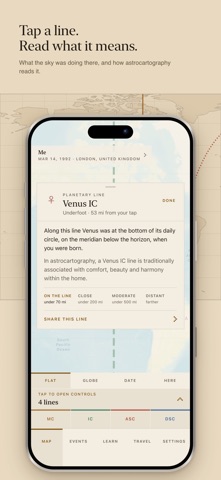
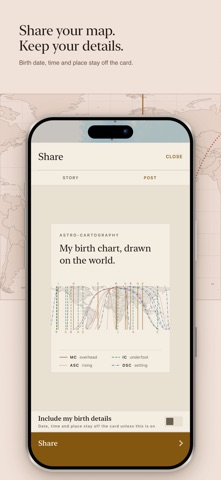
A clearer start Three pages that show the app itself: today's sky drawn on the world, the four angles in plain words, and what you need to make your own chart. Dates and distances your way Dates, times and distances follow your phone, so a US phone reads Oct 6, 2026 and miles. Settings → Display can set month, day or year first, a 12 or 24-hour clock, and miles or kilometers. How close is close Tap a line and the card shows the scale the whole app uses: on the line, close, moderate or distant, in your own units. Share your map New cards for your whole map, your chart wheel and your Best places, sized for a story or a post. Every share carries a link to the app. Your birth details stay off unless you add them.
In-app purchases · US
No in-app purchases.
Screenshots


Keywords this app targets
Search terms AppTracker associates with this app — estimates, not search volume. ❝ = in the app's title; a highlighted number is its current position for that term.
Similar apps
Competitors and close alternatives, as estimated by AppTracker.
 Astrocartography - Pathfinder
Ugur Yasar Kocal
1 shared topic
Astrocartography - Pathfinder
Ugur Yasar Kocal
1 shared topic
 Ephemeris Sky: Astrology Chart
Koreniuk Oleksandr
1 shared topic
Ephemeris Sky: Astrology Chart
Koreniuk Oleksandr
1 shared topic
 TimePassages Astrology
AstroGraph Software
2 shared topics
TimePassages Astrology
AstroGraph Software
2 shared topics
 iPhemeris Astrology Charts
Clifford Ribaudo
2 shared topics
iPhemeris Astrology Charts
Clifford Ribaudo
2 shared topics
 Astro Gold Astrology
Cosmic Apps Pty Ltd
1 shared topic · 1 shared title word
Astro Gold Astrology
Cosmic Apps Pty Ltd
1 shared topic · 1 shared title word
 HoroClock
charapla
2 shared topics
HoroClock
charapla
2 shared topics
 AstroConnexions for iPhone
Roger Pearson
1 shared topic
AstroConnexions for iPhone
Roger Pearson
1 shared topic
 Astrological Charts
Roman Shimchenko
1 shared topic
Astrological Charts
Roman Shimchenko
1 shared topic
About
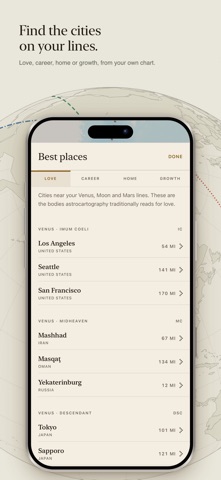
Your birth chart, drawn on the world. Astro-Cartography draws the lines where each planet was rising, setting, overhead and underfoot at the minute you were born, and shows which cities sit on them. YOUR LINES • Ten bodies, four lines each: MC (overhead), IC (underfoot), ASC (rising) and DSC (setting) • A globe drawn from the app's own coastlines, or a flat map to scrub through time • Tap a line to read what the sky was doing there, and how astrocartography traditionally reads it • One scale for how close is close, in miles or kilometers BEST PLACES FOR YOU • Pick Love, Career, Home or Growth to see the cities near the lines astrocartography traditionally reads for each • Your chart cast for any city: its rising sign, Midheaven and houses SHARE • Cards of your whole map, your chart wheel, one line or a list of places, for a story or a post • Your birth date, time and place stay off the card unless you add them ALSO • Travel: compare the cities on a trip by how near your lines run • Events: save a date and place, and put that sky on the map • Learn: how the lines are calculated, and facts on every planet from NASA and ESA • Six themes, from paper and ink to dark, in a serif or a pixel style Planet positions come from the Swiss Ephemeris. One purchase. No account, no ads, no subscription. -- Web: https://dro1dlabs.com Privacy Policy: https://dro1d.org/astrocartography-privacy.html Terms of Use (EULA): https://www.apple.com/legal/internet-services/itunes/dev/stdeula/
What's new · 4.4
A clearer start Three pages that show the app itself: today's sky drawn on the world, the four angles in plain words, and what you need to make your own chart. Dates and distances your way Dates, times and distances follow your phone, so a US phone reads Oct 6, 2026 and miles. Settings → Display can set month, day or year first, a 12 or 24-hour clock, and miles or kilometers. How close is close Tap a line and the card shows the scale the whole app uses: on the line, close, moderate or distant, in your own units. Share your map New cards for your whole map, your chart wheel and your Best places, sized for a story or a post. Every share carries a link to the app. Your birth details stay off unless you add them.
Details