

SystemBatteryAnalysis
Zhangsan Software Co., Ltd., Enshi Prefecture, Hubei Province · Utilities
Independent analytics for this App Store listing. AppTracker is not affiliated with Zhangsan Software Co., Ltd., Enshi Prefecture, Hubei Province.
Chart standing · US
What changed · US
Listing changes AppTracker has observed for this app in this storefront — new versions, price moves, rating shifts, and store copy.
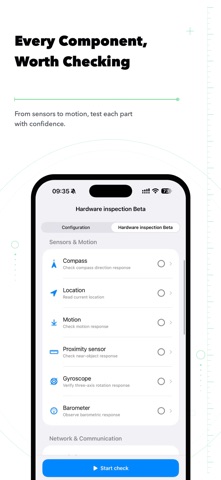
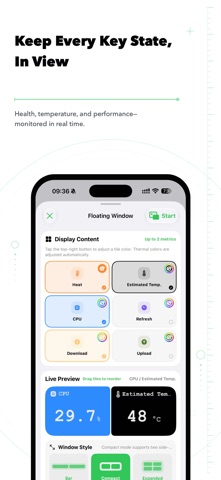
For a user-friendly and accurate configuration query, trust "System Battery Analysis" 【New Feature】 A new configuration review function has been added, providing multi-dimensional reviews based on configuration information 2. Configuration details: For more information, new baseband chip information has been added 3. Configuration query and battery query tutorials, with a more convenient floating tutorial added 4. The language Settings have added the option to follow the system 5. New additions to the battery list will be deleted if multiple selections are made 6. The horizontal bar mode of the floating window supports the display of three pieces of information 【Optimization and Repair】 1. Optimize the widget refresh experience 2. Optimize the display effect of configuration details 3. Optimize the simplicity of the interface of the advanced version 4. Fixed the bug where historical data of the US version of the model was not corrected
Price & rating history · US
Reconstructed from the listing changes AppTracker has observed in this storefront. A field is charted once it has changed more than once, and each line starts at the value it moved from.
Average rating · ★ 4.47 now · 23 changes on record
Ratings breakdown · US
The star breakdown behind this app's rating in this storefront.
Screenshots




Similar apps
Competitors and close alternatives, as estimated by AppTracker.
 System Status Pro: hw monitor
Techet
System Status Pro: hw monitor
Techet
 BatteryPro++
Binh Tran
BatteryPro++
Binh Tran
 System & Network Monitor
Konstantinos Papadakis
System & Network Monitor
Konstantinos Papadakis
 DeviceLab - Phone Benchmark
Shanghai Aisujiao Network Technology Co., Ltd.
DeviceLab - Phone Benchmark
Shanghai Aisujiao Network Technology Co., Ltd.
 Device Status⁺ CPU x Monitor z
Space-Time Transformation Technology Co., Ltd.
Device Status⁺ CPU x Monitor z
Space-Time Transformation Technology Co., Ltd.
 Activity Monitor: CPU, Mem, ..
EyeOS Store Inc.
Activity Monitor: CPU, Mem, ..
EyeOS Store Inc.
 Battery Monitor Sync
Rogier Van dam
Battery Monitor Sync
Rogier Van dam
 Battery HD+ Pro
smalltech sarl
Battery HD+ Pro
smalltech sarl
About
System Battery Analysis is a professional iOS system management tool that integrates multiple functions such as battery status monitoring, mobile phone configuration query, device performance detection, in-depth battery life analysis, charging power detection, and application lag troubleshooting, comprehensively safeguarding the battery and system status of devices. Battery health: Real-time monitoring of core indicators such as battery capacity, cycle times, and temperature, automatically generating weekly and monthly reports to make the battery status clearly visible. Configuration Query: Precisely query mobile phone configuration records and provide more dimensional system analysis based on big data. Performance analysis: Intelligently parse application lag data, accurately identify performance risks, and help improve the smoothness of device operation. Trend tracking: Retain historical detection data, visually present change curves, and continuously monitor the health trend of batteries. Battery Life Analysis: Multi-dimensional dissection of battery life performance, in-depth analysis of power consumption details; Support exclusive battery life data analysis for watches and adapt to more usage scenarios. Battery traceability: Intelligently determine the original or replacement source of the battery, helping to understand the real condition of the device's battery. Charging power: Real-time calibration of charging power, automatic generation of visual data charts, and clear charging speed at a glance.
What's new · 2.3.1
For a user-friendly and accurate configuration query, trust "System Battery Analysis" 【New Feature】 A new configuration review function has been added, providing multi-dimensional reviews based on configuration information 2. Configuration details: For more information, new baseband chip information has been added 3. Configuration query and battery query tutorials, with a more convenient floating tutorial added 4. The language Settings have added the option to follow the system 5. New additions to the battery list will be deleted if multiple selections are made 6. The horizontal bar mode of the floating window supports the display of three pieces of information 【Optimization and Repair】 1. Optimize the widget refresh experience 2. Optimize the display effect of configuration details 3. Optimize the simplicity of the interface of the advanced version 4. Fixed the bug where historical data of the US version of the model was not corrected
Details