

Device Status⁺ CPU x Monitor z
Space-Time Transformation Technology Co., Ltd. · Utilities
Independent analytics for this App Store listing. AppTracker is not affiliated with Space-Time Transformation Technology Co., Ltd.
Chart standing · US
What changed · US
Listing changes AppTracker has observed for this app in this storefront — new versions, price moves, rating shifts, and store copy.
Price & rating history · US
Reconstructed from the listing changes AppTracker has observed in this storefront. A field is charted once it has changed more than once, and each line starts at the value it moved from.
Average rating · ★ 4.82 now · 7 changes on record
Ratings breakdown · US
The star breakdown behind this app's rating in this storefront.
In-app purchases · US
What this app sells inside itself, grouped by kind and priced for this storefront.
Screenshots




Keywords this app targets
Search terms AppTracker associates with this app — estimates, not search volume. ❝ = in the app's title; a highlighted number is its current position for that term.
Similar apps
Competitors and close alternatives, as estimated by AppTracker.
 System Status Pro: hw monitor
Techet
2 shared topics · 2 shared title words
System Status Pro: hw monitor
Techet
2 shared topics · 2 shared title words
 Device Monitor Z: CPU x RAM OS
Phan Nhut
3 shared title words
Device Monitor Z: CPU x RAM OS
Phan Nhut
3 shared title words
 Activity Monitor: CPU, Mem, ..
EyeOS Store Inc.
2 shared topics · 2 shared title words
Activity Monitor: CPU, Mem, ..
EyeOS Store Inc.
2 shared topics · 2 shared title words
 Device Information Tool
Kudit LLC
3 shared topics · 1 shared title word
Device Information Tool
Kudit LLC
3 shared topics · 1 shared title word
 Device Monitor²
Fast-Devs Project
2 shared title words
Device Monitor²
Fast-Devs Project
2 shared title words
 Device Monitor: iDevice
Grima Hdez
2 shared title words
Device Monitor: iDevice
Grima Hdez
2 shared title words
 Specs: Device Info & Widget
CrioSoft LLC
1 shared topic · 1 shared title word
Specs: Device Info & Widget
CrioSoft LLC
1 shared topic · 1 shared title word
 Device Info: System Monitor
文武 马
Device Info: System Monitor
文武 马
About
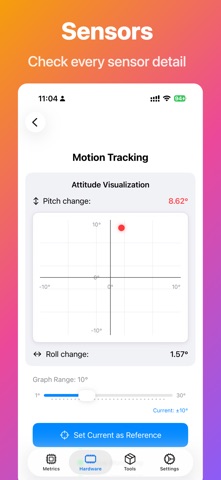
Device Status⁺ is a powerful system monitor and device information toolkit for Apple devices. Track CPU, RAM, storage, battery health, network speed, temperature, sensors, widgets, Live Activities, and screen diagnostics in real time with a PiP floating window that keeps performance visible while you use other apps. Built for iPhone, iPad, Mac, and Apple Watch with 13+ Home Screen Widgets, 7 Dynamic Island Live Activities, and iOS 18 Control Center integration. REAL-TIME MONITORING - PiP Floating Window: Monitor CPU, network speed, and temperature while using other apps - CPU Per-Core Monitoring: Track P-core vs E-core usage independently with live charts - Memory & Storage: Real-time usage with history trends - Battery Health: Capacity (mAh), charging status, low power mode, charging power estimation - Network Speed: Live upload/download speed tracking with real-time graph - Thermal Status: Device temperature monitoring WIDGETS & LIVE ACTIVITIES - 13+ Home Screen Widgets: CPU, RAM, storage, battery, network speed, cellular data, uptime, clock, temperature, and full info overview - 7 Dynamic Island Live Activities: Network speed, CPU, per-core CPU, clock, temperature, GPS address, and speedometer - iOS 18 Control Center Widgets: Quick access to device info and storage stats SCREEN & DISPLAY TESTING - HDR Screen Testing: White field, grayscale ramp, highlight contrast, and SDR vs HDR comparison - Screen Technology Detection: Identify OLED, LTPO, mini-LED, or LCD panels - Display Specs: Resolution, pixel density, refresh rate, color gamut, Dolby Vision, ProMotion, True Tone, brightness (nits), contrast ratio, color depth, and display manufacturer NETWORK TOOLS - LAN Browser: Discover devices on your network via Bonjour (AirPlay, HomeKit, printers, and more) - DNS Query, Ping, Whois: Complete network diagnostics toolkit - Cellular Data Tracking: Billing cycle monitoring, daily/weekly usage stats, and plan limits with auto-reset DIAGNOSTIC LOG ANALYSIS - Diagnostic Log Analyzer: Import a sysdiagnose archive to browse hardware components, chip details, battery chemistry, cycle count, storage controller, memory, connectivity, and crash reports - Battery Log Analyzer: Import a battery Analytics log for capacity, cell consistency, endurance score, screen-on time, voltage, and temperature - Fully on-device: log parsing works completely offline, nothing is uploaded 30+ SENSOR DETECTION Check availability of LiDAR, UWB, MagSafe, Action Button, Camera Control, Always-On Display, Satellite SOS, NFC, Dual SIM, Face ID, Touch ID, 3D Touch, Accelerometer, Gyroscope, Magnetometer, Barometer, Altimeter, GPS, and Pedometer. MORE TOOLS - PDF Report Export: Generate comprehensive device status reports - GPS Speedometer: Real-time speed display with gauge - Multitouch Test: Verify multi-touch screen functionality - Camera & Microphone Test: Full hardware testing suite - Device Uptime: Detailed runtime information with breakdown - SIM Info: Carrier and SIM card details - WebView Fingerprint: Browser fingerprint detection - Installed Fonts: List all available fonts - Apple Links: Quick access to Apple service pages PRIVACY FIRST All monitoring data and diagnostic logs stay on your device — log analysis works completely offline and nothing is uploaded. Feedback: makerneo.lab@gmail.com Privacy Policy: https://www.makerneo.com/en/doc/device-status-privacy.html Terms of Use: https://www.apple.com/legal/internet-services/itunes/dev/stdeula/
What's new · 3.0.9
• UI improvements and polish
Details