

MemoryLens - Photo Overlay Aid
东景 梁 · Photo & Video
Independent analytics for this App Store listing. AppTracker is not affiliated with 东景 梁.
Chart standing · US
What changed · US
Listing changes AppTracker has observed for this app in this storefront — new versions, price moves, rating shifts, and store copy.
A few small refinements for a better experience. Thank you for your support!
Ratings breakdown · US
The star breakdown behind this app's rating in this storefront.
In-app purchases · US
No in-app purchases.
Screenshots

Similar apps
Competitors and close alternatives, as estimated by AppTracker.
 OverlyCam - Camera Overlay
Alex Sieroshtan
OverlyCam - Camera Overlay
Alex Sieroshtan
 Everyday Camera
Ryo Sato
Everyday Camera
Ryo Sato
 框拍 - KuangPai
Su Chun Huang
框拍 - KuangPai
Su Chun Huang
 CropCamera
Shinji Nishijima
CropCamera
Shinji Nishijima
 Lens Buddy - Self Timer Camera
Lens Buddy Selfie Timer Photo Video Filter Camera LLC
Lens Buddy - Self Timer Camera
Lens Buddy Selfie Timer Photo Video Filter Camera LLC
 Lensa AI: Photo Editor
Prisma labs, inc.
Lensa AI: Photo Editor
Prisma labs, inc.
 Selfie Club: Face & Makeup
Yusuke Teranishi
Selfie Club: Face & Makeup
Yusuke Teranishi
 Liquid Lens
Sydney Bryn
Liquid Lens
Sydney Bryn
About
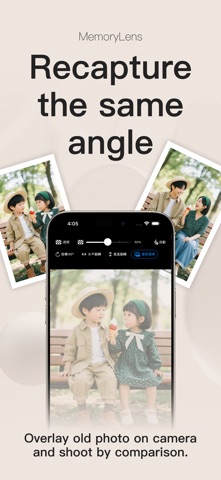
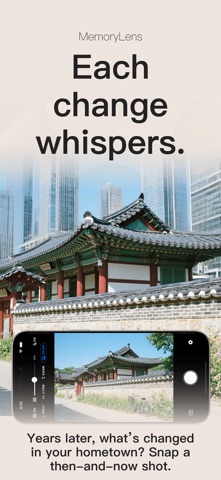
MemoryLens is a photo overlay camera that helps you recreate a picture with similar framing. Choose a reference photo, see it over your live camera view, and use the original pose, background, and angle as a guide for your next shot. From childhood photos to a favorite travel spot, a familiar composition can connect two moments in time. RECREATE FAMILY MEMORIES Bring back a childhood portrait, gather everyone for another family photo, or repeat a picture from a birthday, graduation, or anniversary. Use the reference to see where people stood, how much background was visible, and how the scene was framed. REVISIT PLACES AND TRAVEL PHOTOS Return to a street corner, a mountain viewpoint, or the beach where you took a favorite picture. Line up buildings, the horizon, or other recognizable details to find a similar view. Photograph the same place in another season, revisit a meaningful location years later, or use a reference image to plan a shot on your next trip. USE A POSE AND COMPOSITION REFERENCE Give a friend a clearer idea of the portrait you have in mind. A reference can help with head position, the space around a subject, and the balance between a person and the background. Try it for couple photos, outfit pictures, selfies, cosplay, or travel portraits. Adjust your pose and camera position while keeping the guide visible. RECORD GROWTH OVER TIME Take a family portrait by the same doorway each year, photograph your child beside a familiar chair, or capture your pet in a favorite spot. Use your previous shot to keep the subject's position and size similar. CAPTURE A ROOM BEFORE AND AFTER Document a renovation, a newly painted wall, a furniture rearrangement, or a satisfying decluttering project. Start with a clear photo of the room, then use door frames, windows, and corners as reference points for your next shot. Similar framing makes it easier to notice changes when you view the photos together later. The same approach works for a studio, shop display, or workspace. FOLLOW PLANTS AND CREATIVE PROJECTS Record new leaves, a garden through the seasons, or flowers opening on your balcony. Use a pot, branch, or fixed background to help line up each picture. You can also document a painting, a model, a craft project, or a furniture restoration at different stages. For handmade products and collections, reuse a composition you like to keep your photos visually consistent. KEEP A PERSONAL PHOTO RECORD Use an earlier picture as a guide when recording fitness progress, a new hairstyle, or changes in your personal style. Similar distance, lighting, and posture can make the pictures easier to compare. MemoryLens provides a visual reference for photography; it does not measure or analyze your body. TOOLS FOR YOUR NEXT SHOT • Transparent overlay: adjust the reference opacity to see both images clearly. • Outline guide: use line art and adjust its strength to focus on shapes and edges. • Reference orientation: rotate in 90-degree steps or flip horizontally or vertically. • Camera controls: zoom, tap to focus, switch between front and rear cameras, and control flash. • Save your new photo directly to your photo library. HOW TO GET STARTED 1. Choose a reference photo from your library. 2. Adjust its opacity or switch to the outline guide. 3. Move your phone and adjust the scene to match the framing by eye. 4. Take your photo. Does the reference appear in the saved photo? No. It is a guide for shooting. Your new photo is saved without the overlay or outlines. MemoryLens helps you capture matching shots; it does not combine pictures, make collages, automatically align images, or create comparison videos. Reference images are processed on your device. The app does not upload your photos to a server. Requires iOS 17.0 or later. Questions or feedback: ldjing@qq.com
What's new · 1.1
A few small refinements for a better experience. Thank you for your support!
Details