

框拍 - KuangPai
Su Chun Huang · Photo & Video
Independent analytics for this App Store listing. AppTracker is not affiliated with Su Chun Huang.
Chart standing · US
What changed · US
Listing changes AppTracker has observed for this app in this storefront — new versions, price moves, rating shifts, and store copy.
New: Smooth Skin - A "Smooth Skin" slider now sits in the filter panel, both before you shoot and when editing. It is off until you turn it up. - It softens fine lines and skin texture on the face while keeping eyes, brows and lips sharp. Even at full strength a little pore texture stays. - You see the effect live in the viewfinder, and the saved photo matches it. - Everything runs on your phone. Photos are not uploaded. Fixes: - Front-camera photos on some iPhones, including the iPhone 17 series, could be saved rotated by 90 degrees or upside down. - With a filter or adjustment on, turning the phone sideways could tilt the viewfinder.
In-app purchases · US
No in-app purchases.
Screenshots


Similar apps
Competitors and close alternatives, as estimated by AppTracker.
 Framed - Take Aesthetic Photos
Aaron Langley
Framed - Take Aesthetic Photos
Aaron Langley
 Camera Sun - Pro Camera
ZAHIR MIRZA
Camera Sun - Pro Camera
ZAHIR MIRZA
 Hold Camera: Auto Shutter
CAEN, K.K.
Hold Camera: Auto Shutter
CAEN, K.K.
 Camera+ Legacy
LateNite Apps
Camera+ Legacy
LateNite Apps
 Coincidence Camera
JOSHUA DANIEL HOOVER
Coincidence Camera
JOSHUA DANIEL HOOVER
 Barite — Black & White Camera
Denys Sudilkovskyi
Barite — Black & White Camera
Denys Sudilkovskyi
 CropCamera
Shinji Nishijima
CropCamera
Shinji Nishijima
 CHRO: Vintage Lens Aberration
Alexander Willcox
CHRO: Vintage Lens Aberration
Alexander Willcox
About
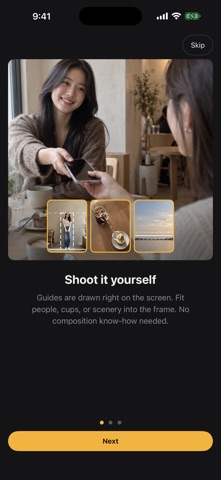
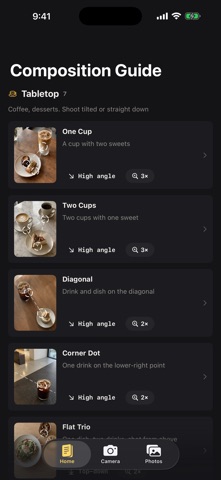
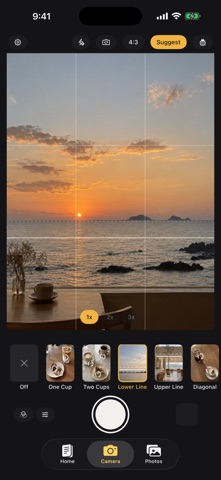
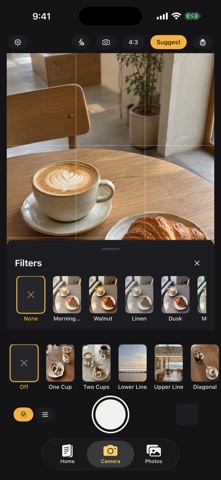
The things that get in the way of a good photo are usually small. Where does the cup go? Should the phone be a little higher? Is the person too close to the edge? Is the horizon straight? Open the camera and the viewfinder shows you where things should sit, along with a hint on what to adjust. Move the phone, change the angle, and shoot once it lines up. On a table, the guides follow your angle, top-down or tilted, and show where the cup, the plate, and the food should go. For scenery, the screen helps you level the horizon and suggests where to place it in the frame. For people, it shows where the person should stand for a full-body, half-body, or close-up shot. Only one hint shows at a time, so the viewfinder stays clear. Want a different look? Pick another layout from the strip. Each one comes with a sample photo and a short note. Handing the phone to a friend? Choose the layout first, then ask them to match the lines on the screen. Even someone who has never thought about photography can get close to the shot you had in mind. Before you shoot, try a different tone: milky white, warm wood, blue-green, a dark look, or film grain. After the shot, adjust the tone again, plus exposure, contrast, saturation, and warmth. The original is kept; edits are saved as a new photo. Image recognition runs on your phone. No account is needed, and neither the viewfinder nor your photos are sent to a server. On iPhones that support Apple Intelligence, you also get a one-line comment on the composition after each shot. Other iPhones keep every shooting, framing, and color feature. One-time purchase. No ads, no subscription, no in-app purchases.
What's new · 1.0.3
New: Smooth Skin - A "Smooth Skin" slider now sits in the filter panel, both before you shoot and when editing. It is off until you turn it up. - It softens fine lines and skin texture on the face while keeping eyes, brows and lips sharp. Even at full strength a little pore texture stays. - You see the effect live in the viewfinder, and the saved photo matches it. - Everything runs on your phone. Photos are not uploaded. Fixes: - Front-camera photos on some iPhones, including the iPhone 17 series, could be saved rotated by 90 degrees or upside down. - With a filter or adjustment on, turning the phone sideways could tilt the viewfinder.
Details