

PaperTrail: TaskPaper Client
gingerbeardman · Productivity
Independent analytics for this App Store listing. AppTracker is not affiliated with gingerbeardman.
Chart standing · US
What changed · US
Listing changes AppTracker has observed for this app in this storefront — new versions, price moves, rating shifts, and store copy.
• Improvements to fold marker display stability • Shortcuts document opening is now more reliable Thanks to the users that raised both of these issues.
Price & rating history · US
Reconstructed from the listing changes AppTracker has observed in this storefront. A field is charted once it has changed more than once, and each line starts at the value it moved from.
Average rating · ★ 4.20 now · 2 changes on record
Ratings breakdown · US
The star breakdown behind this app's rating in this storefront.
In-app purchases · US
No in-app purchases.
Screenshots


Keywords this app targets
Search terms AppTracker associates with this app — estimates, not search volume. ❝ = in the app's title; a highlighted number is its current position for that term.
Similar apps
Competitors and close alternatives, as estimated by AppTracker.
 Taskmator - TaskPaper Client
AMIT CHAUDHARY
2 shared topics · 1 shared title word
Taskmator - TaskPaper Client
AMIT CHAUDHARY
2 shared topics · 1 shared title word
 Papertone
YUSUF SAHAN TARHAN
2 shared topics
Papertone
YUSUF SAHAN TARHAN
2 shared topics
 Minimal Tabbed ToDo List
App Palette LLC
2 shared topics
Minimal Tabbed ToDo List
App Palette LLC
2 shared topics
 My Task Board - To Do Tracker
PaulJAdam.com
2 shared topics
My Task Board - To Do Tracker
PaulJAdam.com
2 shared topics
 PaperCal
Johan Burgler
2 shared topics
PaperCal
Johan Burgler
2 shared topics
 2Do - Todo List, Tasks & Notes
Beehive Innovations Services
2 shared topics
2Do - Todo List, Tasks & Notes
Beehive Innovations Services
2 shared topics
 IssuePad: Task Tracker
Kyle Giammarco
IssuePad: Task Tracker
Kyle Giammarco
 Kan Do: Project Management
Stephen Robles
1 shared topic
Kan Do: Project Management
Stephen Robles
1 shared topic
About
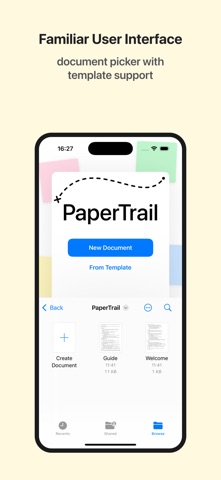
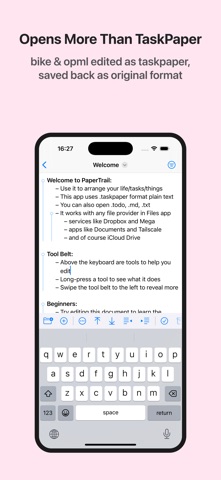
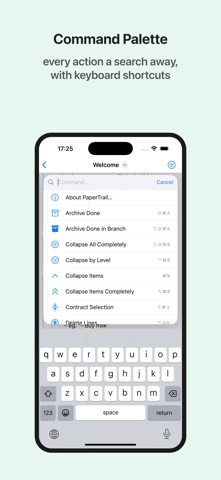
PaperTrail brings full TaskPaper editing to iOS and iPadOS. TaskPaper is plain text productivity—simple, fast, flexible. Projects, tasks, notes, and tags. Filter, search, and archive. All in plain text files you can sync via iCloud and edit in TaskPaper on your Mac. FEATURES • Full TaskPaper format support (.taskpaper, .todo, .txt, .md) • Open Bike (.bike) and OPML (.opml) outlines, with clear warnings when an import can't carry everything across • OPML and Bike-style export, so tags and done state round-trip back into Bike • Fold and focus into any subtree for distraction-free editing • Full query language with text, tag, boolean, and semantic search • Tag system with dates, progress tracking, and cost aggregation • Tag autocomplete ranked by how often you use each tag • Smart filters with edge-swipe gestures and an iPad side-by-side sidebar • Colour lines by priority, depth, or due date proximity • Natural date parsing and two-way iOS Reminders integration—import a Reminders list as a project • Quick capture: append tasks, notes, clipboard text, or web links to your most recent document • Planning shortcuts: Open in Today, Random Next Task, and Morning Brief • Shortcuts, Siri, Action Button, and Spotlight integration via App Intents • Find & update documents from Shortcuts: run queries, mark done, set tags, append tasks • Command palette for projects, searches, tags, and every editor command • iPadOS menu bar with Item, Tag, Outline, View, and Palette menus • Export documents as interactive HTML slide presentations or as OPML outlines • Built-in and custom document templates • 50+ keyboard shortcuts for power workflow • Native Swift app—tiny install size, built for speed • Dynamic Type, VoiceOver, and dark mode support
What's new · 1.4.4
• Improvements to fold marker display stability • Shortcuts document opening is now more reliable Thanks to the users that raised both of these issues.
Details