

Eruda Browser Console
Areeb Sayyed · Developer Tools
Independent analytics for this App Store listing. AppTracker is not affiliated with Areeb Sayyed.
Chart standing · US
What changed · US
Listing changes AppTracker has observed for this app in this storefront — new versions, price moves, rating shifts, and store copy.
• Downloads: save images, videos and HLS streams, with pause and resume • New Downloads screen that keeps going while you browse • Tab groups with a bottom strip for quick switching • History and Bookmarks: filters, tags, undo, export • Per-site settings for JavaScript, cookies, popups and desktop mode • Smarter URL bar with dev shortcuts; long-press a suggestion to remove it • Cleaner toolbar, fixed Google home page URL • Bug fixes and performance improvements
Ratings breakdown · US
The star breakdown behind this app's rating in this storefront.
In-app purchases · US
What this app sells inside itself, grouped by kind and priced for this storefront.
Screenshots




Keywords this app targets
Search terms AppTracker associates with this app — estimates, not search volume. ❝ = in the app's title; a highlighted number is its current position for that term.
Similar apps
Competitors and close alternatives, as estimated by AppTracker.
 DevInspect Browser
Cederic Schmid
1 shared topic · 1 shared title word
DevInspect Browser
Cederic Schmid
1 shared topic · 1 shared title word
 Debug Anywhere
浩鑫 庄
2 shared topics
Debug Anywhere
浩鑫 庄
2 shared topics
 Inspect Browser
Parallax Dynamics Inc.
1 shared topic · 1 shared title word
Inspect Browser
Parallax Dynamics Inc.
1 shared topic · 1 shared title word
 Inspect Browser PRO
Francisco Espejo
Inspect Browser PRO
Francisco Espejo
 Web Inspector & Dev Tools
VISUAL MOBILE SOFTWARE S.R.L.
1 shared topic
Web Inspector & Dev Tools
VISUAL MOBILE SOFTWARE S.R.L.
1 shared topic
 Codeye - Web Inspector
Just4Work
Codeye - Web Inspector
Just4Work
 Console Mini
金攀 虞
1 shared topic · 1 shared title word
Console Mini
金攀 虞
1 shared topic · 1 shared title word
 WebDebug - Web debugging tool
Shanghai Dazhuo Information Technology Co., Ltd.
1 shared topic
WebDebug - Web debugging tool
Shanghai Dazhuo Information Technology Co., Ltd.
1 shared topic
About
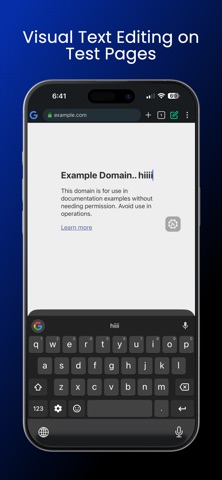
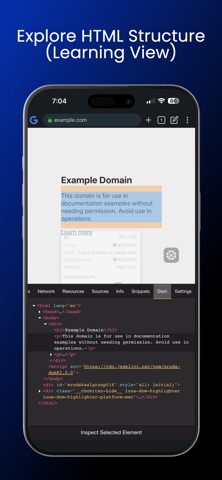
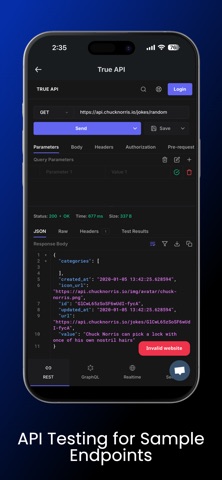
Eruda Browser Console is a lightweight developer utility for learning, testing, and debugging web content inside a controlled in-app browser environment on iOS. Designed for web developers, frontend engineers, QA testers, and learners, the app provides an integrated browser with a built-in developer console for experimenting with JavaScript and inspecting page behaviour during development and testing. Key Features • View console logs (log, warn, error) • Monitor network activity on test pages • Run JavaScript snippets in a sandbox environment • Explore HTML structure and page elements • Monitor performance and FPS during testing • Analyse page resources • Switch between mobile and desktop user agents • Debug your own websites, local servers, and development environments • No external tools or desktop required Built for Developers and Learners Whether you are: • Testing responsive layouts during development • Debugging issues on your own websites • Inspecting API responses in staging environments • Learning how web pages behave on real devices This app helps you experiment and debug directly on iOS within a controlled testing environment. Privacy & Security All browsing and debugging happens locally on your device. No tracking, no data collection, and no remote servers. Notes This app is intended for development, learning, and debugging your own web content and test pages. Some websites may limit inspection features due to their security policies. Terms of Use (EULA): https://www.apple.com/legal/internet-services/itunes/dev/stdeula/
What's new · 41
• Downloads: save images, videos and HLS streams, with pause and resume • New Downloads screen that keeps going while you browse • Tab groups with a bottom strip for quick switching • History and Bookmarks: filters, tags, undo, export • Per-site settings for JavaScript, cookies, popups and desktop mode • Smarter URL bar with dev shortcuts; long-press a suggestion to remove it • Cleaner toolbar, fixed Google home page URL • Bug fixes and performance improvements
Details