

WebDebug - Web debugging tool
Shanghai Dazhuo Information Technology Co., Ltd. · Developer Tools
Independent analytics for this App Store listing. AppTracker is not affiliated with Shanghai Dazhuo Information Technology Co., Ltd.
Chart standing · US
What changed · US
Listing changes AppTracker has observed for this app in this storefront — new versions, price moves, rating shifts, and store copy.
Added HTTPS page debugging and WSS debugging — inspect request and response details in the debug panel Other compatibility fixes
Ratings breakdown · US
The star breakdown behind this app's rating in this storefront.
In-app purchases · US
What this app sells inside itself, grouped by kind and priced for this storefront.
Screenshots


Keywords this app targets
Search terms AppTracker associates with this app — estimates, not search volume. ❝ = in the app's title; a highlighted number is its current position for that term.
Similar apps
Competitors and close alternatives, as estimated by AppTracker.
 Debug Anywhere
浩鑫 庄
1 shared topic
Debug Anywhere
浩鑫 庄
1 shared topic
 Web Inspector & Dev Tools
VISUAL MOBILE SOFTWARE S.R.L.
2 shared topics · 1 shared title word
Web Inspector & Dev Tools
VISUAL MOBILE SOFTWARE S.R.L.
2 shared topics · 1 shared title word
 Web IDE - AI Code Editor
Tahmiez Sandaim
1 shared topic · 1 shared title word
Web IDE - AI Code Editor
Tahmiez Sandaim
1 shared topic · 1 shared title word
 HTML Viewer : Editor & Creator
Hardik Khanesa
1 shared topic
HTML Viewer : Editor & Creator
Hardik Khanesa
1 shared topic
 Codeye - Web Inspector
Just4Work
Codeye - Web Inspector
Just4Work
 Wireless Debug
先练 华
1 shared topic
Wireless Debug
先练 华
1 shared topic
 DevMate - Connect & Debug
小玲 王
1 shared topic
DevMate - Connect & Debug
小玲 王
1 shared topic
 HTML Viewer ++
HurryApp LTD
1 shared topic
HTML Viewer ++
HurryApp LTD
1 shared topic
About
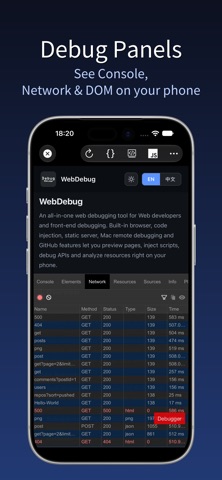
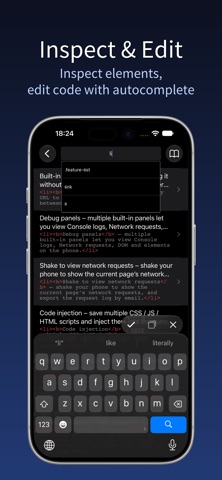
Web Debugger is an all-in-one web debugging tool designed for web developers and front-end debugging scenarios. It combines a built-in browser, code injection, a static server, Mac remote debugging, and common GitHub features, letting you preview pages, inject scripts, debug APIs, and analyze resources right on your phone. Key features: · Built-in browser: Open any URL and debug on the spot — no need to switch between your computer and phone. · Debug panels: Built-in debug panels let you view Console logs, Network requests, DOM and elements right on your phone. · Shake to view network requests: Shake your phone to show the network requests made by the current page, and export the request log via email. · HTTPS & WebSocket debugging: Inspect requests and responses on HTTPS pages and watch WebSocket messages in real time; · Code injection: Save multiple CSS / JS / HTML scripts and inject them into the current page anytime. · Static server: Run a directory on your phone as a static website to cover various debugging scenarios — computers or phones on the same LAN can access it by scanning a QR code. · Mac remote debugging: Connect your phone to a Mac and use Safari's Web Inspector to set breakpoints, watch the network, and edit DOM / CSS in real time, so you can remotely debug how a web page behaves on your phone. · GitHub integration: Built-in repository search, code search, trending, and profile for quick research and managing your remote projects. · Utility tools: 80+ everyday development tools, all running locally and offline. Ideal for mobile page debugging, quick HTML preview and testing, front-end script authoring and validation, local static-site integration, and GitHub code search. Unlimited Access Subscription: - With this subscription, you can enjoy unlimited access to all features within the app. - Subscriptions are charged weekly, monthly, or yearly, depending on the selected subscription plan. - Payment will be charged to your iTunes account upon confirmation of purchase. - You can turn off auto-renewal at least 24 hours before the current subscription period ends; otherwise, the subscription will automatically renew. - The renewal fee will be charged to your account within 24 hours before the end of the current subscription period, depending on the chosen plan. - Users can manage their subscriptions and can turn off auto-renewal in their account settings after purchase. - Any unused portion of a free subscription trial period will be forfeited upon purchase. Privacy Policy: https://www.dazhuogroup.com/debugweb/privacy_statement_en.php Terms of Use: https://www.dazhuogroup.com/debugweb/terms_of_use_en.php
What's new · 1.9
Added HTTPS page debugging and WSS debugging — inspect request and response details in the debug panel Other compatibility fixes
Details