

Sleepcast!
Arthur de Rijke · Entertainment
Independent analytics for this App Store listing. AppTracker is not affiliated with Arthur de Rijke.
Chart standing · US
What changed · US
Listing changes AppTracker has observed for this app in this storefront — new versions, price moves, rating shifts, and store copy.
MAJOR UPDATE! What’s New in Sleep Cast 4.0 - Search your entire library in one place, including podcasts, episodes, playlists, bookmarks, notes, summaries, and transcripts. - Create smart playlists in Expert mode. Episodes appear automatically when they match your rules. - Turn on Morning Overview to see your listening time, sleep timer activity, and new episodes after your sleep timer session. - Set a playback speed and automatic intro and outro skipping for each podcast. - See more sleep timer information and controls in the Live Activity. - Enjoy a redesigned player with a clearer queue and a waveform for precise seeking. - Optionally sync your library, playback progress, bookmarks, and statistics across iPhone, iPad, and Mac with iCloud. Turn it on in Settings, then restart the app. Sync is off by default for new installations. - Benefit from improved stability and smoother podcast refreshes, especially with large libraries.
In-app purchases · US
No in-app purchases.
Screenshots




Keywords this app targets
Search terms AppTracker associates with this app — estimates, not search volume. ❝ = in the app's title; a highlighted number is its current position for that term.
Similar apps
Competitors and close alternatives, as estimated by AppTracker.
 SkipCast: Podcast Player
Matthew Grdinic
SkipCast: Podcast Player
Matthew Grdinic
 Podcast App & Player - Castbox
Guru Network Limited
Podcast App & Player - Castbox
Guru Network Limited
 Neuecast: Podcast App
Rishi Mody
Neuecast: Podcast App
Rishi Mody
 MuteCast
Thomas Erwin Stange
MuteCast
Thomas Erwin Stange
 CastKeeper: Podcast Player
121 Gigawatz
CastKeeper: Podcast Player
121 Gigawatz
 Pocket Casts: Podcast Player
Automattic
Pocket Casts: Podcast Player
Automattic
 BetterCast - Podcast Player
Khashayar Abryoghani
BetterCast - Podcast Player
Khashayar Abryoghani
 Magic Caster Podcasts
Jonathan Bott
Magic Caster Podcasts
Jonathan Bott
About
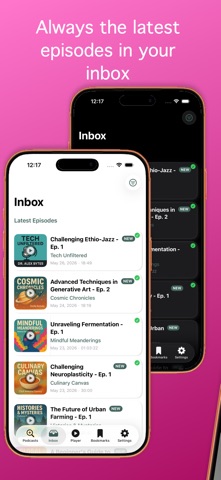
Fall asleep to your favorite podcasts without managing timers, rewinding episodes, or losing the best moments. Sleepcast is built around a simple idea: your podcast player should adapt to your sleep, not the other way around. With an intelligent sleep timer, motion-based extensions, smart night recaps, custom playlists, transcript search, AI summaries, and one-tap bookmarking with audio clips and transcripts, it creates a seamless listening experience from drifting off to waking up. Just press play, relax, and let Sleepcast handle the rest. Drift off to your favorite shows without worry, thanks to an exceptionally advanced Sleep Timer: - Flexible Sleep Timer: Set it by duration or stop automatically at the end of the current episode. - Smart Sleep Check: A gentle beep and motion detection can sense if you're still awake, extending the timer so listening isn’t interrupted too early. - Scheduled Listening: Activate the sleep timer only during specific hours with Time Window, perfect for your nightly routine. - Sleep Timer Statistics: Review a detailed history of your sleep timer sessions. - Continuous Play: Keep the timer going across multiple episodes with auto-restart. - Volume Fade-Out: Audio gently fades out during the final seconds for a smooth transition. Bookmarking and Fragment Sharing - Effortless Bookmarking: Save your spot instantly with one tap or a quick volume-button gesture. - Precision Fragment Editor: Trim captured audio clips with a visual waveform editor and share the exact moment you intended. - AI Transcription: Audio fragments can be transcribed automatically. - Search & Highlight: Search bookmark transcripts and quickly find the moment you saved. - Add Notes & Share: Attach notes and share the audio fragment, transcript, and your thoughts. A Full-Featured Podcast Experience - Personal Inbox: See the newest episodes from all subscriptions, with customizable episode limits per podcast. - Immersive Playback: Enjoy a clean, dynamic player that adapts its colors to the podcast artwork. - Custom Playlists: Create, manage, sort, batch-add, and clear your own episode playlists. - Versatile Queue Management: Switch easily between Playlist Mode, custom playlists, Binge Mode, and Remix. - Discover New Favorites: Explore top podcasts and episodes by country and genre, or search for exactly what you want. - Offline Listening: Download episodes for playback anywhere, with Wi-Fi-only options and simple storage management. - OPML Import/Export: Bring subscriptions from other apps or back up your library. - Multi-Language Support: Fully localized in English, Dutch, German, French, Japanese, Simplified Chinese, and Spanish. Experimental Features - Sudden Loud Sound Suppression: Real-time audio analysis detects volume spikes and smooths them out. - Speed-Sensitive Volume: Automatically adjusts playback volume based on your movement speed. - AI Summaries: Generate searchable podcast summaries and transcripts, with improved cancellation support. Simple Mode — a new way to use SleepCast SleepCast 3.5 introduces Simple mode, a streamlined experience built around falling asleep to podcasts with a smart sleep timer. Simple vs Expert — Choose your experience in Settings → Experience Mode. New users start in Simple mode; existing users stay on Expert. - Podcast grid — Your subscribed shows appear as a clean grid of cover art with tilted artwork, accent shadows, and flippable tiles that reveal episode info and controls. - Grid or list layout — Switch between grid and list views, with sorting by title, latest episode, rating, subscription date, and more. - Fullscreen player — A dedicated player with a collapsible sleep timer panel; full timer options remain in Settings. - Downloads — Pick episodes to download per podcast, or let Simple mode keep the latest episode ready automatically. CarPlay Support Control Sleepcast directly from your car with a clear interface for your queue, subscriptions, and playback controls.
What's new · 4.0
MAJOR UPDATE! What’s New in Sleep Cast 4.0 - Search your entire library in one place, including podcasts, episodes, playlists, bookmarks, notes, summaries, and transcripts. - Create smart playlists in Expert mode. Episodes appear automatically when they match your rules. - Turn on Morning Overview to see your listening time, sleep timer activity, and new episodes after your sleep timer session. - Set a playback speed and automatic intro and outro skipping for each podcast. - See more sleep timer information and controls in the Live Activity. - Enjoy a redesigned player with a clearer queue and a waveform for precise seeking. - Optionally sync your library, playback progress, bookmarks, and statistics across iPhone, iPad, and Mac with iCloud. Turn it on in Settings, then restart the app. Sync is off by default for new installations. - Benefit from improved stability and smoother podcast refreshes, especially with large libraries.
Details