

MuteCast
Thomas Erwin Stange · News
Independent analytics for this App Store listing. AppTracker is not affiliated with Thomas Erwin Stange.
Chart standing · US
What changed · US
Listing changes AppTracker has observed for this app in this storefront — new versions, price moves, rating shifts, and store copy.
1.9.2: Podcast lists and podcast and music players are more comfortable in landscape on iPhone and iPad. Search and queue actions are easier to reach, with your search text and reading position preserved when you rotate. Auto-Skip responds sooner to newly detected ads and self-promotion and more precisely handles measured lead-ins to known promotional patterns. Your settings still apply. We’ve improved responsiveness when refreshing podcasts during music playback, along with navigation when permission to access your music library is missing. 1.9.1: Auto-Skip confirms a successful jump before reporting it, with retry and recovery when needed. Short ads and self-promotions detected with very high confidence can be skipped sooner while analysis continues; your settings still apply. Add multiple episodes to the queue with the new visible plus button. New Cut Wave app icon. 1.9: Stability and performance improvements. Music playback is initialized only when needed, reducing unnecessary system requests at app startup and during podcast playback. Long audio-analysis sections are processed in smaller steps. Large music libraries are sorted more efficiently, and background audio analysis controls CPU usage to reduce load. Compatibility adjustments for the latest Apple SDKs. 1.8.7: More precise ad detection: improved comparison of local and publisher transcripts, including mixed passages, and better timing of automatic skips. Sponsor hints in show notes and linked sponsor lists now inform analysis together with spoken promotional content; a brand mention alone is not enough. Intros and outros are restricted to plausible positions near the episode’s beginning and end, with tighter length limits. Reanalysis refines automatic markers while preserving manual corrections. When you return to the app, pending feed updates, eligible downloads, transcription and analysis are resumed more reliably, respecting your network and download settings. Transcripts remain visible while new sections arrive. Navigation and list preparation on Mac are more responsive. Download-result messages now appear in the active settings screen. 1.8.6: Downloaded is now part of My Lists: episodes show artwork and their order can be changed and saved. When enabled, Silence Reduction shortens pauses without altering voices, with global and per-podcast controls; Time Saved reports the result separately. The new Skip History explains automatic skips, returns to the original position, and applies label corrections to future episodes. Search every transcript in the Transcript Library, jump to a match, and share quotes. 1.8: Major reliability and detection-precision update. Ads, self-promotion, donation appeals, intros, and outros are detected more accurately with stricter confirmation and better segment boundaries. The queue now explains initial analysis, audio matching, and progress more clearly, while interrupted work resumes more reliably. Downloaded and analyzed episodes remain unchanged when feeds update. Repeated downloads and duplicate analysis have been fixed. Playback, iCloud sync, stability, and performance are improved. New on Apple Watch: the MuteCast complication opens the app from your watch face and shows playback progress plus detected segments in color. Changes to podcast subscriptions now appear more reliably in the library. Search checks local spelling variants first and falls back to international directories when needed. 1.7: More reliable refreshing, downloading, and preparation. 1.6: Analysis is easier to understand and the queue is easier to control. 1.5: Improved detection of ads and self-promotion. 1.4: Larger platform update with music library support, better Watch and CarPlay support, revised screenshots, and broader localization. 1.3: Better analysis and sharing features. 1.2: Stability and platform update for iOS and macOS. 1.1: Improved local transcription, more stable downloads, and smoother playback. 1.0: Initial version.
In-app purchases · US
No in-app purchases.
Screenshots





Keywords this app targets
Search terms AppTracker associates with this app — estimates, not search volume. ❝ = in the app's title; a highlighted number is its current position for that term.
Similar apps
Competitors and close alternatives, as estimated by AppTracker.
 SkipCast: Podcast Player
Matthew Grdinic
2 shared topics
SkipCast: Podcast Player
Matthew Grdinic
2 shared topics
 CastKeeper: Podcast Player
121 Gigawatz
1 shared topic
CastKeeper: Podcast Player
121 Gigawatz
1 shared topic
 BetterCast - Podcast Player
Khashayar Abryoghani
1 shared topic
BetterCast - Podcast Player
Khashayar Abryoghani
1 shared topic
 Pocket Casts: Podcast Player
Automattic
1 shared topic
Pocket Casts: Podcast Player
Automattic
1 shared topic
 Podcast Player - Video & RSS
Maple Media Apps, LLC
1 shared topic
Podcast Player - Video & RSS
Maple Media Apps, LLC
1 shared topic
 Magic Caster Podcasts
Jonathan Bott
Magic Caster Podcasts
Jonathan Bott
 Podcast App & Player - Castbox
Guru Network Limited
1 shared topic
Podcast App & Player - Castbox
Guru Network Limited
1 shared topic
 YourPods: Podcast Player
A Secret Company, LLC
1 shared topic
YourPods: Podcast Player
A Secret Company, LLC
1 shared topic
About
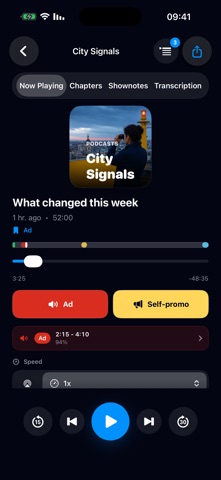
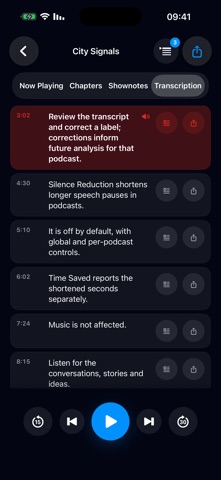
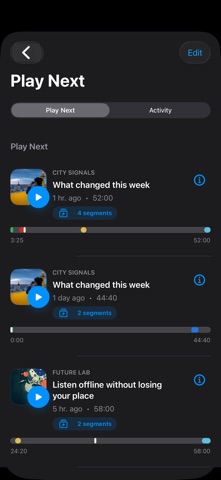
ADS OUT. PODCASTS ON. Listen for the conversations, stories and ideas. MuteCast combines a podcast player with transparent on-device segment detection and Auto-Skip. Podcast lists and players adapt to landscape on iPhone and iPad. Search and queue actions stay within reach, and your search text and reading position are preserved when you rotate. AUTO-SKIP—YOU DECIDE Detect likely ads, self-promos, donation appeals, intros and outros on your device. Choose which types may be skipped for each podcast; other types play normally. Detection draws on available transcripts, chapters, show notes, known patterns and audio cues. SEE WHAT WAS SKIPPED The timeline shows detected segments and confidence. Skip History records automatic skips with reasons and lets you return to the original position later. Review the transcript and correct a label; corrections inform future analysis for that podcast. OPTIONALLY SHORTEN PAUSES Silence Reduction shortens longer speech pauses in podcasts. It is off by default, with global and per-podcast controls. Time Saved reports the shortened seconds separately. Music is not affected. LISTEN, ORGANIZE AND FIND • Subscribe to and refresh RSS podcasts; stream or listen offline • View downloaded episodes with artwork in My Lists and drag them into a saved order • Control your queue, chapters, speed and sleep timer • Search available transcripts across your library, jump to a match and share text quotes • Follow download, transcription and analysis progress NEW EPISODES, YOUR RULES After a feed refresh, eligible episodes from the last seven days are automatically queued when your download and network settings allow. New downloads can be prepared for transcription and analysis. Choose local notifications for new episodes, finished downloads and completed analyses per podcast. Delivery depends on permissions and background activity. ACROSS YOUR APPLE DEVICES Use MuteCast on iPhone, iPad and Mac. Control playback, volume, chapters and queue from Apple Watch. CarPlay offers podcast and music browsing plus playback controls. Subscriptions, playback positions, queue and analysis data sync through your private iCloud database. YOUR MUSIC LIBRARY, TOO Browse playlists, artists, albums and songs in your Apple Music library. Use a full-screen player with artwork, position control, previous/next, visible queue, shuffle and repeat. Search and choose list sorting; pin playlists for Watch and CarPlay. Music and podcasts have separate playback positions. Music access depends on your library and Apple permissions; some content requires an Apple Music subscription. PRIVATE BY DESIGN Analysis happens on your device. No MuteCast account, analytics, tracking SDKs, server-side analysis or in-app ads. PAY ONCE. NO MUTECAST SUBSCRIPTION. A podcast player with Auto-Skip, without a recurring MuteCast fee.
What's new · 1.9.3
1.9.2: Podcast lists and podcast and music players are more comfortable in landscape on iPhone and iPad. Search and queue actions are easier to reach, with your search text and reading position preserved when you rotate. Auto-Skip responds sooner to newly detected ads and self-promotion and more precisely handles measured lead-ins to known promotional patterns. Your settings still apply. We’ve improved responsiveness when refreshing podcasts during music playback, along with navigation when permission to access your music library is missing. 1.9.1: Auto-Skip confirms a successful jump before reporting it, with retry and recovery when needed. Short ads and self-promotions detected with very high confidence can be skipped sooner while analysis continues; your settings still apply. Add multiple episodes to the queue with the new visible plus button. New Cut Wave app icon. 1.9: Stability and performance improvements. Music playback is initialized only when needed, reducing unnecessary system requests at app startup and during podcast playback. Long audio-analysis sections are processed in smaller steps. Large music libraries are sorted more efficiently, and background audio analysis controls CPU usage to reduce load. Compatibility adjustments for the latest Apple SDKs. 1.8.7: More precise ad detection: improved comparison of local and publisher transcripts, including mixed passages, and better timing of automatic skips. Sponsor hints in show notes and linked sponsor lists now inform analysis together with spoken promotional content; a brand mention alone is not enough. Intros and outros are restricted to plausible positions near the episode’s beginning and end, with tighter length limits. Reanalysis refines automatic markers while preserving manual corrections. When you return to the app, pending feed updates, eligible downloads, transcription and analysis are resumed more reliably, respecting your network and download settings. Transcripts remain visible while new sections arrive. Navigation and list preparation on Mac are more responsive. Download-result messages now appear in the active settings screen. 1.8.6: Downloaded is now part of My Lists: episodes show artwork and their order can be changed and saved. When enabled, Silence Reduction shortens pauses without altering voices, with global and per-podcast controls; Time Saved reports the result separately. The new Skip History explains automatic skips, returns to the original position, and applies label corrections to future episodes. Search every transcript in the Transcript Library, jump to a match, and share quotes. 1.8: Major reliability and detection-precision update. Ads, self-promotion, donation appeals, intros, and outros are detected more accurately with stricter confirmation and better segment boundaries. The queue now explains initial analysis, audio matching, and progress more clearly, while interrupted work resumes more reliably. Downloaded and analyzed episodes remain unchanged when feeds update. Repeated downloads and duplicate analysis have been fixed. Playback, iCloud sync, stability, and performance are improved. New on Apple Watch: the MuteCast complication opens the app from your watch face and shows playback progress plus detected segments in color. Changes to podcast subscriptions now appear more reliably in the library. Search checks local spelling variants first and falls back to international directories when needed. 1.7: More reliable refreshing, downloading, and preparation. 1.6: Analysis is easier to understand and the queue is easier to control. 1.5: Improved detection of ads and self-promotion. 1.4: Larger platform update with music library support, better Watch and CarPlay support, revised screenshots, and broader localization. 1.3: Better analysis and sharing features. 1.2: Stability and platform update for iOS and macOS. 1.1: Improved local transcription, more stable downloads, and smoother playback. 1.0: Initial version.
Details