

CalDown
Valentin Haberling · Productivity
Independent analytics for this App Store listing. AppTracker is not affiliated with Valentin Haberling.
Chart standing · US
What changed · US
Listing changes AppTracker has observed for this app in this storefront — new versions, price moves, rating shifts, and store copy.
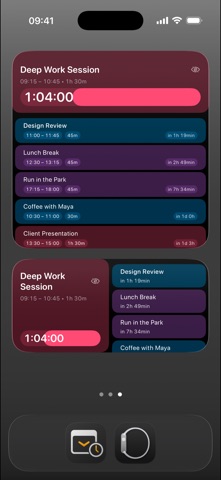
More ways to follow your time, on your Home Screen and Apple Watch. • New countdown widgets, plus redesigned event overviews with clearer titles, time details and upcoming events. • Choose whether to show gaps between events in each supported widget. Overlap indicators help you spot conflicting plans. • Two new complications for Apple Watch, Presentation Dynamic and Presentation Fixed: a large countdown with a small title, or a fixed hours, minutes and seconds layout. Both automatically switch between an upcoming event and the time remaining in a running event. • New Event Overview complication: start times, titles and countdowns for two events, with a colored card highlighting the current event. • Set up calendar groups with their own notification rules. Combine alerts before an event, at its start, during it, before its end or at its end, with sound settings for each group. • Refined typography, colors and layouts across widgets and complications. Additional widgets and the new Watch complications require CalDown Pro. Notifications are configured on your iPhone. Existing Apple Calendar alerts may still appear separately. Widget, complication and background updates are managed by the system.
In-app purchases · US
What this app sells inside itself, grouped by kind and priced for this storefront.
Screenshots


Similar apps
Competitors and close alternatives, as estimated by AppTracker.
 BusyCal: Calendar & Tasks
Busy Apps FZE
BusyCal: Calendar & Tasks
Busy Apps FZE
 Watch Calendar - Monthly
Marcel Mendes Filho
Watch Calendar - Monthly
Marcel Mendes Filho
 Next Meeting Live
Bhagya Silva
Next Meeting Live
Bhagya Silva
 Days Anchor - Countdown Events
Zhiqi Pan
Days Anchor - Countdown Events
Zhiqi Pan
 CalAlarm — Calendar Alarms
Mitsuhiro Ogata
CalAlarm — Calendar Alarms
Mitsuhiro Ogata
 Proximum
Luca Bellintani
Proximum
Luca Bellintani
 InstaCal: Menu Bar Calendar
Higher Bar, LLC
InstaCal: Menu Bar Calendar
Higher Bar, LLC
 TimeTill for Calendar
Golmium Software Inc.
TimeTill for Calendar
Golmium Software Inc.
About
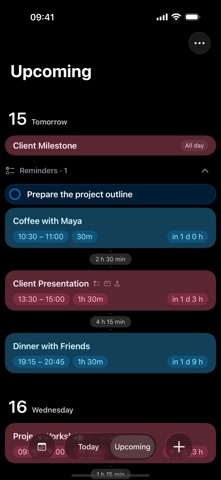
CalDown – Focus. Clarity. Time Awareness. What is happening now? What comes next? How much time is left? CalDown turns Apple Calendar events into a focused timeline across iPhone, iPad, widgets and Apple Watch. Choose your calendars and see your day without the clutter. A TIMELINE BUILT AROUND NOW • Follow your current event with a countdown and progress bar • Keep all-day, upcoming and recently ended events in view • Look ahead by 3, 5 or 7 days • See gaps between events and timed reminders • Create and edit events with the familiar Apple Calendar editor • Hide individual event occurrences without changing them in Apple Calendar, and restore them from Hidden Events WIDGETS THAT MAKE TIME TANGIBLE • See your current or next timed event on the Home Screen or Lock Screen • Choose focused countdowns or overviews combining current and upcoming events • Follow calendar colors, progress and clear event details • Show or hide gaps in supported layouts and spot overlaps • Hide the highlighted event directly from supported widgets APPLE WATCH — WITH PRO • View calendar events available on your Watch, even without your iPhone nearby • Follow the iPhone’s calendar selection or choose separate calendars on Watch • Choose circular, corner, inline and rectangular complications • Presentation Dynamic emphasizes the leading time unit with a small event title • Presentation Fixed keeps hours, minutes and seconds in a consistent layout • Both presentation complications switch from time until an event to time remaining when it starts • Event Overview shows two events and highlights the current one • Expand event and reminder details, with gaps and overlaps in the timeline Widgets and complications use your selected Upcoming range. Refreshes, countdown updates and Always On behavior are managed by the system. CALENDAR NOTIFICATIONS Create calendar groups with their own notification rules. Combine alerts before the start, at the start, partway through, before the end or at the end of each event. Choose sound settings for each group on your iPhone. CalDown alerts are separate from Apple Calendar alerts, so you may receive both. Delivery depends on notification permissions, Focus settings and system background refresh. APPLE REMINDERS — BETA, WITH PRO • Show dated tasks from selected lists alongside your events • Keep overdue tasks in Today and future timed tasks in the timeline • Complete tasks and review dated tasks completed today • Open Apple Reminders to create, edit or reopen tasks Undated tasks are not shown. Reminders do not occupy time and are not included in widgets or complications. Watch completion uses your paired iPhone; offline requests stay pending until confirmed. Both devices need reminder access and the same reminder account. Some accounts cannot identify tasks reliably across devices. NOTES AND CHECKLISTS Keep notes and checklist items with calendar events. Watch additions and checklist changes require the paired iPhone to save and confirm them. Your calendar account manages synchronization. REMAINING TIME COLORS Choose start, warning and urgent colors and thresholds on iPhone. Apply them to the timeline, widgets and Watch independently. These are visual cues; notifications are configured separately. SIRI AND SHORTCUTS Ask about Current, Next or Today’s schedule. Hide an occurrence, restore the last hidden event, or open Today and Upcoming. YOUR DATA, YOUR RULES • No CalDown account, ads, subscriptions or analytics • On-device processing, with no external CalDown server • Hidden-event preferences sync only with the paired Watch • Optional diagnostic reports that you review and choose to share START SIMPLE. UNLOCK MORE WITH PRO. Use one calendar at a time and basic widgets for free. A single one-time purchase unlocks multiple calendars, additional widget layouts, Apple Watch and Apple Reminders integration. Your time. Your focus. CalDown.
What's new · 1.7
More ways to follow your time, on your Home Screen and Apple Watch. • New countdown widgets, plus redesigned event overviews with clearer titles, time details and upcoming events. • Choose whether to show gaps between events in each supported widget. Overlap indicators help you spot conflicting plans. • Two new complications for Apple Watch, Presentation Dynamic and Presentation Fixed: a large countdown with a small title, or a fixed hours, minutes and seconds layout. Both automatically switch between an upcoming event and the time remaining in a running event. • New Event Overview complication: start times, titles and countdowns for two events, with a colored card highlighting the current event. • Set up calendar groups with their own notification rules. Combine alerts before an event, at its start, during it, before its end or at its end, with sound settings for each group. • Refined typography, colors and layouts across widgets and complications. Additional widgets and the new Watch complications require CalDown Pro. Notifications are configured on your iPhone. Existing Apple Calendar alerts may still appear separately. Widget, complication and background updates are managed by the system.
Details