

Flow Money Manager
Yeonwoo Lee · Finance
Independent analytics for this App Store listing. AppTracker is not affiliated with Yeonwoo Lee.
Chart standing · US
What changed · US
Listing changes AppTracker has observed for this app in this storefront — new versions, price moves, rating shifts, and store copy.
• Auto Add: Transactions are recorded automatically when you receive payment text messages or app notifications from your card issuer or bank. • New calculator: Calculate amounts while entering a transaction and apply the result right away. • Quick currency selection: Choose the currency for your transaction faster and more easily. • Improved overall usability and stability.
Price & rating history · US
Reconstructed from the listing changes AppTracker has observed in this storefront. A field is charted once it has changed more than once, and each line starts at the value it moved from.
Average rating · ★ 4.38 now · 4 changes on record
Ratings breakdown · US
The star breakdown behind this app's rating in this storefront.
In-app purchases · US
What this app sells inside itself, grouped by kind and priced for this storefront.
Screenshots




Keywords this app targets
Search terms AppTracker associates with this app — estimates, not search volume. ❝ = in the app's title; a highlighted number is its current position for that term.
Similar apps
Competitors and close alternatives, as estimated by AppTracker.
 Money manager, expense tracker
Orange dog d.o.o.
2 shared topics · 3 shared title words
Money manager, expense tracker
Orange dog d.o.o.
2 shared topics · 3 shared title words
 Expense Tracker• Money Manager
Devarsh Patel
2 shared topics · 3 shared title words
Expense Tracker• Money Manager
Devarsh Patel
2 shared topics · 3 shared title words
 Money Tracker: Budget Manager
Pham Thi Hong Nhung
2 shared topics · 2 shared title words
Money Tracker: Budget Manager
Pham Thi Hong Nhung
2 shared topics · 2 shared title words
 Money Manager Budget Planner
Hastik Mangukiya
2 shared topics · 3 shared title words
Money Manager Budget Planner
Hastik Mangukiya
2 shared topics · 3 shared title words
 Money: track income & expenses
Whitesmith Lda
2 shared topics · 1 shared title word
Money: track income & expenses
Whitesmith Lda
2 shared topics · 1 shared title word
 Smart Budget – Money Manager
Carlo Di Giuseppe
2 shared topics · 3 shared title words
Smart Budget – Money Manager
Carlo Di Giuseppe
2 shared topics · 3 shared title words
 Money Manager Expense & Budget
Realbyte Inc.
2 shared topics · 3 shared title words
Money Manager Expense & Budget
Realbyte Inc.
2 shared topics · 3 shared title words
 Money Flow - Expense Tracker
Abstract Software LLC
2 shared topics · 2 shared title words
Money Flow - Expense Tracker
Abstract Software LLC
2 shared topics · 2 shared title words
About
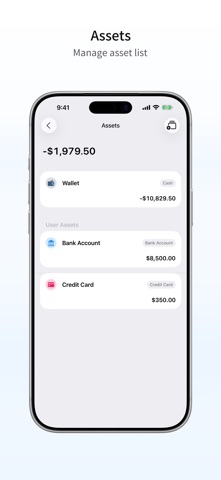
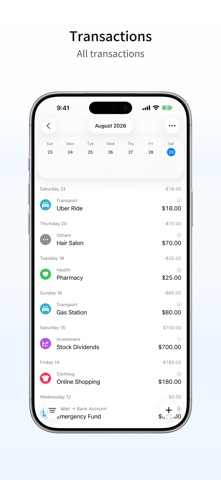
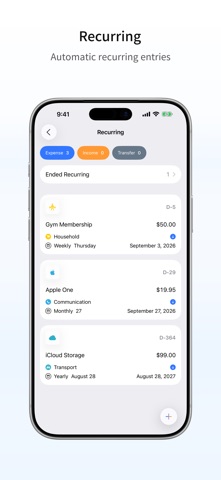
Track your income and expenses at a glance with the household ledger. Easily enter income and expenses, and set your budget. Recurring income and expenses are automatically added with a single setup. Easy income and expense tracking • You can quickly write your ledger as soon as you open the app. • Register more easily with smart AI features. • Manage recurring or fixed income and expenses with the repeat feature. They will be automatically added on the set date. Summary and trends • View your income, expenses, and assets at a glance based on your records. • Easily compare income and expenses by category. • Check monthly trends in your income and expenses. Data management • No need for separate backups — your data is automatically saved with iCloud sync. • Even if you delete and reinstall the app, your data will be restored seamlessly. • Real-time sync across iPhone, iPad, and Mac. This app complies with Apple’s standard EULA. https://www.apple.com/legal/internet-services/itunes/dev/stdeula/
What's new · 2.2.4
• Auto Add: Transactions are recorded automatically when you receive payment text messages or app notifications from your card issuer or bank. • New calculator: Calculate amounts while entering a transaction and apply the result right away. • Quick currency selection: Choose the currency for your transaction faster and more easily. • Improved overall usability and stability.
Details