

R8 Companion
Angela Mcarthur · Utilities
Independent analytics for this App Store listing. AppTracker is not affiliated with Angela Mcarthur.
Chart standing · US
What changed · US
Listing changes AppTracker has observed for this app in this storefront — new versions, price moves, rating shifts, and store copy.
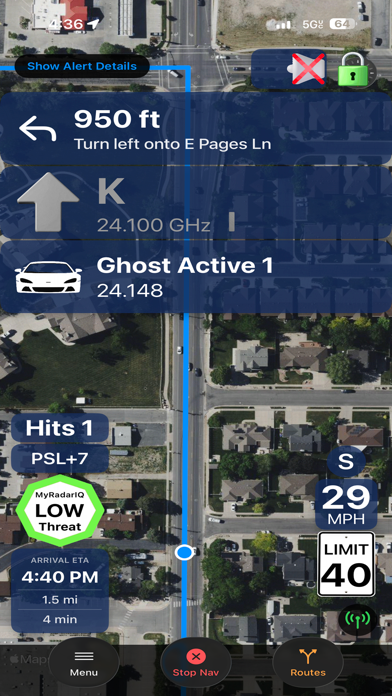
Works with CarPlay!! "Feels like a new detector!", -e This is what people are saying after using the Radar Companion™ apps - See what all the fuss is about, try it for yourself! Version 1.40: • Hi-res signal strength meters for both front & rear horns added to the alert banner. See what your detector is seeing, not just the standard bar strength. Front strength shown as a thin line at the top of the banner, rear strength shown at the bottom of the banner. Turn it on by using the option found in both the CarPlay & iPhone menus. • "Active" Banner - K&X noise meter added to top of banner. Enable in the "Map screen" menu under the 'Active Banner' section. • "Active" Banner - MyRadarIQ threat level meter added to bottom of banner. Enable in the "Map screen" menu under the 'Active Banner' section. • Text notification customization. Enable / Disable types of phone & watch text notifications. Found in the R8 Companion's "iPhone" settings menu. • Battery optimizations. Other recent big updates: • SpotLock engine version 2.0.09012026 - latest historical data. • Advanced false assist engine version 3.0.09012026 - latest 6+ years of historical data. • New audio engine handles navigation, speech & detector tones seamlessly with options for output style, voice, speech rate, etc. • Option to include all Detector audio for nav mute tap (kill switch). • CarPlay background-alert controls. • Live Activities for CarPlay, iPhone, Apple Watch. • Alert banner "SignalScope" Shows signal strength over time of the current priority alert. • Alert screen (portrait & landscape views). Option to view classic or new alert screen with a tap of a button. • Ability to turn on/off posted speed limit (US, CA, AU, NZ). • New alert screen banners showing detailed alert, false assist, POI, MyRadarIQ, over speed warnings & other detailed detector status information. • Alternate Route selection with highway, & toll avoidance. • Shows arrival time, distance & trip time remaining. • 'Show traffic' option while navigating. • “Free Drive” (map / no map) alert screen. • MyRadarIQ™ - Threat assessment intelligent system for the radar companion series of apps. A new meter, visible at the top of the main alert screen, will show a graphical representation of the probability of a police presence (Ka or Laser) in the direction of your travel. Using your personal alert data, whenever a high probability exists for an encounter ahead, you will know about it well in advance of facing the actual threat. The meter will go from yellow (low threat), to orange (medium threat), to red (high threat) and flash aa a voice announcement occurs. The meter will also flash red when a Ka or Laser alert is actively being received to help draw attention to the alert. Probabilities are calculated down to the day of the week you are traveling, increasing the accuracy on any given day. If you liked R8 Companion before this release, you are going to LOVE it after! Modify the most popular settings on your R8 radar detector right from the app! See the list below for a complete list of the settings you can modify (more settings coming in future updates). Spread the word, it is only going to get better. If you have an idea / suggestion you would like included in a future update, please visit https://crackedpixel.com/contact-us to let us know. Thanks! Noteworthy info: • Supports both R8 & R8w detectors. • Firmware update notifications via main alert screen. • Option to have the radar detector's alert tones play through the app. • Accessibility option to flash the screen on alert. ***TIP: Setting the main volume for the detector to 0 on the main alert screen and enabling the detector alert tones, will eliminate the brief audio "blips" you would normally hear when a mute command is first sent to the detector. Only potential threats will then trigger audio through your speaker or audio system providing an extremely quiet ride.
Price & rating history · US
Reconstructed from the listing changes AppTracker has observed in this storefront. A field is charted once it has changed more than once, and each line starts at the value it moved from.
Average rating · ★ 4.81 now · 7 changes on record
Ratings breakdown · US
The star breakdown behind this app's rating in this storefront.
In-app purchases · US
What this app sells inside itself, grouped by kind and priced for this storefront.
Screenshots



Keywords this app targets
Search terms AppTracker associates with this app — estimates, not search volume. ❝ = in the app's title; a highlighted number is its current position for that term.
Similar apps
Competitors and close alternatives, as estimated by AppTracker.
 V1Driver
George Mills
3 shared topics
V1Driver
George Mills
3 shared topics
 Radar Speed Camera Detector
Vasundhara Infotech LLP
Radar Speed Camera Detector
Vasundhara Infotech LLP
 RadarAll Speed Camera Detector
Raul Martin Carbonell
RadarAll Speed Camera Detector
Raul Martin Carbonell
 Speed Cameras Radar Detector
Sergei Semashko
1 shared topic
Speed Cameras Radar Detector
Sergei Semashko
1 shared topic
 proRadar・Radar & Speed Cameras
DOFUapps
proRadar・Radar & Speed Cameras
DOFUapps
 Speed Camera - Radar
APPASPECT TECHNOLOGIES PRIVATE LIMITED
Speed Camera - Radar
APPASPECT TECHNOLOGIES PRIVATE LIMITED
 Radarbot: Speed Camera GPS App
Iteration Mobile S.L
Radarbot: Speed Camera GPS App
Iteration Mobile S.L
 RadarIO - Speed Trap Alerts
Alvaro Escarcha Esteban
RadarIO - Speed Trap Alerts
Alvaro Escarcha Esteban
About
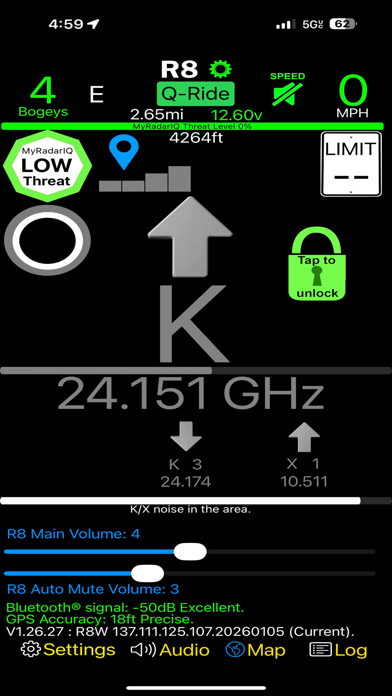
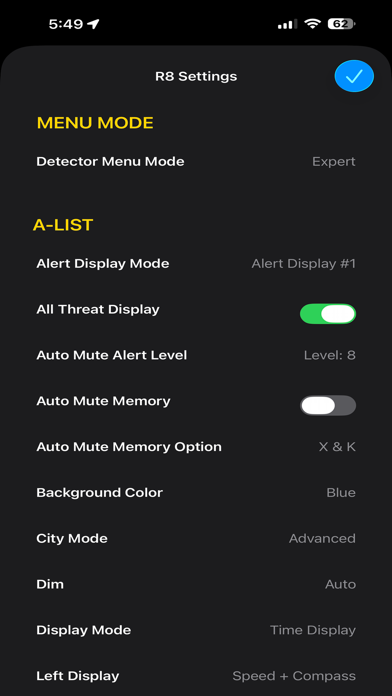
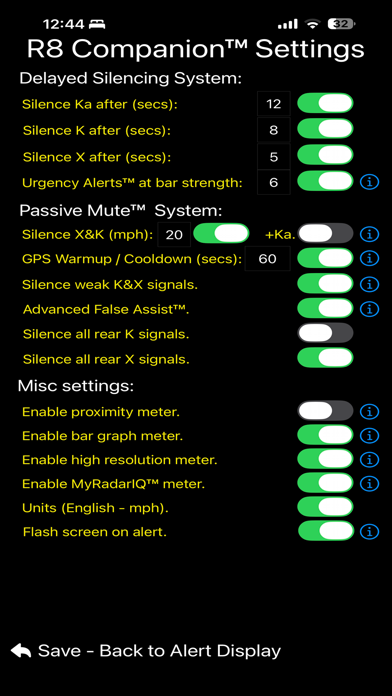
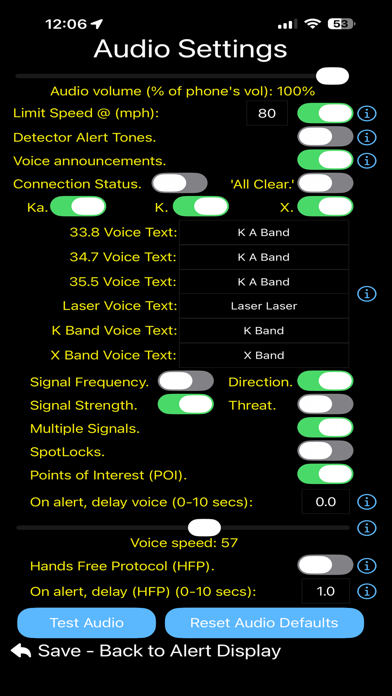
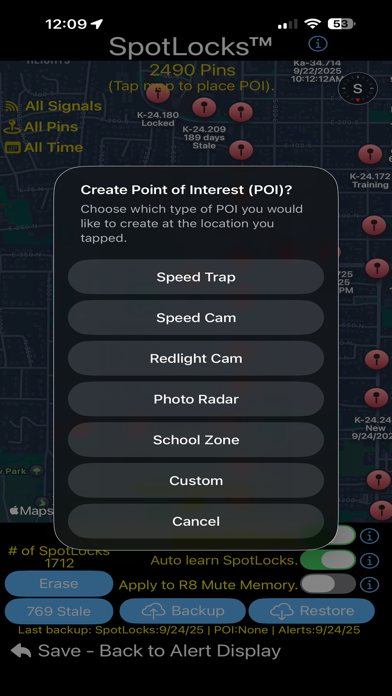
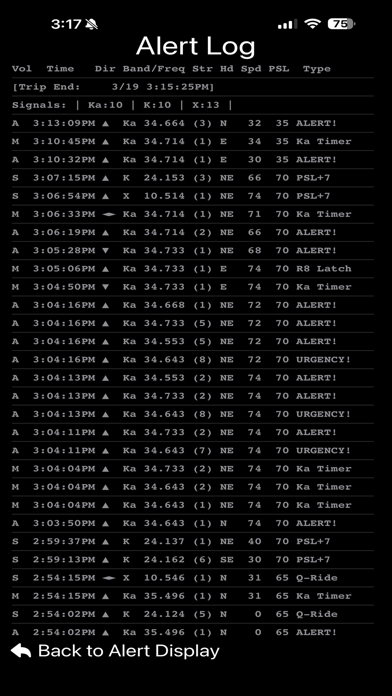
Works with CarPlay! The R8(w) Companion™ app leverages 6+ years of historical data in its acclaimed 'Advanced False Assist' filtering engine, detector optimizations and shared features from the Radar Companion™ series of apps. (Available separately for owners of the V1, R4, R9, & DS1 radar detectors). The filtering engine is updated on a regular basis from accumulated real world usage data for better filtering against falses, and protection against real threats. R8 Companion™ is a feature rich app, designed to give you the most out of your R8, while enhancing your driving experience along the way. It is extremely easy to get up and running. Featuring intelligent alerts and advanced muting! R8 Companion™ is the COMPLETE solution to enjoying your R8. NOTE: R8 Companion™ requires a Uniden R8 or R8w radar detector with US Version 145 (R8) or 143 (R8w) firmware (OR EARLIER) to function correctly. R8 Companion will NOT function correctly without the appropriate firmware for each detector. Enhanced GPS location based 'false muting' via SpotLocks - All future updates to this app are free to purchasers of R8 Companion. R8 Companion's alerting and muting systems are fully optimized for the R8 platform. Intelligent voice announcements and on-screen visuals will always keep you informed and aware of the situation around you. R8 Companion full feature list: • SpotLocks - Location based false silencing has never been this good or easy. Turn on the intelligent location-based learning and let R8 Companion™ do the rest. Or you can manually 'lock' or 'unlock' locations with ease from the main alert screen. • SpotLocks works seamlessly with your R8’s built in 'auto mute memory' locations. If you create or delete a location from the app it will apply the changes to your R8 at the same time. • Option to play detector tones in app. • 'Proximity' meter - leverages the high resolution signal strength and direction information provided by the detector to show you a better representation of the signal's source. • 'K & X falses in area' meter shows you how many possible false alerts exist in the area you are travelling based on the accumulated SpotLock data™. • 'Custom Phrases' for a given threat's audio announcements. • High resolution meter for the priority alert (Not limited to the # of bars on the R8 display). • Customizable heads-up display (HUD). • HUD displays the priority alert's band, signal strength, frequency, & direction. • HUD of the secondary alerts' bands, signal strengths, frequencies, bogey counts & directions. • Mute rear K & X band signals independently. • Advanced BSM/CAS/Ka False Muting (Optimized for the R8 platform). • Ability to set the R8’s internal detector settings from within the app. No need for different apps to modify your detector settings. Do it all from the companion app. • 'Ghost' muting quiets false alerts when you are stuck traveling near a false emitting vehicle. • "Passive Mute™"- Quiets the R8 below user set speeds & during weak K & X signals. • Bogey count display showing total number of threats. • Vehicle speed (MPH or KMH) display. Speed is color coded for each alert type. • Mute status with the ability to manually mute/unmute alerts as you need. • Detailed & intelligent voice announcements of direction, band, frequency, strength, number of alerts, occurrences of mixed signals and more. • Automatic muting of Ka, K, and X bands ('Time before mute' set for each band). • 'Reduce Speed' notification for user set speed. • ‘Urgency Alerts™’ - Unmutes growing threats & announces these alerts via voice & notifications. • ‘Alert History’ - View your past alerts with detailed information about each encounter. • Compass heading. • Imperial/metric units. • Detailed trip summary at the end of your ride including duration, distance, alerts, muting stats, battery, and more. • iPhone & Apple Watch notifications of direction, band, & frequency. • Help system. Speed limit data © OpenStreetMap contributors (ODbL)
What's new · 1.40.4
Works with CarPlay!! "Feels like a new detector!", -e This is what people are saying after using the Radar Companion™ apps - See what all the fuss is about, try it for yourself! Version 1.40: • Hi-res signal strength meters for both front & rear horns added to the alert banner. See what your detector is seeing, not just the standard bar strength. Front strength shown as a thin line at the top of the banner, rear strength shown at the bottom of the banner. Turn it on by using the option found in both the CarPlay & iPhone menus. • "Active" Banner - K&X noise meter added to top of banner. Enable in the "Map screen" menu under the 'Active Banner' section. • "Active" Banner - MyRadarIQ threat level meter added to bottom of banner. Enable in the "Map screen" menu under the 'Active Banner' section. • Text notification customization. Enable / Disable types of phone & watch text notifications. Found in the R8 Companion's "iPhone" settings menu. • Battery optimizations. Other recent big updates: • SpotLock engine version 2.0.09012026 - latest historical data. • Advanced false assist engine version 3.0.09012026 - latest 6+ years of historical data. • New audio engine handles navigation, speech & detector tones seamlessly with options for output style, voice, speech rate, etc. • Option to include all Detector audio for nav mute tap (kill switch). • CarPlay background-alert controls. • Live Activities for CarPlay, iPhone, Apple Watch. • Alert banner "SignalScope" Shows signal strength over time of the current priority alert. • Alert screen (portrait & landscape views). Option to view classic or new alert screen with a tap of a button. • Ability to turn on/off posted speed limit (US, CA, AU, NZ). • New alert screen banners showing detailed alert, false assist, POI, MyRadarIQ, over speed warnings & other detailed detector status information. • Alternate Route selection with highway, & toll avoidance. • Shows arrival time, distance & trip time remaining. • 'Show traffic' option while navigating. • “Free Drive” (map / no map) alert screen. • MyRadarIQ™ - Threat assessment intelligent system for the radar companion series of apps. A new meter, visible at the top of the main alert screen, will show a graphical representation of the probability of a police presence (Ka or Laser) in the direction of your travel. Using your personal alert data, whenever a high probability exists for an encounter ahead, you will know about it well in advance of facing the actual threat. The meter will go from yellow (low threat), to orange (medium threat), to red (high threat) and flash aa a voice announcement occurs. The meter will also flash red when a Ka or Laser alert is actively being received to help draw attention to the alert. Probabilities are calculated down to the day of the week you are traveling, increasing the accuracy on any given day. If you liked R8 Companion before this release, you are going to LOVE it after! Modify the most popular settings on your R8 radar detector right from the app! See the list below for a complete list of the settings you can modify (more settings coming in future updates). Spread the word, it is only going to get better. If you have an idea / suggestion you would like included in a future update, please visit https://crackedpixel.com/contact-us to let us know. Thanks! Noteworthy info: • Supports both R8 & R8w detectors. • Firmware update notifications via main alert screen. • Option to have the radar detector's alert tones play through the app. • Accessibility option to flash the screen on alert. ***TIP: Setting the main volume for the detector to 0 on the main alert screen and enabling the detector alert tones, will eliminate the brief audio "blips" you would normally hear when a mute command is first sent to the detector. Only potential threats will then trigger audio through your speaker or audio system providing an extremely quiet ride.
Details