

Budget Bestie
Budget Bestie Corp. · Finance
Independent analytics for this App Store listing. AppTracker is not affiliated with Budget Bestie Corp.
Chart standing · US
What changed · US
Listing changes AppTracker has observed for this app in this storefront — new versions, price moves, rating shifts, and store copy.
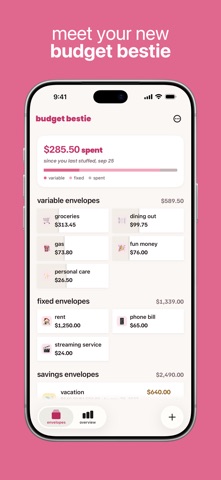
hey besties, you told us, we listened. 2 per row is back, so you can see more of your envelopes at a glance again. like the bigger cards better? turn off compact home view in settings. empty envelopes dim, each card shades as you spend, and savings goals have their progress bar back. we fixed a crash on the envelope screen, too. thank you for every message, besties. keep them coming, and keep on stuffing!
Price & rating history · US
Reconstructed from the listing changes AppTracker has observed in this storefront. A field is charted once it has changed more than once, and each line starts at the value it moved from.
Average rating · ★ 4.66 now · 2 changes on record
Ratings breakdown · US
The star breakdown behind this app's rating in this storefront.
In-app purchases · US
What this app sells inside itself, grouped by kind and priced for this storefront.
Screenshots




Keywords this app targets
Search terms AppTracker associates with this app — estimates, not search volume. ❝ = in the app's title; a highlighted number is its current position for that term.
Similar apps
Competitors and close alternatives, as estimated by AppTracker.
 CalendarBudget: Budget Planner
CalendarBudget Inc.
3 shared topics · 1 shared title word
CalendarBudget: Budget Planner
CalendarBudget Inc.
3 shared topics · 1 shared title word
 Budget app - spending tracker
InnerGrow
1 shared topic · 1 shared title word
Budget app - spending tracker
InnerGrow
1 shared topic · 1 shared title word
 Weekly: Budget Planner & Bills
Weekly, LLC
2 shared topics · 1 shared title word
Weekly: Budget Planner & Bills
Weekly, LLC
2 shared topics · 1 shared title word
 Best Budget Planner-Money Book
永文 胡
2 shared topics · 1 shared title word
Best Budget Planner-Money Book
永文 胡
2 shared topics · 1 shared title word
 Smart Budget – Money Manager
Carlo Di Giuseppe
2 shared topics · 1 shared title word
Smart Budget – Money Manager
Carlo Di Giuseppe
2 shared topics · 1 shared title word
 My Budget Book
Christian Drapatz
2 shared topics · 1 shared title word
My Budget Book
Christian Drapatz
2 shared topics · 1 shared title word
 Goodbudget Budget Planner
Dayspring Technologies
1 shared topic · 1 shared title word
Goodbudget Budget Planner
Dayspring Technologies
1 shared topic · 1 shared title word
 BuyBye - Budget Planner
BuyBye Inc.
1 shared topic · 1 shared title word
BuyBye - Budget Planner
BuyBye Inc.
1 shared topic · 1 shared title word
About
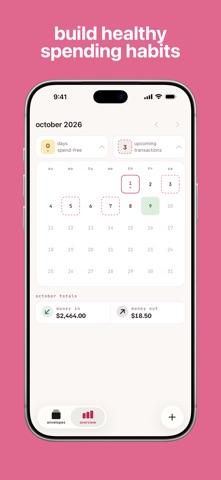
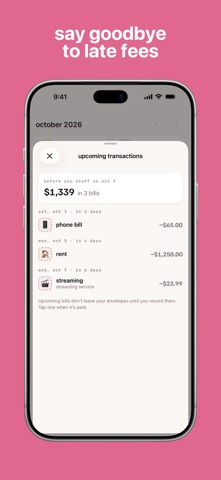
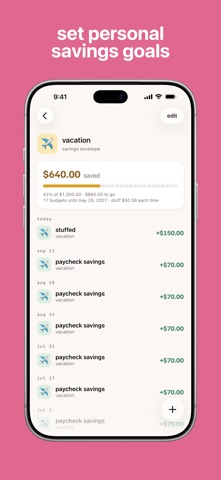
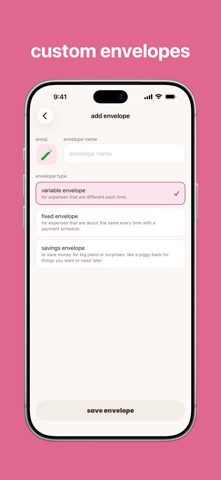
hey bestie, ready to make budgeting effortless? with budget bestie, you can take full control of your money on your own terms—whether you get paid weekly, biweekly, twice a month, or monthly, we’ve got you covered. using the cash stuffing method, you’ll say goodbye to stress and hello to a budgeting approach that fits your life perfectly. okay but what’s cash stuffing? 1. create envelopes – create an envelope for each expense category like food, eating out, rent 2. stuff your envelopes – put all of your cash into envelopes based on how much you’ll spend before you get paid again 3. spend your money – this is the fun part - don’t feel guilty for spending your hard earned money. when you buy something, use the cash from the corresponding envelope 4. get paid, repeat - record your income (cha-ching) and go back to step 2, stuff your envelopes how budget bestie works - no need to carry cash - we’ve taken this 100+ year old proven technique and put it in your iPhone - say bye to math and spreadsheets - we’ll recommend how much to stuff into each envelope based on previous spending habits and upcoming bills - avoid late fees by getting reminded - we’ll send you a notification when you haven’t recorded paying a recurring expense - hit your savings goals - create savings envelopes and we’ll make sure you’re on track to hit your goals - budget on your schedule - whether it’s weekly, biweekly, twice a month, or monthly, you can budget based on what works for you what our besties are saying: “First full month of the app and it's so simple. I've not had to dip into my emergency fund or sinking fund or use overdraft. I've even managed to put some money towards debt and not reuse it” - @Nicola Disney Pomeranian Mummy "Been using budget bestie for a month!The monthly recap made me realize I spend so much on little things (like buying to go lunch everyday) since it's in budget, but never seen how much it adds up" – @Julia "This app is great I have been searching for a budgeting app that lets me budget per check and this is it” - @Chy6699 “Definitely helped me the last two weeks. Can't wait to see how much money I can save.” - @Erin Backes subscription details: before your free trial begins, you’ll choose between a monthly or annual subscription. subscriptions are billed and managed directly by Apple. you can manage or cancel your subscription anytime within your iPhone settings app. terms of use: https://www.apple.com/legal/internet-services/itunes/dev/stdeula/
What's new · 1.7.1
hey besties, you told us, we listened. 2 per row is back, so you can see more of your envelopes at a glance again. like the bigger cards better? turn off compact home view in settings. empty envelopes dim, each card shades as you spend, and savings goals have their progress bar back. we fixed a crash on the envelope screen, too. thank you for every message, besties. keep them coming, and keep on stuffing!
Details