

AstroShader
AstroShader Limited · Photo & Video
Independent analytics for this App Store listing. AppTracker is not affiliated with AstroShader Limited.
Chart standing · US
What changed · US
Listing changes AppTracker has observed for this app in this storefront — new versions, price moves, rating shifts, and store copy.
- Bug fix for image timestamps following edits - Various UI layout fixes
Price & rating history · US
Reconstructed from the listing changes AppTracker has observed in this storefront. A field is charted once it has changed more than once, and each line starts at the value it moved from.
Average rating · ★ 4.30 now · 13 changes on record
Ratings breakdown · US
The star breakdown behind this app's rating in this storefront.
In-app purchases · US
No in-app purchases.
Screenshots


Keywords this app targets
Search terms AppTracker associates with this app — estimates, not search volume. ❝ = in the app's title; a highlighted number is its current position for that term.
Similar apps
Competitors and close alternatives, as estimated by AppTracker.
 AstroEdit - Simple and Quick
yong chong loh
1 shared topic
AstroEdit - Simple and Quick
yong chong loh
1 shared topic
 AstroGlow: Milky Way Camera
Steven smith
AstroGlow: Milky Way Camera
Steven smith
 Starry sky Camera
HIROFUMI MARUO
1 shared topic
Starry sky Camera
HIROFUMI MARUO
1 shared topic
 Moon Capture
Steven Marshall
2 shared topics
Moon Capture
Steven Marshall
2 shared topics
 StarryCamera2
康行 Nagasima
1 shared topic
StarryCamera2
康行 Nagasima
1 shared topic
 NightCap Camera: Long Exposure
RTD
NightCap Camera: Long Exposure
RTD
 Star Stacker
michael webb
1 shared topic
Star Stacker
michael webb
1 shared topic
 DragonLight Mobile
Dark Dragons Astronomy LLC
DragonLight Mobile
Dark Dragons Astronomy LLC
About
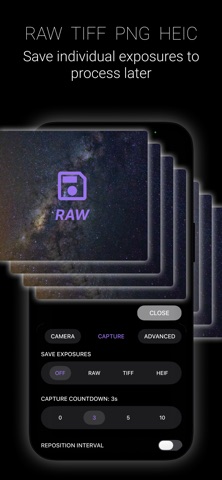
One-time purchase. No subscription. AstroShader is an astrophotography app for capturing, stacking and editing. All you need is a stand, tripod, telescope or rock (to lean your phone on). AstroShader lets you align and stack live during the image capture process. You can also align and stack images from you Photos library. No need to transfer images to a computer to align and stack them separately (but there is a built in intervalometer if you need it). To take an image follow these steps: • Use a stand, tripod, telescope mount (or lean your iPhone on a rock). • Zoom in on stars and set focus manually, or use autofocus. • Set the exposure time, ISO and white balance, or leave to auto-exposure. • Set the number of exposures to be automatically aligned and stacked. • Calibrate your images from the edit tools. • After the capture is complete you can edit and save your image—including as 16bit TIFF. • You can open images directly to use the edit tools in AstroShader - rather following a new image capture. Image capture options include: • Number of exposures to be aligned and stacked • Exposure time • ISO • White balance • Camera type • Countdown timer • Manual focus • Pause the capture to reposition iPhone or telescope Edit options include: • Stretch image • Background extraction • Dynamic background extraction (DBE) • x5 Histogram curves for fine tonal adjustment • x3 sharpen layers each with radius and intensity with layer blending rather than chaining • Brightness (low light enhancement) • Saturation • Black point • Temperature • Tint • Save format options; HEIF, PNG, JPEG, TIFF
What's new · 1.2.7
- Bug fix for image timestamps following edits - Various UI layout fixes
Details