

Floor Plan & AI Home - CamPlan
CamPlan AI Ltd · Graphics & Design
Independent analytics for this App Store listing. AppTracker is not affiliated with CamPlan AI Ltd.
Chart standing · US
What changed · US
Listing changes AppTracker has observed for this app in this storefront — new versions, price moves, rating shifts, and store copy.
- New: Scan with Video. No LiDAR needed: film a quick walkthrough of a room or a whole floor, and AI measures and draws your floor plan. - Improve accuracy: enter the real length of one wall you measured and the whole plan adjusts. - Clearer scan tips and a new summary screen to check your floor plan before you add it.
Ratings breakdown · US
The star breakdown behind this app's rating in this storefront.
In-app purchases · US
What this app sells inside itself, grouped by kind and priced for this storefront.
Screenshots




Keywords this app targets
Search terms AppTracker associates with this app — estimates, not search volume. ❝ = in the app's title; a highlighted number is its current position for that term.
Similar apps
Competitors and close alternatives, as estimated by AppTracker.
 AI Room & Home Planner: LiDAR
Rocket Digital Ltd
2 shared topics · 2 shared title words
AI Room & Home Planner: LiDAR
Rocket Digital Ltd
2 shared topics · 2 shared title words
 Planner 5D: AI Home Design
Planner5D, UAB
2 shared topics · 3 shared title words
Planner 5D: AI Home Design
Planner5D, UAB
2 shared topics · 3 shared title words
 Room Planner : Home 3d Design
Muhammad Nur Hazrul Hisham
2 shared topics · 1 shared title word
Room Planner : Home 3d Design
Muhammad Nur Hazrul Hisham
2 shared topics · 1 shared title word
 Home Planner AI:Room Design 3D
Room Planner Ltd
2 shared topics · 2 shared title words
Home Planner AI:Room Design 3D
Room Planner Ltd
2 shared topics · 2 shared title words
 Floorplan 3D & 2D
drillstars UG haftungsbeschrankt
3 shared topics
Floorplan 3D & 2D
drillstars UG haftungsbeschrankt
3 shared topics
 AI Home Design: Room Planner
Z ZET LTD
1 shared topic · 3 shared title words
AI Home Design: Room Planner
Z ZET LTD
1 shared topic · 3 shared title words
 AI Decor - AI Home Design
Yspira Digital
1 shared topic · 3 shared title words
AI Decor - AI Home Design
Yspira Digital
1 shared topic · 3 shared title words
 RoomSketch3D Floor Planner
ImmEx Technologies, Inc.
1 shared topic · 1 shared title word
RoomSketch3D Floor Planner
ImmEx Technologies, Inc.
1 shared topic · 1 shared title word
About
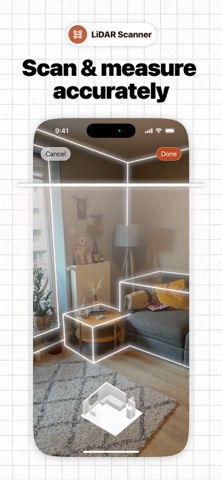
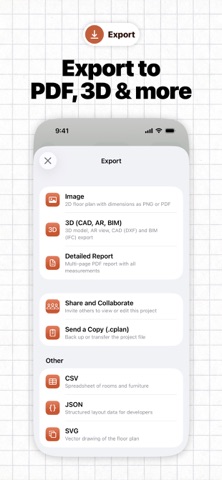
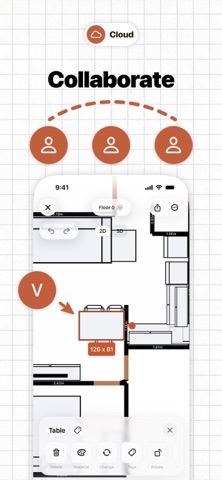
CamPlan gives you a fast, modern way to create 2D and 3D floor plans, room layouts, and interior design concepts with LiDAR scanning, AI design tools, detailed exports, and real-time collaboration. Floor Plan Scanner & Creator • LiDAR-based capture: Use your iPhone or iPad to scan a room. Walls, windows, doors, and measurements are detected automatically. • 2D and 3D editing: Adjust layouts in a flat view or explore a rendered 3D model. • AR preview: Place the virtual plan back into the real space to check scale and positioning. • Detailed export options: Export floor plans as images, PDFs, 3D files, and professional formats including USDZ, OBJ, DXF, CAD, DAE, and more. • Symbols & text: Add notes, labels, annotations, electrical symbols, and other plan details. • Real-time collaboration: Share projects and work together with others on the same plan. • Estimates: turn scanned floor plans into professional quotes with automatically measured quantities, reusable price lists, and AI-assisted line items. Review pricing, add taxes and markups, export branded PDFs, create invoices, and track payments. AI Interior & Home Designer • Photo-driven redesign: Snap a picture of any room and describe changes like “paint walls blue,” “add a reading nook,” or “switch to Scandinavian style.” • Style guidance: Get ideas for colors, furniture, lighting, materials, and layouts that suit your space. • Real-time updates: See design adjustments applied instantly. Available on iOS, iPadOS, and macOS, CamPlan offers an optimized interface with platform-specific gestures for a seamless experience. Enjoy accessibility support, including light and dark modes. CamPlan is ideal for homeowners, real estate agents, electricians, renovators, interior designers, contractors, and architects. CamPlan Plus, Pro and Business are available as auto-renewing subscriptions. Payment will be charged to your Apple Account at confirmation of purchase. Your subscription renews automatically unless auto-renew is turned off at least 24 hours before the end of the current period. You can manage or cancel your subscription in your Apple Account settings. You will continue to receive full functionality until the end of your current subscription period, but unused portions cannot be refunded. Terms of Use and Privacy Policy: https://camplan.ai/terms
What's new · 2.8.20
- New: Scan with Video. No LiDAR needed: film a quick walkthrough of a room or a whole floor, and AI measures and draws your floor plan. - Improve accuracy: enter the real length of one wall you measured and the whole plan adjusts. - Clearer scan tips and a new summary screen to check your floor plan before you add it.
Details