

Ledger - Accounting
Lucas Gladding · Finance
Independent analytics for this App Store listing. AppTracker is not affiliated with Lucas Gladding.
Chart standing · US
What changed · US
Listing changes AppTracker has observed for this app in this storefront — new versions, price moves, rating shifts, and store copy.
- Added account presets - Updated transaction import UI
Ratings breakdown · US
The star breakdown behind this app's rating in this storefront.
In-app purchases · US
No in-app purchases.
Screenshots




Keywords this app targets
Search terms AppTracker associates with this app — estimates, not search volume. ❝ = in the app's title; a highlighted number is its current position for that term.
Similar apps
Competitors and close alternatives, as estimated by AppTracker.
 The Ledger
Manu Gupta
3 shared topics · 1 shared title word
The Ledger
Manu Gupta
3 shared topics · 1 shared title word
 Pro Ledger
Andres Nadal
1 shared topic · 1 shared title word
Pro Ledger
Andres Nadal
1 shared topic · 1 shared title word
 Account Ledger
Manu Gupta
Account Ledger
Manu Gupta
 Business Ledger Pro
Manu Gupta
2 shared topics · 1 shared title word
Business Ledger Pro
Manu Gupta
2 shared topics · 1 shared title word
 Tally Personal Finance
Omar Bezreh
Tally Personal Finance
Omar Bezreh
 Pocket Ledgers
Manu Gupta
Pocket Ledgers
Manu Gupta
 Flow Money Manager
Yeonwoo Lee
1 shared topic
Flow Money Manager
Yeonwoo Lee
1 shared topic
 Debit & Credit
Ivan Pavlov Pty Ltd
2 shared topics
Debit & Credit
Ivan Pavlov Pty Ltd
2 shared topics
About
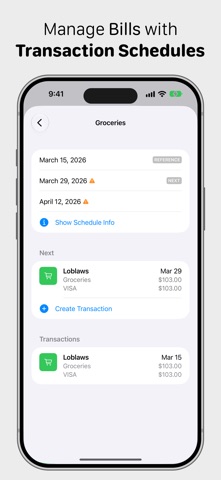
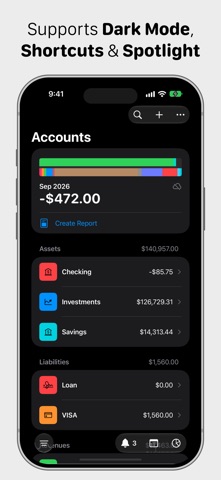
Ledger is designed around double-entry accounting. Because Ledger is based on proven accounting practices, your transactions can be as complex as you need them to be. Record income, expenses, transfers, and splits through a simple interface. When viewing accounts and their transactions, balances are at the forefront. Balances are charted for each account. For bank accounts, see significant deposits and withdrawals at a glance. For income and expenses, see your budget plotted against your spending balances — a budget tracker that shows how you're actually doing against your plan. Capture transactions using CSV import. Automations can be created to assign categories based on transaction text. You can also set up integrations in Shortcuts, saving entries when using Apple Pay. Sometimes a calendar is the best way to navigate your spending. From the main screen, it shows any transactions that happened on a given day. Open it from an expense account and you can see how often you're dining out, making online purchases, and so on — a budget calendar that makes patterns easy to spot. Budgets can be a great tool when managing your money, but sometimes it's hard to know where to start. Open stats from each account to see your per-month spending over the past year. Once you create your budget, that line is overlaid on your spending chart. Sometimes your invoices come far in advance. Ledger supports transaction statuses. When you receive an invoice, record it as "planned." From the main screen, open the Upcoming screen to see which invoices are coming due. For more predictable expenses, create a schedule and assign a template transaction. Entries can be generated on those dates as they occur. Ledger supports backup and restore. It supports iPhone and iPad, and your data can be synced between devices. Dark mode and Spotlight search are also supported.
What's new · 4.1.5
- Added account presets - Updated transaction import UI
Details