

Photo Album Widget
Lukas Gergel · Photo & Video
Independent analytics for this App Store listing. AppTracker is not affiliated with Lukas Gergel.
Chart standing · US
What changed · US
Listing changes AppTracker has observed for this app in this storefront — new versions, price moves, rating shifts, and store copy.
Photos are framed better, and albums are easier to find. • Better cropping. Photos are now cropped to fit the shape of each widget. Portrait photos keep more of the top of the picture, so faces are less likely to be cut off. • Wide widgets favor landscape photos. When a wide widget shows photos in random order, it now leans toward landscape photos, which fit it better. Oldest-first and newest-first orders are unchanged. • A tidier album list. When you choose Edit Widget and tap Album, your albums are now grouped under My Albums and Shared Albums and sorted by name. Thanks for using Photo Album Widget.
Price & rating history · US
Reconstructed from the listing changes AppTracker has observed in this storefront. A field is charted once it has changed more than once, and each line starts at the value it moved from.
Average rating · ★ 3.38 now · 3 changes on record
Ratings breakdown · US
The star breakdown behind this app's rating in this storefront.
In-app purchases · US
No in-app purchases.
Screenshots



Keywords this app targets
Search terms AppTracker associates with this app — estimates, not search volume. ❝ = in the app's title; a highlighted number is its current position for that term.
Similar apps
Competitors and close alternatives, as estimated by AppTracker.
 Photo Widget — The Best One
Sindre Sorhus
2 shared topics · 2 shared title words
Photo Widget — The Best One
Sindre Sorhus
2 shared topics · 2 shared title words
 Photo Albums and Widget
Zhiguang Han
1 shared topic · 2 shared title words
Photo Albums and Widget
Zhiguang Han
1 shared topic · 2 shared title words
 Photo Widget
Francis Bonnin
2 shared topics · 2 shared title words
Photo Widget
Francis Bonnin
2 shared topics · 2 shared title words
 PhotoWidget+
tadashi atoji
2 shared topics
PhotoWidget+
tadashi atoji
2 shared topics
 Photo Widget: Theme Wallpapers
Photo Widget Inc.
1 shared topic · 2 shared title words
Photo Widget: Theme Wallpapers
Photo Widget Inc.
1 shared topic · 2 shared title words
 Photo Widget-Live Pic Sharing
银雪 朱
2 shared title words
Photo Widget-Live Pic Sharing
银雪 朱
2 shared title words
 Colorful Widget- Widget&Themes
Guangzhou ZHIFENG Information Technology Co.,Ltd.
1 shared topic · 1 shared title word
Colorful Widget- Widget&Themes
Guangzhou ZHIFENG Information Technology Co.,Ltd.
1 shared topic · 1 shared title word
 Photo Of The Day Widget
Francis Bonnin
Photo Of The Day Widget
Francis Bonnin
About
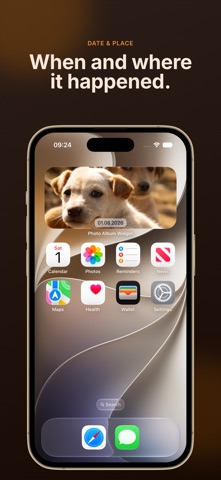
Bring the photos you love back to your Home Screen. Photo Album Widget turns any album in Photos into a personal photo frame. Choose an album on your device or an iCloud Shared Album, add a widget, and see a different photo on the schedule you choose. MAKE EACH WIDGET YOURS • Add as many widgets as you like—each with its own album and settings • Show photos oldest first, newest first, or in a random order • Choose a refresh period from every 5 minutes to every 24 hours • Apply filters, including Noir, and add decorative frames • Show the date, location, or both alongside the photo • Choose what a tap does: open the photo in the app, move to the next photo, or do nothing • Use the Next Photo Shortcuts action to advance a widget without opening the app ON YOUR MAC, TOO The widget works on macOS as well, so your memories can live on your desktop. PRIVATE BY DESIGN No account. No sign-in. No ads. No tracking. Your photos stay in your photo library on your device. Choose an album, make it yours, and let your photos come back into view.
What's new · 2.11
Photos are framed better, and albums are easier to find. • Better cropping. Photos are now cropped to fit the shape of each widget. Portrait photos keep more of the top of the picture, so faces are less likely to be cut off. • Wide widgets favor landscape photos. When a wide widget shows photos in random order, it now leans toward landscape photos, which fit it better. Oldest-first and newest-first orders are unchanged. • A tidier album list. When you choose Edit Widget and tap Album, your albums are now grouped under My Albums and Shared Albums and sorted by name. Thanks for using Photo Album Widget.
Details