

RØDE Central Mobile
FREEDMAN ELECTRONICS PTY LTD · Music
Independent analytics for this App Store listing. AppTracker is not affiliated with FREEDMAN ELECTRONICS PTY LTD.
Chart standing · US
What changed · US
Listing changes AppTracker has observed for this app in this storefront — new versions, price moves, rating shifts, and store copy.
Stability fixes
Price & rating history · US
Reconstructed from the listing changes AppTracker has observed in this storefront. A field is charted once it has changed more than once, and each line starts at the value it moved from.
Average rating · ★ 1.66 now · 6 changes on record
Ratings breakdown · US
The star breakdown behind this app's rating in this storefront.
In-app purchases · US
No in-app purchases.
Screenshots
Keywords this app targets
Search terms AppTracker associates with this app — estimates, not search volume. ❝ = in the app's title; a highlighted number is its current position for that term.
Similar apps
Competitors and close alternatives, as estimated by AppTracker.
 Mobile MIDI
Adam Hammad
2 shared topics · 1 shared title word
Mobile MIDI
Adam Hammad
2 shared topics · 1 shared title word
 MicSwap Pro: Microphone Sound
Future Moments LLC
MicSwap Pro: Microphone Sound
Future Moments LLC
 iRig Recorder
IK Multimedia US, LLC
1 shared topic
iRig Recorder
IK Multimedia US, LLC
1 shared topic
 Stereo Microphone
Ryouta Kira
1 shared topic
Stereo Microphone
Ryouta Kira
1 shared topic
 MultiTrack DAW
Harmonicdog
1 shared topic
MultiTrack DAW
Harmonicdog
1 shared topic
 Analyzer
DSP Mobile UG (haftungsbeschraenkt)
1 shared topic
Analyzer
DSP Mobile UG (haftungsbeschraenkt)
1 shared topic
 CreamAudio Recorder
Siarhei Hladkou
CreamAudio Recorder
Siarhei Hladkou
 RF Control
Claus Menke
RF Control
Claus Menke
About
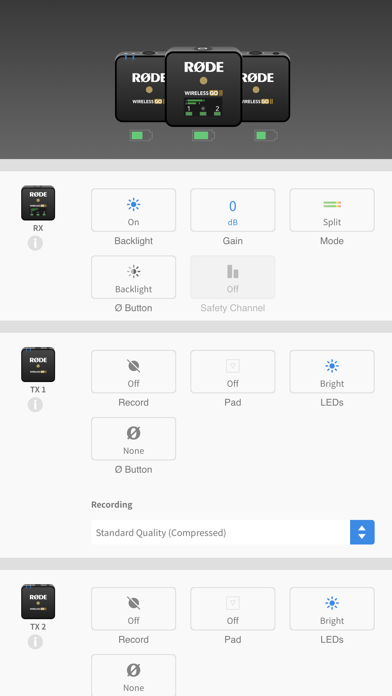
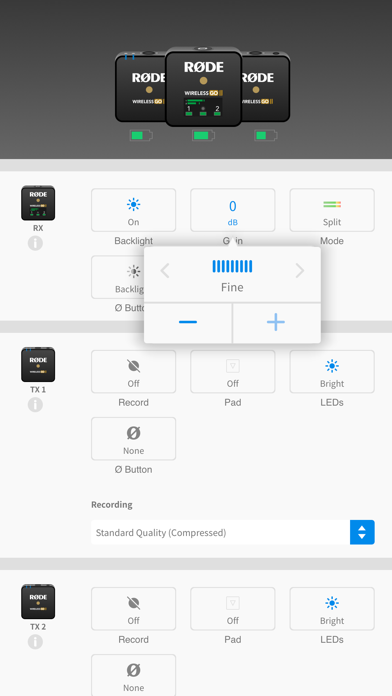
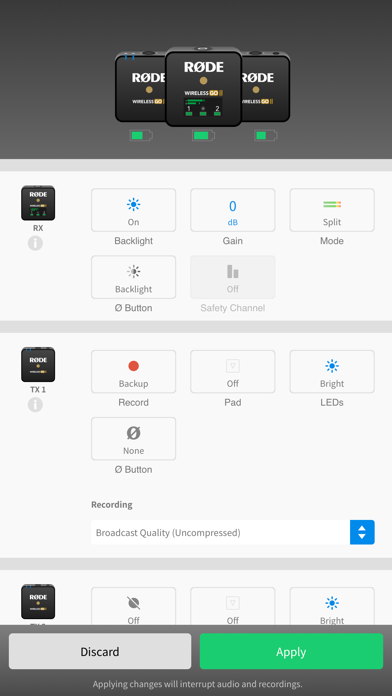
RØDE Central is an easy-to-use mobile companion app for compatible RØDE microphones that allows you to configure your device settings anywhere, unlock advanced features and processing, access device information, and update to the latest firmware. Note: You will need to use an MFi-certified Lightning Accessory cable such as the RØDE SC15 or SC21 to connect your RØDE microphone to your smartphone. To access on-board recordings from the Wireless GO II, you will need to use the desktop version of the RØDE Central app. Key Features ------------- - Fully featured and easy-to-use companion app for a range of RØDE products - Activate and control features and settings anytime, anywhere - Access powerful on-board processing and effects, including compression, high-pass filtering, noise gating and the legendary Aphex® Aural Exciter™ and Big Bottom™ - Update your device firmware to access latest features - Access device information, including clock, firmware version, battery levels, product ID and more Supported Microphones and Settings -------------------------------------- [ Wireless ME ] - ME Mic: On, Off - GainAssist: Auto, Dynamic, Off - Split / Merged Mode - Output Gain: Low, Mid, High - LEDs: Dim, Bright [ Wireless GO II ] - Split / Merged Mode - Backlight: On, Off - Gain Mode: Fine, Coarse, Camera Preset - Safety Channel: On, Off - Button: Marker, Backlight, Mute, None - On-board Recording: Always, Backup, Off - Pad: On, Off - Recording Quality: Compressed, Uncompressed [ VideoMic GO II ] - Input Gain - High-frequency Boost: On, Off - High-pass Filter: Off, 75Hz, 150Hz - Pad: On, Off - Direct Monitoring: On, Off - Monitoring Level [ AI-Micro ] - Merged / Split / Stereo Input 1 Mode - Input Gain (Input 1, 2) - High-pass Filter: Off, 75Hz, 150Hz - Direct Monitoring: On, Off - Monitoring Level [ NT-USB+ ] - Input Gain - High-pass Filter: Off/75Hz/150Hz - Noise Gate: On, Off - Compressor: On, Off - Aphex® Aural Exciter™: On, Off - Aphex® Big Bottom™: On, Off - Save to Microphone (settings persist)
What's new · 2.1.2
Stability fixes
Details