

CreamAudio Recorder
Siarhei Hladkou · Utilities
Independent analytics for this App Store listing. AppTracker is not affiliated with Siarhei Hladkou.
Chart standing · US
What changed · US
Listing changes AppTracker has observed for this app in this storefront — new versions, price moves, rating shifts, and store copy.
Your recordings now appear in the Files app, under On My iPhone → CreamAudio Recorder → Recordings, so you can copy or share them directly. This update also fixes microphone and capture-mode issues and improves audio device reliability.
In-app purchases · US
No in-app purchases.
Screenshots




Similar apps
Competitors and close alternatives, as estimated by AppTracker.
 Audio Recorder Pro & Playback
LiveBird Technologies Private Limited
Audio Recorder Pro & Playback
LiveBird Technologies Private Limited
 You Record Pro
Eval'das Sichyunas
You Record Pro
Eval'das Sichyunas
 Recorder Pro: Voice Recorder
Perception System
Recorder Pro: Voice Recorder
Perception System
 Voice Recorder Pro & Editor
LiveBird Tech Inc
Voice Recorder Pro & Editor
LiveBird Tech Inc
 Voice Recorder HD
eFUSION Co., Ltd.
Voice Recorder HD
eFUSION Co., Ltd.
 Voice Recorder - Audio Record
LiveBird Technologies Private Limited
Voice Recorder - Audio Record
LiveBird Technologies Private Limited
 My Rec - Audio Recorder
Raffaele Di Marzo
My Rec - Audio Recorder
Raffaele Di Marzo
 RecorderHQ -Recorder for cloud
SHENG TA TSAI
RecorderHQ -Recorder for cloud
SHENG TA TSAI
About
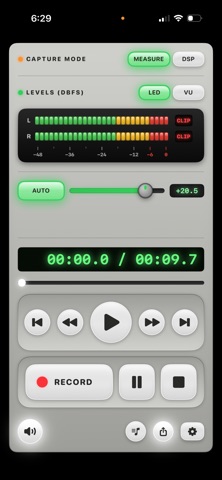
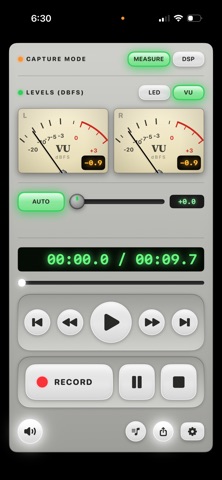
CreamAudio Recorder captures audio the way engineers and musicians need it: straight from the hardware, with nothing added and nothing taken away. MEASURE mode — unprocessed, by default Every recording starts in MEASURE mode, which turns off automatic gain control, noise suppression, and EQ so what hits the file is the raw, linear signal from the input — the built-in mic, or an attached USB/Thunderbolt/class-compliant audio interface. No smoothing, no "enhancement," no surprises — just a clean, faithful, repeatable recording. Built for acoustic measurement, instrument capture, room tone, and any use where accuracy matters more than a processed sound. DSP mode — Apple's stereo mic, when you want it (iPhone/iPad) Flip the switch to DSP mode on iPhone or iPad to hand the signal to Apple's mic-array processing and unlock true stereo capture from the built-in microphones, with the OS's natural-sound tuning (AGC/EQ/noise suppression) applied — good for interviews, ambience, and everyday recording where a fuller, processed sound is what you want. DSP mode only ever applies to the built-in mic; plug in an external interface and the signal is always the raw, unprocessed one. Recording Set your format before you hit record: WAV (24-bit PCM) or AAC (.m4a) at your choice of 96/128/192/256 kbps, recorded directly with no intermediate conversion Share a take straight from the app via the standard system share sheet — AirDrop, Messages, Mail, Save to Files, or any other app — in the format you recorded (WAV by default) Record-level gain boost up to +24 dB, with optional auto level Live stereo metering: switchable analog VU needle or segmented LED ladder Background recording continues when the app is backgrounded or the screen locks Universal: macOS, iPhone, and iPad CreamAudio Recorder is a paid app — a single purchase unlocks every feature described here. There are no subscriptions and no in-app purchases; all features are included.
What's new · 1.0.1
Your recordings now appear in the Files app, under On My iPhone → CreamAudio Recorder → Recordings, so you can copy or share them directly. This update also fixes microphone and capture-mode issues and improves audio device reliability.
Details