

Resolutioner
Sun Apps, LLC · Developer Tools
Independent analytics for this App Store listing. AppTracker is not affiliated with Sun Apps, LLC.
Chart standing · US
What changed · US
Listing changes AppTracker has observed for this app in this storefront — new versions, price moves, rating shifts, and store copy.
Resolutioner is now ready for iOS 27 and macOS 27! I also have a few new features for you! WHAT’S NEW - Calculate Aspect Ratio: if you input a resolution to scale up/down, you can now calculate its base aspect ratio. For example, 1920 × 1080 would be 16:9. - Visualize Resolution: now you can view your input resolution as a rectangle to get an idea for what it would look like! - Shortcuts support! Use Resolutioner features within your Shortcuts, or manage your Saved Presets within Shortcuts. - Updated all app icons to look their best with the new Liquid Glass icon rendering! - Improved Mac Menu Bar app (now a popup window). BUG FIXES - Fixed and improved some animations - Fixed “Quit Resolutioner” SF Symbol - Fixed some spacing issues - Multiple UI fixes and improvements
Price & rating history · US
Reconstructed from the listing changes AppTracker has observed in this storefront. A field is charted once it has changed more than once, and each line starts at the value it moved from.
Average rating · ★ 4.49 now · 3 changes on record
Ratings breakdown · US
The star breakdown behind this app's rating in this storefront.
In-app purchases · US
What this app sells inside itself, grouped by kind and priced for this storefront.
Screenshots




Keywords this app targets
Search terms AppTracker associates with this app — estimates, not search volume. ❝ = in the app's title; a highlighted number is its current position for that term.
Similar apps
Competitors and close alternatives, as estimated by AppTracker.




About
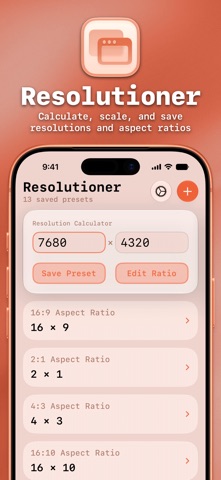
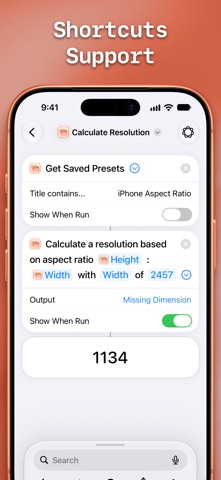
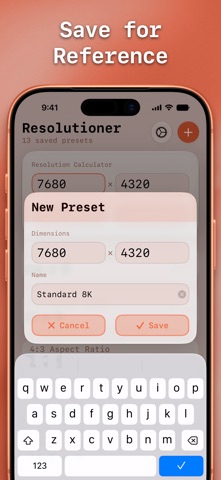
Resolutioner by Sun Apps is a simple utility app for calculating and scaling resolutions and aspect ratios. You can input an aspect ratio and calculate a resolution based on it, or you can input a resolution and scale it up or down. For quick reference, you can save an aspect ratio to your Saved Presets, and load it back into the calculator with just one tap. NO ADS OR PREMIUM FEATURES The price you see is the price you pay. There are no ads, premium features, subscriptions, or anything else. And since we don’t collect any data, there’s no data for us to sell! If you really love the app, you can donate via the Tip Jar option (that’s the in-app purchases the App Store shows). SHORTCUTS SUPPORT Resolutioner extends all of its functionality to the Shortcuts app, so you can calculate resolutions, scale resolutions, and determine aspect ratios in Shortcuts or with Siri AI. You can also view, create, and manage your Saved Presets. INTERFACE You can choose from two great interface options, Unified or Split. Unified puts the calculator and Saved Presets on one page, while Split puts them side-by-side or into tabs, depending on screen/window size. You can also turn the theme color on or off, as well as toggle between a monospaced and a standard font design. DESIGNED FOR iOS AND iPadOS Resolutioner has been designed with Liquid Glass in mind, and works great across iPhone, iPad, Mac, and Apple Vision Pro! - Full support for Dark, Tinted, and Clear Home Screen modes - Full multitasking support: multi-window support, keyboard shortcuts, full cursor support, Slide Over + Split View, and more - Choose from five app icon designs - Fully updated for Liquid Glass - iCloud sync support - Dynamic text support
What's new · 2.1
Resolutioner is now ready for iOS 27 and macOS 27! I also have a few new features for you! WHAT’S NEW - Calculate Aspect Ratio: if you input a resolution to scale up/down, you can now calculate its base aspect ratio. For example, 1920 × 1080 would be 16:9. - Visualize Resolution: now you can view your input resolution as a rectangle to get an idea for what it would look like! - Shortcuts support! Use Resolutioner features within your Shortcuts, or manage your Saved Presets within Shortcuts. - Updated all app icons to look their best with the new Liquid Glass icon rendering! - Improved Mac Menu Bar app (now a popup window). BUG FIXES - Fixed and improved some animations - Fixed “Quit Resolutioner” SF Symbol - Fixed some spacing issues - Multiple UI fixes and improvements
Details