

Nomad Sculpt
Hexanomad · Graphics & Design
Independent analytics for this App Store listing. AppTracker is not affiliated with Hexanomad.
Chart standing · US
What changed · US
Listing changes AppTracker has observed for this app in this storefront — new versions, price moves, rating shifts, and store copy.
• Paint - Paint with shapes: line, band, lasso, polygon, rectangle, ellipse - Band: a gradient between two guides, shaped by a curve - End material and feather for soft gradients - Shapes stay editable with a live preview • Mask - Mask and SelMask merged into one Mask tool - Feather on closed shapes, gradient masks with Band • Material - Displacement maps displace the mesh live, Apply turns them into geometry - Bake and inspect displacement - Displacement import and export for OBJ, USD and FBX - Create a material preset from the selected object • Curves and primitives - Tube IK: tap a point to lock it, long press to lock all - Spiral: Spin can change along the curve - Shapes follow the curve type, Bevel rounds the corners - Handles show their value while you drag them • Repeaters and Arrange - Surface repeater: tap the object to toggle face groups - Consistent tile orientation and faster scatter - Faster display of many copies - Arrange repeaters and groups as one item, circle and sphere without overlap • Gizmo, background and history - Rotation snap: any angle step, new Magnet option - Linear background gradient with an angle - History replay: camera smoothing • Interface and input - Shortcuts to open any menu - On tap: choose finger or stylus for tap actions - Double tap the intensity slider to reset it - Blender Link: displacement and pivot sync - Holding a key no longer repeats its shortcut
Ratings breakdown · US
The star breakdown behind this app's rating in this storefront.
In-app purchases · US
What this app sells inside itself, grouped by kind and priced for this storefront.
Screenshots


Keywords this app targets
Search terms AppTracker associates with this app — estimates, not search volume. ❝ = in the app's title; a highlighted number is its current position for that term.
Similar apps
Competitors and close alternatives, as estimated by AppTracker.
 Sketch 3D
Victor Ng
1 shared topic
Sketch 3D
Victor Ng
1 shared topic
 3D modeling: ArtiMesh
White Bread Games
1 shared topic
3D modeling: ArtiMesh
White Bread Games
1 shared topic
 Voxel Max: 3D Modeling
Adrian Andreca
2 shared topics
Voxel Max: 3D Modeling
Adrian Andreca
2 shared topics
 3D modeling: Design my model
Core five, Inc.
1 shared topic
3D modeling: Design my model
Core five, Inc.
1 shared topic
 Valence 3D
Hi-Rez, LLC
1 shared topic
Valence 3D
Hi-Rez, LLC
1 shared topic
 Verto Studio 3D
Verto Studio LLC
1 shared topic
Verto Studio 3D
Verto Studio LLC
1 shared topic
 Magic Poser - Art Pose Tool
Wombat Studio, Inc.
1 shared topic
Magic Poser - Art Pose Tool
Wombat Studio, Inc.
1 shared topic
 Art Model - Pose & morph tool
Tomi Nevalainen
Art Model - Pose & morph tool
Tomi Nevalainen
About
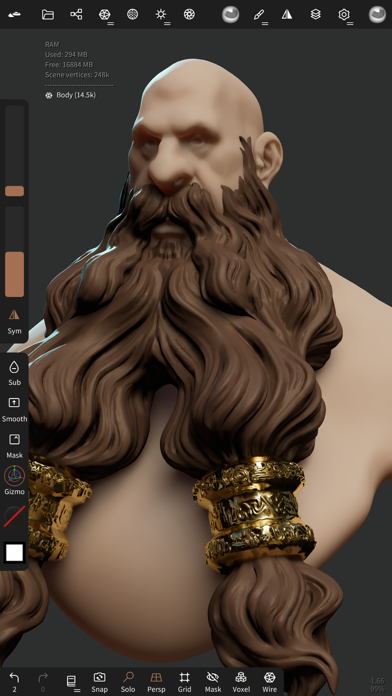
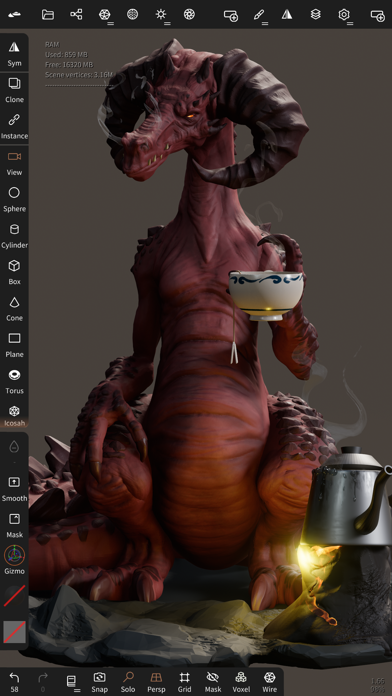
• Sculpting tools Clay, flatten, smooth, mask and many other brushes will let you shape your creation. You can also use the trim boolean cutting tool with lasso, rectangle and other shapes, for hardsurface purposes. • Stroke customization Falloff, alphas, tilings, pencil pressure and other stroke parameters can be customized. You can save and load your tools preset as well. • Painting tools Vertex painting with color, roughness and metalness. You can easily manage all your material presets as well. • Layers Record your sculpting and painting operations in separate layers for easier iteration during the creation process. Both the sculpting and painting changes are recorded. • Multiresolution sculpting Go back and forth between multiple resolution of your mesh for a flexible workflow. • Voxel remeshing Remesh quickly your mesh to get a uniform level of detail. It can be used to quickly sketch a rough shape at the beginning of the creation process. • Dynamic topology Refine locally your mesh under your brush to get an automatic level of detail. You can even keep your layers, as they will be automatically updated! • Decimate Reduce the number of polygons by keeping as many details as possible. • Face Group Segment your mesh into subgroups with the face group tool. • Automatic UV unwrap The automatic UV unwrapper can use face groups to control the unwrapping process. • Baking You can transfer vertex data such as color, roughness, metalness and small scaled detail in to textures. You can also do the opposite, transfering textures data into vertex data or layers. • Primitive shape Cylinder, torus, tube, lathe and other primitives can be used to quickly start new shapes from scratch. • PBR rendering Beautiful PBR rendering by default, with lighting and shadows. You can always switch to matcap for a more standard shading for sculpting purposes. • Post processing Screen Space Reflection, Depth of Field, Ambient Occlusion, Tone mapping, etc • Export and Import Supported formats include glTF, OBJ, STL or PLY files. • Interface Easy-to-use interface, designed for mobile experience. Customization is possible as well! • Quad Remesher (separate in-app purchase only) Remesh your object automatically with a quad dominant mesh that follows the mesh curvatures. It supports guides, face groups and density painting.
What's new · 2.10
• Paint - Paint with shapes: line, band, lasso, polygon, rectangle, ellipse - Band: a gradient between two guides, shaped by a curve - End material and feather for soft gradients - Shapes stay editable with a live preview • Mask - Mask and SelMask merged into one Mask tool - Feather on closed shapes, gradient masks with Band • Material - Displacement maps displace the mesh live, Apply turns them into geometry - Bake and inspect displacement - Displacement import and export for OBJ, USD and FBX - Create a material preset from the selected object • Curves and primitives - Tube IK: tap a point to lock it, long press to lock all - Spiral: Spin can change along the curve - Shapes follow the curve type, Bevel rounds the corners - Handles show their value while you drag them • Repeaters and Arrange - Surface repeater: tap the object to toggle face groups - Consistent tile orientation and faster scatter - Faster display of many copies - Arrange repeaters and groups as one item, circle and sphere without overlap • Gizmo, background and history - Rotation snap: any angle step, new Magnet option - Linear background gradient with an angle - History replay: camera smoothing • Interface and input - Shortcuts to open any menu - On tap: choose finger or stylus for tap actions - Double tap the intensity slider to reset it - Blender Link: displacement and pivot sync - Holding a key no longer repeats its shortcut
Details