

Work Counter: Hours Tracker
Youri Berentsen · Business
Independent analytics for this App Store listing. AppTracker is not affiliated with Youri Berentsen.
Chart standing · US
What changed · US
Listing changes AppTracker has observed for this app in this storefront — new versions, price moves, rating shifts, and store copy.
• Pause: take a break while clocked in. The timer stops and your break is subtracted when you clock out. Also from the Live Activity, widget and Apple Watch. • Holidays & Time Off: mark holidays, sick days and vacation, also as half days. See your vacation balance and earn extra pay on holidays. • Calendar View: see your month at a glance in History, with days off and workdays you forgot to log. • Shared Tasks: one task list for all your projects, with a rate per task. • Custom Period & Time Zones: pick any date range, and entries keep the time zone they were made in. • Smarter Invoices: every invoice is kept, to open again, change and mark as paid. Import your hours, overtime and travel costs in one tap. • Help & Feedback: suggest a feature or report a bug right from the app. • More accurate earnings: a project or person without a rate no longer sets your earnings to 0, overtime starts after 8 hours unless you set another limit, and rounding uses the interval shown in Settings. Entries keep the rate, overtime and travel costs they were saved with. • Support for larger text sizes, smoother animations and many bug fixes.
Price & rating history · US
Reconstructed from the listing changes AppTracker has observed in this storefront. A field is charted once it has changed more than once, and each line starts at the value it moved from.
Average rating · ★ 4.84 now · 2 changes on record
Ratings breakdown · US
The star breakdown behind this app's rating in this storefront.
In-app purchases · US
What this app sells inside itself, grouped by kind and priced for this storefront.
Screenshots



Keywords this app targets
Search terms AppTracker associates with this app — estimates, not search volume. ❝ = in the app's title; a highlighted number is its current position for that term.
Similar apps
Competitors and close alternatives, as estimated by AppTracker.
 WorkTimes - Hours Tracker
Florian Mielke
3 shared topics · 3 shared title words
WorkTimes - Hours Tracker
Florian Mielke
3 shared topics · 3 shared title words
 Hours Tracker - myTime
Heiner Gerdes
1 shared topic · 3 shared title words
Hours Tracker - myTime
Heiner Gerdes
1 shared topic · 3 shared title words
 iboChron - Work Time Tracker
Tobias Hauss
2 shared topics · 2 shared title words
iboChron - Work Time Tracker
Tobias Hauss
2 shared topics · 2 shared title words
 WorkHours: Time Tracker
DEVAPPS d.o.o.
2 shared topics · 1 shared title word
WorkHours: Time Tracker
DEVAPPS d.o.o.
2 shared topics · 1 shared title word
 Hours Tracker: Time Tracking
Cribasoft, LLC
1 shared topic · 3 shared title words
Hours Tracker: Time Tracking
Cribasoft, LLC
1 shared topic · 3 shared title words
 Temps Travail
Kevin Francois
2 shared topics
Temps Travail
Kevin Francois
2 shared topics
 atWork Hours & Pay Tracker
Sergej Steinbach
1 shared topic · 2 shared title words
atWork Hours & Pay Tracker
Sergej Steinbach
1 shared topic · 2 shared title words
 Hours Tracker - Salarybook
Centriqo
1 shared topic · 3 shared title words
Hours Tracker - Salarybook
Centriqo
1 shared topic · 3 shared title words
About
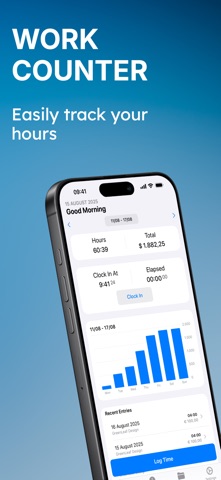
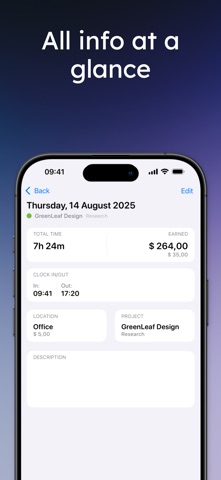
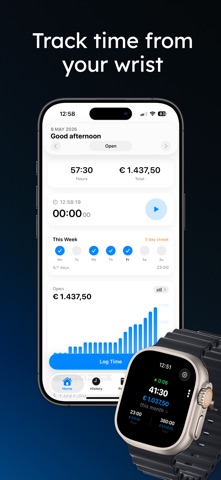
Work Counter shows you exactly what you worked and earned, per project or in total, overtime included. Clock in with one tap, take a break, clock out: your hours, pay and timesheet are done. No account needed, and your data stays on your device and in your own iCloud. • Clock in and out from the app, Lock Screen, a widget, Siri or Apple Watch • Organize your hours by project and task, with totals and charts per project • Pause for a break, it is subtracted automatically • Clock in automatically when you arrive at work • Hourly rates per project, task, person or weekday • Overtime calculated automatically, with its own rate • Holidays, sick days and vacation, with your vacation balance • A calendar of your month that shows workdays you forgot to log • Invoices with your logo, saved to open again, change or mark as paid • Export your timesheet to PDF, CSV or JSON, for all projects or just one • Travel costs per work location and pay periods per project • iPhone, iPad, Mac and Apple Watch, synced with iCloud Made for freelancers, shift workers, contractors, temps and employees who want to check their paycheck. Start for free. Premium unlocks unlimited entries and projects, automatic clock in and out, holiday pay and more. Terms of Use: https://www.apple.com/legal/internet-services/itunes/dev/stdeula/
What's new · 4.5.0
• Pause: take a break while clocked in. The timer stops and your break is subtracted when you clock out. Also from the Live Activity, widget and Apple Watch. • Holidays & Time Off: mark holidays, sick days and vacation, also as half days. See your vacation balance and earn extra pay on holidays. • Calendar View: see your month at a glance in History, with days off and workdays you forgot to log. • Shared Tasks: one task list for all your projects, with a rate per task. • Custom Period & Time Zones: pick any date range, and entries keep the time zone they were made in. • Smarter Invoices: every invoice is kept, to open again, change and mark as paid. Import your hours, overtime and travel costs in one tap. • Help & Feedback: suggest a feature or report a bug right from the app. • More accurate earnings: a project or person without a rate no longer sets your earnings to 0, overtime starts after 8 hours unless you set another limit, and rounding uses the interval shown in Settings. Entries keep the rate, overtime and travel costs they were saved with. • Support for larger text sizes, smoother animations and many bug fixes.
Details