

Hours Tracker: Time Tracking
Cribasoft, LLC · Business
Independent analytics for this App Store listing. AppTracker is not affiliated with Cribasoft, LLC.
Chart standing · US
What changed · US
Listing changes AppTracker has observed for this app in this storefront — new versions, price moves, rating shifts, and store copy.
Bugs Fixed Editing comments now consistently uses the full screen. This fixes issues with keyboard covering up the text on some devices. The Manage Tags screen no longer crashes sometimes when editing data.
Ratings breakdown · US
The star breakdown behind this app's rating in this storefront.
In-app purchases · US
What this app sells inside itself, grouped by kind and priced for this storefront.
Screenshots



Keywords this app targets
Search terms AppTracker associates with this app — estimates, not search volume. ❝ = in the app's title; a highlighted number is its current position for that term.
Similar apps
Competitors and close alternatives, as estimated by AppTracker.
 WorkHours: Time Tracker
DEVAPPS d.o.o.
2 shared topics · 2 shared title words
WorkHours: Time Tracker
DEVAPPS d.o.o.
2 shared topics · 2 shared title words
 Hours Time Tracking
Hours, LLC
2 shared topics · 4 shared title words
Hours Time Tracking
Hours, LLC
2 shared topics · 4 shared title words
 Hours Tracker - myTime
Heiner Gerdes
2 shared topics · 3 shared title words
Hours Tracker - myTime
Heiner Gerdes
2 shared topics · 3 shared title words
 Hours Tracker - Salarybook
Centriqo
2 shared topics · 3 shared title words
Hours Tracker - Salarybook
Centriqo
2 shared topics · 3 shared title words
 WorkTimes - Hours Tracker
Florian Mielke
2 shared topics · 3 shared title words
WorkTimes - Hours Tracker
Florian Mielke
2 shared topics · 3 shared title words
 atWork Hours & Pay Tracker
Sergej Steinbach
3 shared topics · 2 shared title words
atWork Hours & Pay Tracker
Sergej Steinbach
3 shared topics · 2 shared title words
 Time Squared: Hours Tracker
TSQ Publishing Corp.
1 shared topic · 4 shared title words
Time Squared: Hours Tracker
TSQ Publishing Corp.
1 shared topic · 4 shared title words
 Hours TimeLord - Time Tracker
Hours, LLC
2 shared topics · 3 shared title words
Hours TimeLord - Time Tracker
Hours, LLC
2 shared topics · 3 shared title words
About
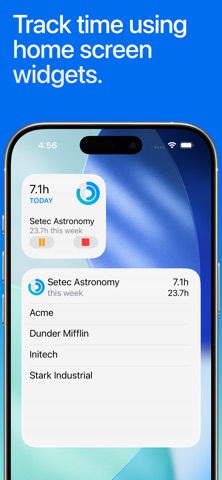
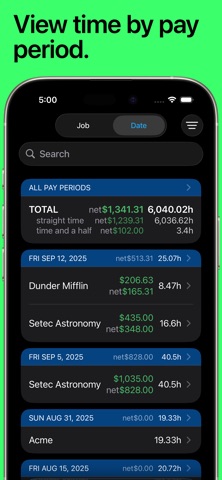
QUICK AND EASY time entry and editing make time tracking painless • Record time using timers, complete with support for Breaks and Pauses, including automatic breaks • Track your pay, including Tips, Mileage, and flexible ± time and earnings adjustments • Pick any time to start, stop, break or pause the timer (7 minutes ago, 10 minutes from now, whatever you need) • Set job locations to get clock in and out reminders when you arrive or leave or fully automate your time tracking (geofencing) • Manually enter time entries with minimal effort thanks to smart, adaptive defaults • Enter comments of any length with your time entries and optionally include them in your exports • Control timers, dictate comments, and apply tags using your Apple Watch ADVANCED FEATURES and customization set HoursTracker above the rest • Automatic daily and weekly overtime earnings calculations • Built-in reports by Day, Week, and Month and support for most common pay period schedules • Robust tagging and filtering allow you to build your own custom views • Reminders when you've worked your target number of hours per day (even takes time rounding into account) • Automatic time rounding: up, down, or to nearest (including 6 min) • Easily copy an existing job or time entry to save time and effort • Reminders you to clock in on your selected work days • Today Widget for at a glance time and pay monitoring • CSV and formatted text export via e-mail or the iOS Share Sheet • Passcode lock (with Touch ID & Face ID support) helps keep your HoursTracker data private • Cloud-based backup/restore with one re-usable backup slot included free (free account sign up is required) • Web-based reporting access, including charts, graphs, desktop exports, and rolling backups available with optional subscription • Customize your HoursTracker experience in the Preferences section under the More tab. Choose only one or many jobs clocked in at a time, opt-into prompts for comments, choose an elapsed time format (hours:minutes, or decimal hours), and more "Free Edition" stores up to 3 jobs and 21 days of entries. For unlimited entries, subscribe to "Premium" (up to 5 jobs) or "Unlimited" (unlimited jobs). Or, erase older data and continue to use the "Free Edition" until you're ready to buy. Visit our website at http://www.hourstrackerapp.com to learn more, and follow @HoursTracker on Twitter or facebook.com/HoursTracker to hear about upcoming features first. hourstrackerapp.com/privacy hourstrackerapp.com/terms www.apple.com/legal/internet-services/itunes/dev/stdeula
What's new · 8.3.2
Bugs Fixed Editing comments now consistently uses the full screen. This fixes issues with keyboard covering up the text on some devices. The Manage Tags screen no longer crashes sometimes when editing data.
Details