

Opal: Screen Time Control
Opal OS · Productivity
Independent analytics for this App Store listing. AppTracker is not affiliated with Opal OS.
Chart standing · US
What changed · US
Listing changes AppTracker has observed for this app in this storefront — new versions, price moves, rating shifts, and store copy.
Take a break, keep your streak Vacation Mode pauses the Rules you pick for as long as you need, then turns them back on. Find it in Settings, or on any Rule that isn't running. A clearer Home Your Opal Score, today's Screen Time and your top distractions now sit side by side at the top of Home. Screen Time, rebuilt A redesigned Screen Time screen with a calendar, simpler Day / Week / Month switching, and the option to exclude apps you don't want counted. Smoother all round Unblocking from inside a Rule keeps you where you were, Sign in with Apple recovers an existing account, subscribers stop seeing upgrade prompts, and translations read more naturally in nine languages.
Ratings breakdown · US
The star breakdown behind this app's rating in this storefront.
In-app purchases · US
What this app sells inside itself, grouped by kind and priced for this storefront.
Screenshots



Keywords this app targets
Search terms AppTracker associates with this app — estimates, not search volume. ❝ = in the app's title; a highlighted number is its current position for that term.
Similar apps
Competitors and close alternatives, as estimated by AppTracker.
 BePresent: Screen Time Control
Screen Detox Inc
1 shared topic · 6 shared title words
BePresent: Screen Time Control
Screen Detox Inc
1 shared topic · 6 shared title words
 Jomo - Screen Time Blocker
Jomo
2 shared topics · 3 shared title words
Jomo - Screen Time Blocker
Jomo
2 shared topics · 3 shared title words
 Freedom: Screen Time Control
Eighty Percent Solutions Corporation
6 shared title words
Freedom: Screen Time Control
Eighty Percent Solutions Corporation
6 shared title words
 AppBlock: Block Apps & Website
MobileSoft s.r.o.
AppBlock: Block Apps & Website
MobileSoft s.r.o.
 Screen Time - AppStops
Yoshiharu Yamada
1 shared topic · 3 shared title words
Screen Time - AppStops
Yoshiharu Yamada
1 shared topic · 3 shared title words
 Brainrot: Screen Time Control
Smolworks Inc
6 shared title words
Brainrot: Screen Time Control
Smolworks Inc
6 shared title words
 HabitBlocker: Earn Screen Time
JOSH EDMUND MONTGOMERY
3 shared title words
HabitBlocker: Earn Screen Time
JOSH EDMUND MONTGOMERY
3 shared title words
 Zentime: Screen Time Control
Ryunosuke Nagase
6 shared title words
Zentime: Screen Time Control
Ryunosuke Nagase
6 shared title words
About
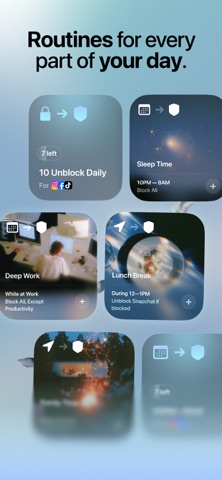
Achieve screen time control with the world’s most-loved screen time app! Opal is the fun, free Screen Time app to improve your focus and make the most out of every day. 5 to 6 hours. That’s the average time you’ll spend looking at your phone today, often without realizing it. It's time to fight back. With a combination of screen time control, app limits, app blockers, real time data, leaderboards and rewards, you will focus better and accomplish your dreams, just like Opal’s members. **As of August 2026, Opal has saved humanity 500 Million hours of screen time. ** Many of the world's top teams and companies trust Opal to help protect their focus. You can too. **Opal cut my screen time by 2 hours per day – Marketing at Google ** **You need this app. When I first got opal my daily screen-time was about 8 1/2 hours a day. Now it's 1 hour. ** **Opal has become an indispensable tool in my quest for productivity and mindful technology usage ** **Get Opal! - Ali Abdaal, productivity expert** BENEFITS Save 1 hour and 23 minutes per DAY from less screen time, on average. 94% of Opal members are less distracted 93% are more productive thanks to the app 90% report improved well-being Added benefits: - Better screen time control - Better productivity at work - Reduce stress, be more mindful - Supports focus challenges, including ADHD - Set daily work hours, sleep, and routines - Block apps to unplug and detox - Stay in focus when you need it most - You're happy and in control of your screen time FEATURES - #1 Screen Time Control: the most loved app for screen time control with 4.8/5. - #1 App Blocker: Instantly Block apps and websites you choose at a specific time of day throughout the week to organize your time. - Focus Difficulty: Make it hard, or make it a bit easier. Deep Focus won't let you cancel or bypass at all. - App Limits: Set daily usage limits on apps and websites to automatically block them and prevent overuse. - Mindful Block Screens: Discover quotes, puns and more every time you try to open an app or website you really shoudn't. - Blocklist & Allowlist: Easily pick any app, game or website you want to block or allow during your Blocks. - Focus Report: Measure your progress with clear metrics, actionable screen time stats, and benchmark against your peers. - Focus Score: Check your screen time and focus level at any point easily spotting Focus and Distracted time. - Calendar: Set daily working hours, sleep and routines, block apps automatically, so you don’t have to remember. - Precious Rewards: Unlock unique MileStones you can share with friends. - Leaderboard: Challenge friends to top the leaderboard, enhancing productivity, focus and keeping each other motivated. - Breaks: Choose the app you want to use, write your intention, and set a timer. - Focus Mode Integration: Sync your Opal Focus Sessions with iPhone Focus Mode to block apps. - Shortcut Integration: Connect iPhone shortcut automations to start/stop Focus Sessions based on app opens, time, location and more! - Focus Reminders: Get timely reminder notifications when you get distracted or reach a time limit. - Deep Focus: Need ultimate focus? Deep Focus is the maximum level of protection — you can’t bypass or cancel. - More Fun: Opal is guilt-free and fun. - Widget: Have Opal on your home screen! CREATE A PERSONALIZED APP BLOCK LIST Easily pick any app, game or website you want to block or allow to Block Apps. PRIVATE & SAFE We use Apple's Screen Time API in order to monitor and block apps you use. Installation is easy and takes a few seconds on your iPhone. Unlike most apps, Opal works entirely on your phone and personal browsing data never leaves your device. TERMS, PRIVACY & CONDITIONS Read on https://opal.so/terms & https://www.apple.com/legal/internet-services/itunes/dev/stdeula/
What's new · 4.19.1
Take a break, keep your streak Vacation Mode pauses the Rules you pick for as long as you need, then turns them back on. Find it in Settings, or on any Rule that isn't running. A clearer Home Your Opal Score, today's Screen Time and your top distractions now sit side by side at the top of Home. Screen Time, rebuilt A redesigned Screen Time screen with a calendar, simpler Day / Week / Month switching, and the option to exclude apps you don't want counted. Smoother all round Unblocking from inside a Rule keeps you where you were, Sign in with Apple recovers an existing account, subscribers stop seeing upgrade prompts, and translations read more naturally in nine languages.
Details