

Omnistat 2
Mathieu Bolard · Utilities
Independent analytics for this App Store listing. AppTracker is not affiliated with Mathieu Bolard.
Chart standing · US
What changed · US
Listing changes AppTracker has observed for this app in this storefront — new versions, price moves, rating shifts, and store copy.
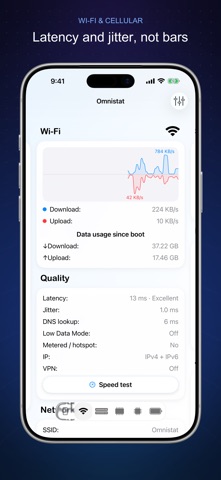
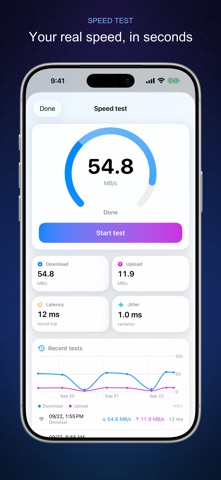
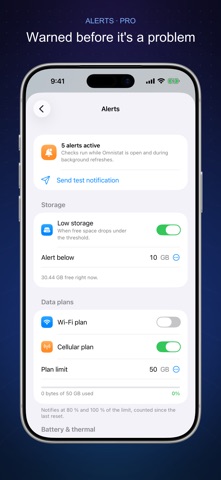
• History & trends: storage, battery, memory, CPU and data charts by day, week, month or year • Smart alerts: low storage, data plan at 80 % and 100 %, overheating, battery, unusual traffic • Speed test with download, upload, latency and history — free for everyone • Storage speed test: sequential read and write speed, with samples from 64 MB to 1 GB • Battery consumption: real drain or charge rate in %/h and watts, time to empty or full • Network identity on the Wi-Fi card: public IP, operator, country and NAT type • New Sensors page: 3D orientation, level, compass and barometer • Network quality on the Wi-Fi and Cellular cards: latency, jitter, DNS, VPN, Low Data Mode • Wi-Fi signal strength and security, GPU section, thermal throttling in the history • Rebuilt Apple Watch app with complications, new widgets, Control Center controls, Siri and Shortcuts • Support for the latest devices, including iPhone 18 Pro, iPhone 17e and iPad Air M4 • Redesigned interface and settings
In-app purchases · US
What this app sells inside itself, grouped by kind and priced for this storefront.
Screenshots




Keywords this app targets
Search terms AppTracker associates with this app — estimates, not search volume. ❝ = in the app's title; a highlighted number is its current position for that term.
Similar apps
Competitors and close alternatives, as estimated by AppTracker.
 Device Status⁺ CPU x Monitor z
Space-Time Transformation Technology Co., Ltd.
1 shared topic
Device Status⁺ CPU x Monitor z
Space-Time Transformation Technology Co., Ltd.
1 shared topic
 Specs: Device Info & Widget
CrioSoft LLC
2 shared topics
Specs: Device Info & Widget
CrioSoft LLC
2 shared topics
 Device Monitor²
Fast-Devs Project
Device Monitor²
Fast-Devs Project
 System Status Pro: hw monitor
Techet
1 shared topic
System Status Pro: hw monitor
Techet
1 shared topic
 Stats Panel - System Monitor
Andrew Moloney
2 shared topics
Stats Panel - System Monitor
Andrew Moloney
2 shared topics
 DataMan - Data Usage Widget
Johnny Ixe
1 shared topic
DataMan - Data Usage Widget
Johnny Ixe
1 shared topic
 Activity Monitor: CPU, Mem, ..
EyeOS Store Inc.
1 shared topic
Activity Monitor: CPU, Mem, ..
EyeOS Store Inc.
1 shared topic
 Device Info: System Monitor
文武 马
Device Info: System Monitor
文武 马
About
Everything your device knows about itself — in one app, in your widgets, on your Watch. NEW • History & trends — storage, battery, memory, CPU and data usage charted by day, week, month or year • Smart alerts — low storage, data plan at 80 % and 100 %, overheating, battery full or low, unusual traffic • Speed test — download, upload, latency and jitter, with a history of every run • Storage speed test — sequential read and write speed of your flash storage, with samples from 64 MB to 1 GB • Battery consumption — the real drain or charge rate in %/h and watts, with the time to empty or full • Network identity — public IP, operator, country and NAT type, next to SSID, BSSID and signal • Sensors — live 3D orientation, bubble level, compass and barometer • Apple Watch app, widgets, Lock Screen, Control Center, Siri and Shortcuts WHAT OMNISTAT SHOWS Device — name, model, internal name, system and build, kernel, uptime, screen resolution, scale and refresh rate Wi-Fi — network name, BSSID, signal strength and security, public IP, operator and AS number, country, NAT type, interfaces, IPv4 and IPv6, data used, live speed, latency, jitter, DNS time, VPN and Low Data Mode Cellular — carrier, country and network codes, radio technology, interfaces, data used and live speed Storage — total, used and free space, every partition with its mount point, file system and size, plus a read/write speed test Memory — total, compressed, resident, active, inactive and free RAM, page size, swap, faults, compressions and purges CPU & GPU — usage per core, thermal state, processor name and type, cores, frequency, architecture, caches, GPU name, Metal family, unified memory and ray tracing Battery — percentage, voltage, capacity in mAh, power, state, drain or charge rate in %/h and watts, time to empty or full, estimated talk, browsing, audio and standby time, and Low Power Mode Sensors — barometric pressure, altitude change, magnetometer, compass, level and motion OMNISTAT PRO History & trends and smart alerts are part of Omnistat Pro. The speed test is free. Monthly and yearly subscriptions with a 1-week free trial, or a one-time lifetime unlock. Payment is charged to your Apple Account at confirmation of purchase. A subscription renews automatically unless it is cancelled at least 24 hours before the end of the current period; manage it in your Apple Account settings. Terms of Use: https://omnistat.netlify.app/eula Privacy Policy: https://omnistat.netlify.app/privacy
What's new · 3.0
• History & trends: storage, battery, memory, CPU and data charts by day, week, month or year • Smart alerts: low storage, data plan at 80 % and 100 %, overheating, battery, unusual traffic • Speed test with download, upload, latency and history — free for everyone • Storage speed test: sequential read and write speed, with samples from 64 MB to 1 GB • Battery consumption: real drain or charge rate in %/h and watts, time to empty or full • Network identity on the Wi-Fi card: public IP, operator, country and NAT type • New Sensors page: 3D orientation, level, compass and barometer • Network quality on the Wi-Fi and Cellular cards: latency, jitter, DNS, VPN, Low Data Mode • Wi-Fi signal strength and security, GPU section, thermal throttling in the history • Rebuilt Apple Watch app with complications, new widgets, Control Center controls, Siri and Shortcuts • Support for the latest devices, including iPhone 18 Pro, iPhone 17e and iPad Air M4 • Redesigned interface and settings
Details