

OBD Tracker - ELM327 Terminal
SMART Technologies GmBH · Travel
Independent analytics for this App Store listing. AppTracker is not affiliated with SMART Technologies GmBH.
Chart standing · US
What changed · US
Listing changes AppTracker has observed for this app in this storefront — new versions, price moves, rating shifts, and store copy.
Price & rating history · US
Reconstructed from the listing changes AppTracker has observed in this storefront. A field is charted once it has changed more than once, and each line starts at the value it moved from.
Average rating · ★ 4.08 now · 2 changes on record
Ratings breakdown · US
The star breakdown behind this app's rating in this storefront.
In-app purchases · US
No in-app purchases.
Screenshots
Keywords this app targets
Search terms AppTracker associates with this app — estimates, not search volume. ❝ = in the app's title; a highlighted number is its current position for that term.
Similar apps
Competitors and close alternatives, as estimated by AppTracker.
 Torque OBD 2 & Car Pro
Fantastic Software, Inc.
1 shared topic · 1 shared title word
Torque OBD 2 & Car Pro
Fantastic Software, Inc.
1 shared topic · 1 shared title word
 Car Scanner ELM OBD2
Stanislav Svistunov
2 shared topics
Car Scanner ELM OBD2
Stanislav Svistunov
2 shared topics
 inCarDoc OBD2 ELM327 Scanner
PNN SOFT
1 shared topic · 1 shared title word
inCarDoc OBD2 ELM327 Scanner
PNN SOFT
1 shared topic · 1 shared title word
 OBD Connect
Alphabit Software Inc.
3 shared topics · 1 shared title word
OBD Connect
Alphabit Software Inc.
3 shared topics · 1 shared title word
 OBD Connector - OBD-II, ELM327
Karina Balkarova
1 shared topic · 2 shared title words
OBD Connector - OBD-II, ELM327
Karina Balkarova
1 shared topic · 2 shared title words
 OBD2 Car Scanner - EOBD Facile
Outils OBD Facile
1 shared topic
OBD2 Car Scanner - EOBD Facile
Outils OBD Facile
1 shared topic
 Engine Link - OBD II diagnosis
K SOLUTION LLC
2 shared topics · 1 shared title word
Engine Link - OBD II diagnosis
K SOLUTION LLC
2 shared topics · 1 shared title word
 OBDeleven – OBD2 car scanner
OBDeleven UAB
2 shared topics
OBDeleven – OBD2 car scanner
OBDeleven UAB
2 shared topics
About
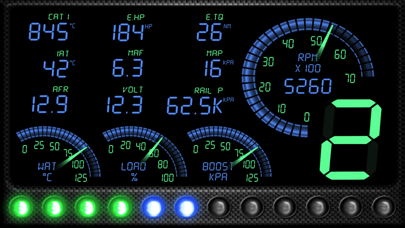
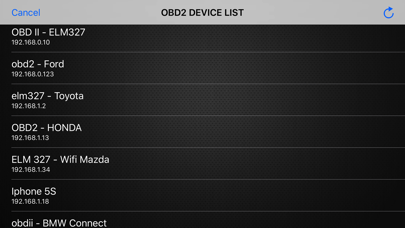
The ELM module(s) supported are network to serial interfaces that use wifi to communicate. This app communicates with an ELM OBDII (OBD2) car interface device. The Ultimate Step-by Step Guide: ◆ Get the right OBD 2 reader or scan tool, whichever suits your car. This is done by checking on the compatibility and the relevant tool. ◆ Locating where the OBD 2 port is. ◆ Powering the car engine on for the case ease of making the system work. ◆ Plug in the pins of the OBD2 connector to the areas of relevance within the OBD 2 port. ◆ Enable the OBD 2 to start reading. ◆ Open app, click "SCAN" - and select correct OBD2 device in list. (default is 192.168.0.10 / 192.168.0.123) You have any questions or concerns? Feel free to contact us. We're always here to help.
Details