

NanoTire
恒俭 董 · Utilities
Independent analytics for this App Store listing. AppTracker is not affiliated with 恒俭 董.
Chart standing · US
What changed · US
Listing changes AppTracker has observed for this app in this storefront — new versions, price moves, rating shifts, and store copy.
NanoTire 2.0.1 brings broader device support and a faster appearance studio. • Now supports iOS 16 and iPadOS 16, including iPhone 8, iPhone X and older iPads. • Shared reports now include the 3D tire exactly as shown on the home screen. • Appearance studio: changing the target size, caliper color or wheel finish is now instant, without rebuilding the tire. • Lower memory use and smoother 3D rendering; large vehicle photos load faster in the try-on preview. • GPS dashboard: automatically resumes after a call or screen lock, and the landscape lock follows the way you hold the phone. • Fixed missing icons in the candidate-size list and the HUD toggle, and a rare case where switching tabs could stop responding. Core calculations remain offline. Thank you for supporting NanoTire.
In-app purchases · US
No in-app purchases.
Screenshots



Similar apps
Competitors and close alternatives, as estimated by AppTracker.
 TreadView — Tire Tread Check
TRIMECH Dhaker
TreadView — Tire Tread Check
TRIMECH Dhaker
 Tire Size Calculator
Cheng Fan
Tire Size Calculator
Cheng Fan
 Tire Calculator (Offset&Speed)
Satoshi Mori
Tire Calculator (Offset&Speed)
Satoshi Mori
 SizeMyBike
Chalaoux Francois-Regis
SizeMyBike
Chalaoux Francois-Regis
 Kart Chassis Setup
ISEnet
Kart Chassis Setup
ISEnet
 Speedometer 55 GPS Speed & HUD
Stanislav Dvoychenko
Speedometer 55 GPS Speed & HUD
Stanislav Dvoychenko
 Speedometer: Driving Tracker
Taohidul Islam
Speedometer: Driving Tracker
Taohidul Islam
 Thread Pitch Gauge - Tap Drill
Vladislav Zhirnov
Thread Pitch Gauge - Tap Drill
Vladislav Zhirnov
About
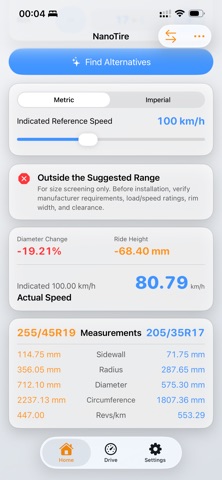
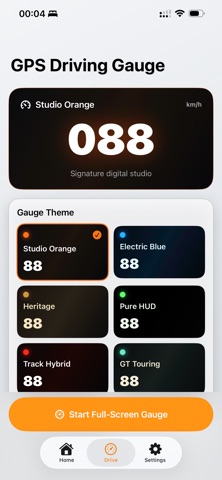
NanoTire brings tire-size comparison, premium 3D visualization and a full-screen GPS driving gauge together in one carefully designed app for iPhone and iPad. TIRE SIZE COMPARISON • Compare original and target width, aspect ratio and rim diameter. • View nominal sidewall, radius, diameter, circumference, revolutions, ride-height change and speedometer/distance difference. • Adjust reference speed and switch between metric and imperial units. • Explore mathematically matched candidate sizes with a configurable safety tolerance. 3D APPEARANCE STUDIO • Rotate a detailed 3D tire freely. • Choose wheel designs, finishes, tread patterns, caliper colors, brake-rotor sizes and types, and studio scenes. • Keep appearance choices consistent across the main preview and vehicle photo preview. VEHICLE PHOTO PREVIEW • Place the selected wheel style on a side-view vehicle photo. • Manually align size, perspective, wheel-face angle, occlusion and rotation. • Export and share the composed preview image. • This is a visual preview, not a fitment guarantee. GPS DRIVING GAUGE • Six visual themes with portrait and landscape layouts. • HUD mirror mode, speed alert, trip distance, maximum/average speed and duration. • Map-enhanced landscape layout using Apple MapKit. • NanoTire uses foreground location only while the gauge is active and does not record your route. SAVE, SHARE & WIDGETS • Save common tire comparisons and restore them later. • Share a clear text or image comparison report. • The optional WidgetKit widget shows recent 7-day steps and walking distance. NanoTire supports English, Simplified Chinese, Traditional Chinese, Japanese, Korean, German, Spanish and French, with Light and Dark Mode and dedicated iPad layouts. IMPORTANT Calculations are based on nominal tire dimensions. Actual dimensions and fitment vary by manufacturer, rim width, load, pressure, suspension, clearance and vehicle configuration. Always verify with the tire or vehicle manufacturer, or a qualified professional, before installation.
What's new · 2.0.1
NanoTire 2.0.1 brings broader device support and a faster appearance studio. • Now supports iOS 16 and iPadOS 16, including iPhone 8, iPhone X and older iPads. • Shared reports now include the 3D tire exactly as shown on the home screen. • Appearance studio: changing the target size, caliper color or wheel finish is now instant, without rebuilding the tire. • Lower memory use and smoother 3D rendering; large vehicle photos load faster in the try-on preview. • GPS dashboard: automatically resumes after a call or screen lock, and the landscape lock follows the way you hold the phone. • Fixed missing icons in the candidate-size list and the HUD toggle, and a rare case where switching tabs could stop responding. Core calculations remain offline. Thank you for supporting NanoTire.
Details