

Treadmill Smart Speed
John McManus · Health & Fitness
Independent analytics for this App Store listing. AppTracker is not affiliated with John McManus.
Chart standing · US
What changed · US
Listing changes AppTracker has observed for this app in this storefront — new versions, price moves, rating shifts, and store copy.
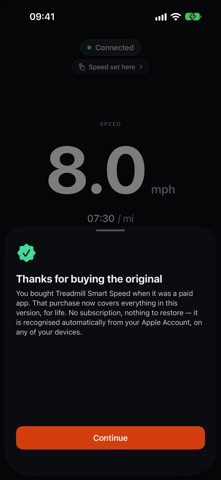
Treadmill Smart Speed has been completely rebuilt. • A speed readout sized to be read at arm's length, mid-run • Six presets you set to your own paces, one tap each • Incline, sent alongside speed • Metric or imperial, chosen separately for speed and for pace • The Apple Watch app, carried over and working with the new app, now sending your heart rate to Zwift too If you bought the original app, it stays yours. Everything here is free for you, for ever — no subscription, nothing to restore. It is recognised automatically from your Apple Account, on any of your devices. For everyone else the app is now free to download. Every feature is free for a 10-minute run, and a one-time Unlock forever makes every run unlimited, with no subscription.
Ratings breakdown · US
The star breakdown behind this app's rating in this storefront.
Screenshots



Keywords this app targets
Search terms AppTracker associates with this app — estimates, not search volume. ❝ = in the app's title; a highlighted number is its current position for that term.
Similar apps
Competitors and close alternatives, as estimated by AppTracker.
 iSmoothRun
Lake Horizon Ltd
2 shared topics
iSmoothRun
Lake Horizon Ltd
2 shared topics
 Workout Live - Heart Rate Zone
Anh Nguyen
2 shared topics
Workout Live - Heart Rate Zone
Anh Nguyen
2 shared topics
 Map My Tracks: run tracker pro
Tinderhouse
2 shared topics
Map My Tracks: run tracker pro
Tinderhouse
2 shared topics
 Strava: Run, Bike, Walk
Strava, Inc.
2 shared topics
Strava: Run, Bike, Walk
Strava, Inc.
2 shared topics
 Fitmeter Run - GPS Tracker
Volker Schueppel
1 shared topic
Fitmeter Run - GPS Tracker
Volker Schueppel
1 shared topic
 RunTrace: Run Tracker
Yongliang Wang
RunTrace: Run Tracker
Yongliang Wang
 What Is My Speed?
Sarah Reichelt
1 shared title word
What Is My Speed?
Sarah Reichelt
1 shared title word
 Speedowski: GPS Speedometer
Witold Witkowski
Speedowski: GPS Speedometer
Witold Witkowski
About
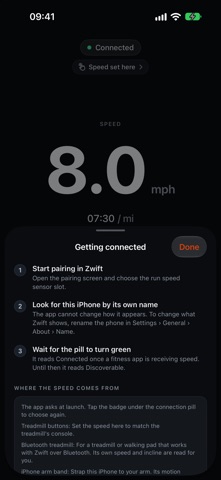
Your treadmill, on Zwift. Treadmill Smart Speed turns your iPhone into a Bluetooth running speed and incline sensor. Set the speed you are running on screen and your iPhone broadcasts it, exactly as a footpod would — so Zwift, and any other app that reads a running sensor, sees your treadmill. No footpod, no treadmill upgrade, no extra hardware. GETTING CONNECTED 1. Start pairing in Zwift. Open the pairing screen and choose the run speed sensor slot. 2. Look for this iPhone by its own name. The app cannot change how it appears — to change what Zwift shows, rename the phone in Settings › General › About › Name. 3. Wait for the pill to turn green. It reads Connected once a fitness app is receiving speed. Until then it reads Discoverable. BUILT TO BE READ MID-RUN The screen is made to be read at arm's length, in a dim room, while you are running. The speed being broadcast owns the display, and every control sits in the half a thumb reaches. • A large speed readout with your current pace beneath it • Plus and minus keys that step in 0.1 increments • Six presets you set to your own paces, one tap each • Incline, sent alongside speed • Metric or imperial, chosen separately for speed and for pace • Keeps broadcasting in the background, so glancing at another app does not drop the connection APPLE WATCH The Apple Watch app estimates your speed and cadence from your wrist and reads your heart rate, then streams them to your iPhone. Your iPhone broadcasts the speed, and your heart rate as a heart-rate sensor that Zwift can pair too. Your run is saved to Health as a workout. IF YOU BOUGHT THE ORIGINAL APP It stays yours. Everything in this version is free for you, for ever — no subscription, nothing to restore. It is recognised automatically from your Apple Account, on any of your devices. FREE TO TRY Every feature is free for a 10-minute run, with an hour between free runs. When a free run ends, the speed sent drops to zero until you unlock. Unlock forever is a one-time purchase with no subscription. Every run is then unlimited, and the unlock is shared with your family through Family Sharing. The price is shown before you buy. Privacy policy: https://appyappster.com/privacy Support: https://appyappster.com/support
What's new · 3.0.0
Treadmill Smart Speed has been completely rebuilt. • A speed readout sized to be read at arm's length, mid-run • Six presets you set to your own paces, one tap each • Incline, sent alongside speed • Metric or imperial, chosen separately for speed and for pace • The Apple Watch app, carried over and working with the new app, now sending your heart rate to Zwift too If you bought the original app, it stays yours. Everything here is free for you, for ever — no subscription, nothing to restore. It is recognised automatically from your Apple Account, on any of your devices. For everyone else the app is now free to download. Every feature is free for a 10-minute run, and a one-time Unlock forever makes every run unlimited, with no subscription.
Details