

Cloud Music-Download Songs Lab
国文 李 · Reference
Independent analytics for this App Store listing. AppTracker is not affiliated with 国文 李.
Chart standing · US
What changed · US
Listing changes AppTracker has observed for this app in this storefront — new versions, price moves, rating shifts, and store copy.
• Stronger Wi‑Fi Transfer as a core import path • Clearer offline import and playback experience • Import, Library, and Playlist polish • Updated App Store screenshots • Bug fixes and stability improvements
Ratings breakdown · US
The star breakdown behind this app's rating in this storefront.
In-app purchases · US
What this app sells inside itself, grouped by kind and priced for this storefront.
Screenshots


Keywords this app targets
Search terms AppTracker associates with this app — estimates, not search volume. ❝ = in the app's title; a highlighted number is its current position for that term.
Similar apps
Competitors and close alternatives, as estimated by AppTracker.
 Cloud Music Player - Listener
继勋 于
Cloud Music Player - Listener
继勋 于
 Stream Music Player
Yew Chen Chung
Stream Music Player
Yew Chen Chung
 OnePlayer Pro-Offline Music
Guangzhou Charming Island Technology Co., Ltd.
OnePlayer Pro-Offline Music
Guangzhou Charming Island Technology Co., Ltd.
 iSound - Offline Music Player
Serhii Toritsyn
iSound - Offline Music Player
Serhii Toritsyn
 Offline Music Player
Md Zakir Hossain
Offline Music Player
Md Zakir Hossain
 Music Box – Offline Player
文娟 蔡
Music Box – Offline Player
文娟 蔡
 Dodast
Mohammad Khakpaki
Dodast
Mohammad Khakpaki
 AudioShelf: Music & Books
Jiri Kluciar
AudioShelf: Music & Books
Jiri Kluciar
About
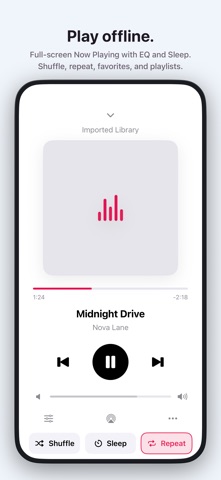
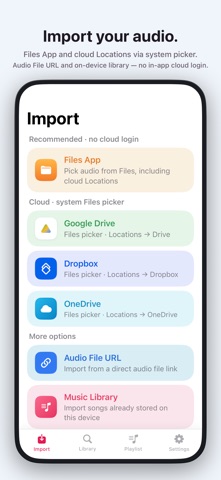
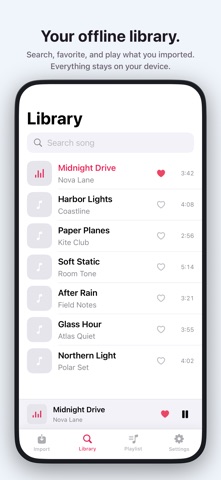
Importone brings audio you already own into one offline library — then plays it on your iPhone or iPad. IMPORT YOUR MUSIC • Wi‑Fi Transfer — send files from another device on the same network (browser / QR) • Files App — including cloud Locations • Google Drive, Dropbox, and OneDrive via the system file picker (Browse → Locations) — no cloud sign-in inside Importone • Direct audio file URL • On-device music library, where available PLAY & ORGANIZE • Library with search, favorites, and playlists • Favorites, Recent, and Most Played • Mini player and full Now Playing • Equalizer and sleep timer • AirPlay and system audio routes YOUR FILES STAY YOURS Importone is not a streaming music catalog. It does not sell a subscription music library. You import files you have the right to use; they are stored on your device for offline playback. ADS & REMOVE ADS The free app may show ads. A one-time Remove Ads purchase clears ads for your Apple ID. Restore anytime from Settings. Privacy Policy: https://feedbackofapp.wixsite.com/feedback/single-post/privacy-policy Terms of Service: https://feedbackofapp.wixsite.com/feedback/single-post/terms-of-service Support: feedbackofapp@outlook.com
What's new · 3.0.0
• Stronger Wi‑Fi Transfer as a core import path • Clearer offline import and playback experience • Import, Library, and Playlist polish • Updated App Store screenshots • Bug fixes and stability improvements
Details