

AudioShelf: Music & Books
Jiri Kluciar · Music
Independent analytics for this App Store listing. AppTracker is not affiliated with Jiri Kluciar.
Chart standing · US
What changed · US
Listing changes AppTracker has observed for this app in this storefront — new versions, price moves, rating shifts, and store copy.
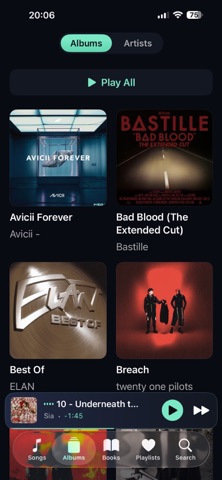
New in AudioShelf 1.5 YOUR MUSIC, WITHIN REACH • Add the playing track to Favorites or a playlist directly from the player. You can also create a new playlist there. • Switch between the album grid and a larger, easier-to-read album list. • Smart playlists have a fresh look with colorful cards, album artwork, track counts and easier-to-read titles. FIND YOUR PLACE IN AUDIOBOOKS • Save bookmarks while listening, give them names and return to them from the book’s bookmark list. • Choose to rewind 5 or 10 seconds when resuming an audiobook, or leave this option off. BACK UP YOUR LIBRARY • Export and restore playlists, favorites, audiobook positions, bookmarks and edited library labels. • Preview matched and missing tracks before restoring. Restoring merges playlists, favorites and bookmarks; saved labels and listening positions replace those of matched tracks. • Audio files are not included. Keep them separately and import them before restoring. NOW IN JAPANESE • AudioShelf is now available in Japanese. FIXES • Importing different files with the same filename no longer overwrites an existing audio file. • Albums with the same title by different artists are kept separate. • The “end of chapter” sleep timer also stops at the end of an MP3 chapter instead of continuing to the next track. • Seeking while paused keeps playback paused. • Corrected playback time for files whose sample rate differs from the audio output. The progress bar stays within its bounds.
In-app purchases · US
No in-app purchases.
Screenshots



Keywords this app targets
Search terms AppTracker associates with this app — estimates, not search volume. ❝ = in the app's title; a highlighted number is its current position for that term.
Similar apps
Competitors and close alternatives, as estimated by AppTracker.
 ShelfPlayer
AI Tools Apps SRL
ShelfPlayer
AI Tools Apps SRL
 BookPlayer
Gianni Carlo
2 shared topics
BookPlayer
Gianni Carlo
2 shared topics
 Cloud Music Player - Listener
继勋 于
2 shared topics · 1 shared title word
Cloud Music Player - Listener
继勋 于
2 shared topics · 1 shared title word
 AudioBooth: Audiobooks Player
Jeremy Grenier
1 shared topic
AudioBooth: Audiobooks Player
Jeremy Grenier
1 shared topic
 playBridge
Davide Kraehenbuehl
1 shared topic
playBridge
Davide Kraehenbuehl
1 shared topic
 ListenBook Pro: book player
Oleg Brailean
1 shared topic
ListenBook Pro: book player
Oleg Brailean
1 shared topic
 Voxi Book Player
Nomadic Soft LLC
2 shared topics
Voxi Book Player
Nomadic Soft LLC
2 shared topics
 MP3 Audiobook Player Pro
Oleg Brailean
1 shared topic
MP3 Audiobook Player Pro
Oleg Brailean
1 shared topic
About
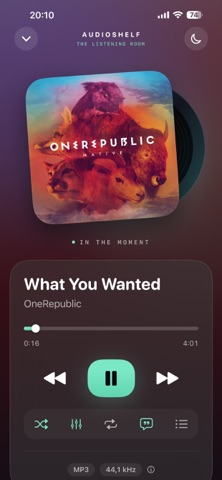
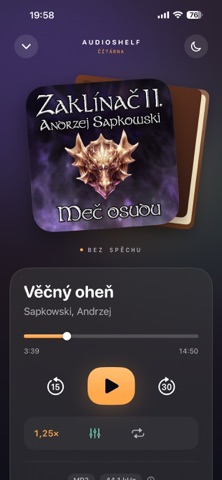
AudioShelf is a music and audiobook player for the files you already own. No subscription, no account, no cloud — pay once and it's yours. Add music through the Files app and your library builds itself: artwork, artists, albums and track numbers straight from your tags. FLAC, MP3, WAV, AIFF, M4A and M4B play in full quality, completely offline. Built-in search finds songs, artists, albums and audiobooks in a moment. The player shows what you're listening to: a silver CD peeks out from behind lossless FLAC and WAV, a vinyl record from behind MP3 and other formats, and audiobooks get a cloth-bound book with warm amber accents. YOUR LIBRARY, YOUR WAY • Favorites and playlists directly from the player • Album grid or a larger, easier-to-read list • Named audiobook bookmarks and optional 5- or 10-second rewind on resume • Export and restore playlists, favorites, book positions, bookmarks and edited library labels. Audio files are not included; keep them separately and import them before restoring. MUSIC • Gapless playback and smooth crossfade between songs • 10-band equalizer with presets, or tune your own curve • ReplayGain for even volume across your whole library • Up Next queue — play next, add to queue, drag to reorder • Synced lyrics from LRCLIB, saved for offline listening • Smart playlists: Recently Added, Recently Played, Most Played with play counts, Favorites • Swipe the artwork: up and down for volume, left and right to skip tracks AUDIOBOOKS • Their own shelf, separate from your music • Picks up exactly where you left off • M4B chapters with a chapter list and quick jumps • Playback speed from 0.75× to 2× • Sleep timer, including "end of chapter" • Voice Enhancement for clearer narration • Home Screen widget to resume with one tap IN THE CAR AND ON THE GO • CarPlay: playlists, albums, songs and audiobooks on your car's display • Lock Screen and Dynamic Island controls • Seamless switching between AirPods and wired headphones FOR THE DETAIL-MINDED • File info: format, bitrate, sample rate, bit depth, channels • Tag editor for one track or many at once — your original files stay untouched • Experimental spatial sound (HRTF) for wired headphones Available in English, Czech, German, Spanish, French, Portuguese, Italian and Japanese. Your music. Your files. Your rules. IDEAS, FEEDBACK & BUG REPORTS Help shape AudioShelf. Share your ideas, feedback and bug reports on our developer Discord: https://discord.com/invite/UeJEAZWG8T
What's new · 1.5
New in AudioShelf 1.5 YOUR MUSIC, WITHIN REACH • Add the playing track to Favorites or a playlist directly from the player. You can also create a new playlist there. • Switch between the album grid and a larger, easier-to-read album list. • Smart playlists have a fresh look with colorful cards, album artwork, track counts and easier-to-read titles. FIND YOUR PLACE IN AUDIOBOOKS • Save bookmarks while listening, give them names and return to them from the book’s bookmark list. • Choose to rewind 5 or 10 seconds when resuming an audiobook, or leave this option off. BACK UP YOUR LIBRARY • Export and restore playlists, favorites, audiobook positions, bookmarks and edited library labels. • Preview matched and missing tracks before restoring. Restoring merges playlists, favorites and bookmarks; saved labels and listening positions replace those of matched tracks. • Audio files are not included. Keep them separately and import them before restoring. NOW IN JAPANESE • AudioShelf is now available in Japanese. FIXES • Importing different files with the same filename no longer overwrites an existing audio file. • Albums with the same title by different artists are kept separate. • The “end of chapter” sleep timer also stops at the end of an MP3 chapter instead of continuing to the next track. • Seeking while paused keeps playback paused. • Corrected playback time for files whose sample rate differs from the audio output. The progress bar stays within its bounds.
Details