

Audio Evolution Mobile Studio
Davy Wentzler · Music
Independent analytics for this App Store listing. AppTracker is not affiliated with Davy Wentzler.
Chart standing · US
What changed · US
Listing changes AppTracker has observed for this app in this storefront — new versions, price moves, rating shifts, and store copy.
* Solved some issues with insets due to issues with iOS27. * Solved an issue with AudioShare that could cause a crash on iOS27.
Price & rating history · US
Reconstructed from the listing changes AppTracker has observed in this storefront. A field is charted once it has changed more than once, and each line starts at the value it moved from.
Average rating · ★ 4.20 now · 14 changes on record
Ratings breakdown · US
The star breakdown behind this app's rating in this storefront.
In-app purchases · US
What this app sells inside itself, grouped by kind and priced for this storefront.
Screenshots



Keywords this app targets
Search terms AppTracker associates with this app — estimates, not search volume. ❝ = in the app's title; a highlighted number is its current position for that term.
Similar apps
Competitors and close alternatives, as estimated by AppTracker.
 FL Studio Mobile
Image Line Software
1 shared topic · 2 shared title words
FL Studio Mobile
Image Line Software
1 shared topic · 2 shared title words
 Recording Studio Pro!
Glauco Percopo
1 shared topic · 1 shared title word
Recording Studio Pro!
Glauco Percopo
1 shared topic · 1 shared title word
 n-Track Studio Pro | DAW
n-Track S.r.l.
1 shared topic · 1 shared title word
n-Track Studio Pro | DAW
n-Track S.r.l.
1 shared topic · 1 shared title word
 Music Studio
Steinberg Media Technologies GmbH
1 shared topic · 1 shared title word
Music Studio
Steinberg Media Technologies GmbH
1 shared topic · 1 shared title word
 SoundLab - Audio Editor
孛 刘
1 shared title word
SoundLab - Audio Editor
孛 刘
1 shared title word
 Tape It - Pro Audio Recorder
Tape It Music GmbH
1 shared topic · 1 shared title word
Tape It - Pro Audio Recorder
Tape It Music GmbH
1 shared topic · 1 shared title word
 Audio Editor - AI Music Editor
Beijing Beibeitan Technology Co., Ltd.
1 shared title word
Audio Editor - AI Music Editor
Beijing Beibeitan Technology Co., Ltd.
1 shared title word
 MicSwap Pro: Microphone Sound
Future Moments LLC
1 shared topic
MicSwap Pro: Microphone Sound
Future Moments LLC
1 shared topic
About
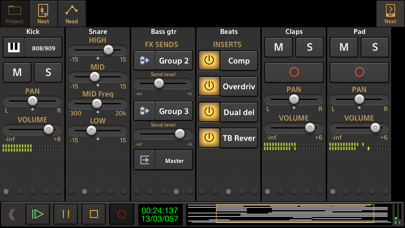
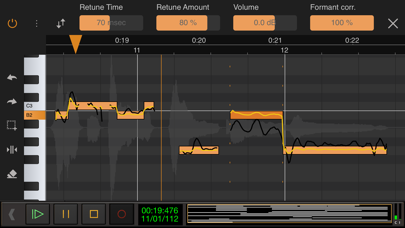
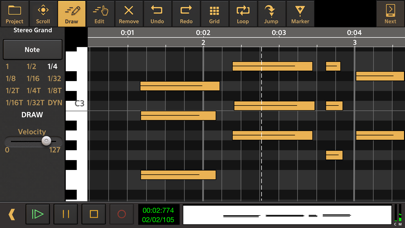
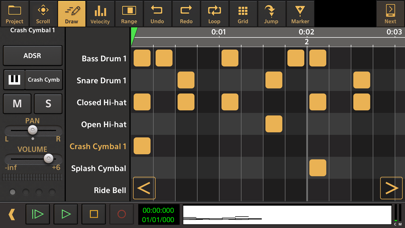
Record your ideas on the go or create entire music productions from scratch, we'll leave it up to you! This app is a portable multitrack audio and MIDI recording studio featuring virtual instruments, pitch and time editing of vocals (*), unlimited undo/redo, mixing, real-time effects, automation and much more! Features: • Multitrack audio recording / playback • MIDI sequencing with piano roll editor and MPE support • Drum pattern editor (including triplets, use your own samples and effects chain per drum sound) • Automatically or manually tune your vocals with Vocal Tune Studio (*) : an editor to correct pitch and time of vocal recordings and the timing of any audio material. It features retune time, retune amount, volume and formant correction per note as well as vibrato controls. • Add tempo and time signature changes including gradual tempo change • Real-time effects including: chorus, compressor, delay, dual delay, reverse delay, reverb, flanger, noise gate and many more! • Flexible effect routing: an unlimited number of effects can be placed on a grid, featuring parallel effect paths. • Assign LFO's to effect parameters or lock parameters to tempo • Sidechain on the compressor effects • Inter-app audio effects and instruments • AudioBus support (including AudioBus remote) • Audio Unit instruments, effects and AU MIDI • Multi-output support for Audio Unit instruments • Virtual analog synthesizer 'Evolution One' featuring morphing oscillators, FM, Sub Osc, Noise, Portamento, 2 LFO's that can be routed to 12 targets, Moog type filtering, effects, ARP, sequencer and more! • Soundfont (sf2/sf3/sfz) support: free GS/GM Soundfont included, add more from the Soundfont shop or from your own collection • Non-linear editing with move, trim, split, cut/copy/paste, remove, cross-fade, time-stretching etc. with full undo/redo • Virtual instruments (comes with free instruments and more instrument packs to download) • Track freezing to save CPU usage • Clip volume and fade points • Loop playback • Automation of mixer and effect parameters • Mix-down to WAV, AIFF and ALAC • Metronome • Ghost track display on the piano roll • MIDI clock sync • MIDI remote control • Punch in/out • Unlimited number of tracks and groups • Offline effects: fade in/out, normalize, reverse, pitch shift, time stretching • Several grid options for aligning your samples (with tempo and time signature settings) • Export to other DAW's by rendering all tracks to separate audio files (stems) • Media server to access your files easily from a desktop computer • Multi-core support • AudioShare support • Trackpad support • Cloud sync using Google Drive and Dropbox In short: a complete portable multitrack music studio that will replace your fourtrack recorder or tape machine! (*) The following in-app purchases are available to expand your studio: • ToneBoosters effect pack 1 (Barricade, DeEsser, Gate, Reverb) • ToneBoosters EQ with frequency analyzer • ToneBoosters Compressor • ToneBoosters Ferox • ToneBoosters V4 Barricade • ToneBoosters V4 BitJuggler • ToneBoosters V4 Compressor • ToneBoosters V4 Enhancer • ToneBoosters V4 EQ • ToneBoosters V4 MBC (multi-band compressor) • ToneBoosters V4 ReelBus • ToneBoosters V4 Reverb • ToneBoosters V4 Sibilance • ToneBoosters V4 Voice Pitcher • Vocal Tune with two-voice harmonizer and Vocal Tune PRO, both real-time vocal pitch correction effects • Vocal Tune Studio: auto tune your vocals, pitch and time correction • Soundfont instrument packs • Loop packs from Function Loops The 'PRO' in-app purchase is only for people who downloaded version 1.x in the past and is not applicable to version 2.0 or higher. If you have any suggestions, questions or want to report a bug, please contact us! We'll gladly solve any problem! Facebook: https://www.facebook.com/AudioEvolutionMobile Forum: https://www.extreamsd.com/forum
What's new · 7.3.3
* Solved some issues with insets due to issues with iOS27. * Solved an issue with AudioShare that could cause a crash on iOS27.
Details